Mastering Motion: A Deep Dive into the CSS offset-path Property
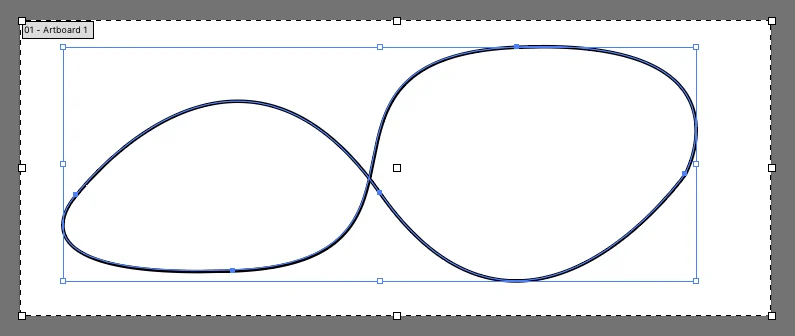
In the evolving landscape of web design, the ability to create sophisticated, fluid animations directly within CSS has shifted from a "nice-to-have" to an industry standard. Among the most powerful tools in a developer’s arsenal for geometric movement is the offset-path property. By allowing elements to follow precise, complex trajectories, this property effectively bridges the gap between static design and high-fidelity motion graphics.
Main Facts: Understanding offset-path
At its core, the offset-path property defines a geometric path that an element will follow during an animation sequence. It is not an animation property in itself; rather, it provides the "track" upon which the element travels. To trigger the movement, developers must pair this with the offset-distance property.
Unlike traditional transforms—which are often limited to linear translations, rotations, or scaling—offset-path allows for curvilinear motion. By using the path() function, which mirrors the syntax of the d attribute found in Scalable Vector Graphics (SVG), developers can create intricate movements that would otherwise require complex JavaScript libraries or cumbersome CSS keyframe hacks.
The Mechanism of Movement
The magic of offset-path lies in its coordinate system. When you define a path, the browser maps the element’s position relative to that path based on the offset-distance. Setting offset-distance: 0% places the element at the beginning of the path, while 100% places it at the terminus. By animating this value from 0% to 100% using @keyframes, you create a seamless travel effect along the specified vector.
Chronology: From motion-path to offset-path
The journey of this property is a case study in the maturation of web standards. Initially introduced under the moniker motion-path, the property was designed to standardize how browsers handle object motion. However, as the W3C’s FX Task Force continued to iterate on the Motion Path Module, it became clear that the name "motion" was too broad for a property that specifically handled the geometry of a path.
The Rebranding
In the interest of technical accuracy and clarity within the CSS specification, the W3C initiated a transition. All properties beginning with the motion-* prefix—including motion-path, motion-offset, and motion-rotation—were renamed to offset-*. This change was more than cosmetic; it aligned the property with other layout-based properties and solidified its role within the browser’s rendering engine.
Implementation Timeline
- Late 2015: The
motion-pathproperty appears in experimental builds of Blink-based browsers (Chrome/Opera). - 2016: The W3C formalizes the
offset-*naming convention. - December 2016: Stable versions of Chrome officially support the
offset-*syntax, signaling a shift toward cross-browser standardization. - Present Day: The property is a cornerstone of modern UI animation, though developers are still advised to provide fallbacks or utilize both naming conventions where legacy support remains a concern.
Supporting Data: Implementing Motion
To implement offset-path effectively, one must understand the relationship between the CSS syntax and the SVG path data.
The Anatomy of a Path
If you are designing in vector software like Adobe Illustrator or Figma, you can export your path data as an SVG. The crucial piece of information is the d attribute. You can copy this value directly into the path() function in CSS.
.mover
  offset-path: path("M 10 80 C 40 10, 65 10, 95 80 S 150 150, 180 80");
  offset-distance: 0%;
  animation: travel 4s linear infinite;


@keyframes travel
  100%
    offset-distance: 100%;
Coordinate Systems and Units
A critical nuance is the distinction between SVG-based elements and standard HTML elements. When applying offset-path to an SVG element, the coordinate system is relative to the internal viewBox. Conversely, when applying it to a standard HTML element, the path values are interpreted in pixels relative to the element’s layout box. Failure to account for this can lead to "missing" animations where the element travels far outside the viewport.
Controlling Orientation
One of the most impressive features of this property is offset-rotate. By default, an element following a path will "face forward," automatically rotating to match the tangent of the path. This mimics real-world motion, such as a car following a curved road. Developers can override this:
auto: The element rotates to follow the path (default).reverse: The element rotates 180 degrees from the path direction.30deg: The element maintains a fixed rotation regardless of the path.auto 45deg: Combines path-following with an additional offset.
Official Responses and Technical Challenges
While the W3C has championed offset-path, implementation across browser engines has not been without friction. The primary challenge involves the url() value for offset-path. While the specification theoretically allows developers to reference an external SVG path via url(#my-path), support for this remains inconsistent.
Engineers have noted that referencing an internal SVG path often fails due to complex security and scoping rules within the Shadow DOM and various rendering contexts. Consequently, the path() function remains the only truly reliable, cross-browser method for defining motion.
Furthermore, the integration with the Web Animations API (WAAPI) provides a robust programmatic alternative to CSS. Developers can define the path in CSS but control the progression, speed, and timing of the animation via JavaScript. This hybrid approach is often preferred in complex applications where motion must be synchronized with user interactions or data-driven events.
Implications for Modern Web Design
The adoption of offset-path signals a move toward a more "performant-first" philosophy in web design. In years past, complex motion required heavy third-party libraries like GreenSock (GSAP) or reliance on SMIL (Synchronized Multimedia Integration Language). While these tools remain powerful—especially GSAP for its cross-browser compatibility and advanced sequencing—having a native CSS solution reduces the reliance on JavaScript, thereby improving the initial load time and rendering performance of web pages.
Performance Benefits
Because offset-path is handled by the browser’s compositor, it is far more efficient than animating top or left properties, which trigger layout reflows and repaints. By leveraging the GPU for motion, offset-path ensures that animations remain buttery smooth at 60 frames per second, even on lower-end mobile devices.
Future-Proofing
As the web continues to move toward more interactive, immersive storytelling experiences, properties like offset-path will become increasingly central. We are seeing a shift away from static, text-heavy designs toward dynamic interfaces where elements move in response to scrolling, hovering, and clicking. The offset-* suite provides the geometric foundation for these interactions.
The Verdict on Alternatives
For those who find the syntax of offset-path restrictive or require backward compatibility for legacy browsers, libraries like GSAP still offer a significant advantage. However, for a standard, performant, and maintainable codebase, relying on the native CSS specification is the recommended path.
In conclusion, offset-path is not merely a tool for moving shapes across a screen; it is a fundamental shift in how we conceive of UI animation. By mastering this property, developers can create rich, complex, and highly performant motion sequences that elevate the user experience, proving that the web is just as capable of sophisticated design as traditional desktop software. As browser support continues to solidify, the reliance on external assets will decrease, ushering in a new era of lightweight, path-based animation that defines the next decade of web development.