Amazon Unveils CloudWatch Omni: An AI-Driven Observability Suite Bridging Traditional Applications and Agentic Workloads
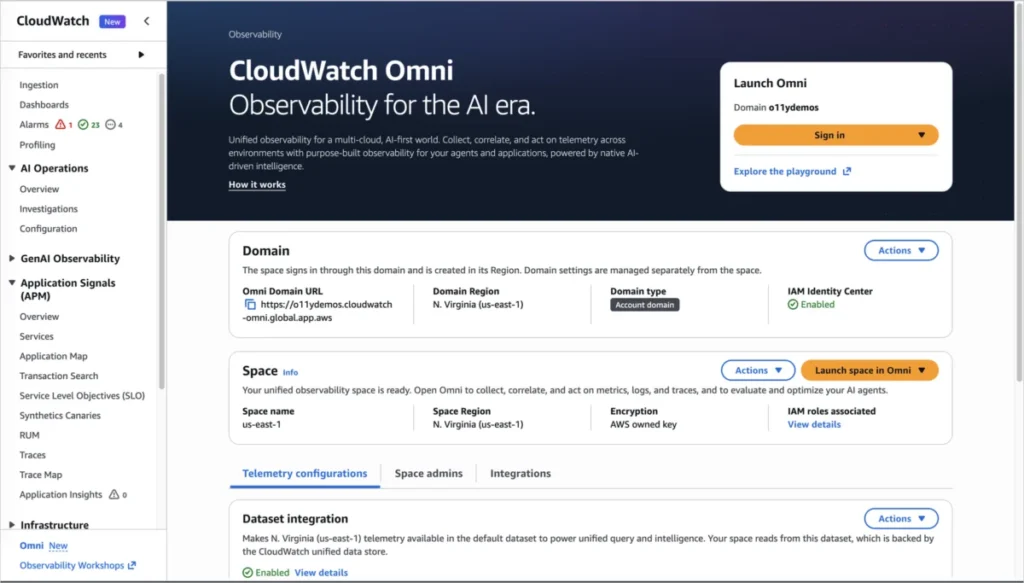
SEATTLE — In a major leap forward for enterprise software management, Amazon Web Services (AWS) has officially announced the launch of Amazon CloudWatch Omni. This cutting-edge, AI-powered observability experience is engineered to tackle the modern complexity of distributed software systems, modern applications, and emerging generative AI agentic workloads. By unifying disparate telemetry streams into a single, collaborative workspace, Omni seeks to eliminate the traditional friction of incident response: fragmented tools, static dashboards, and siloed communication channels.
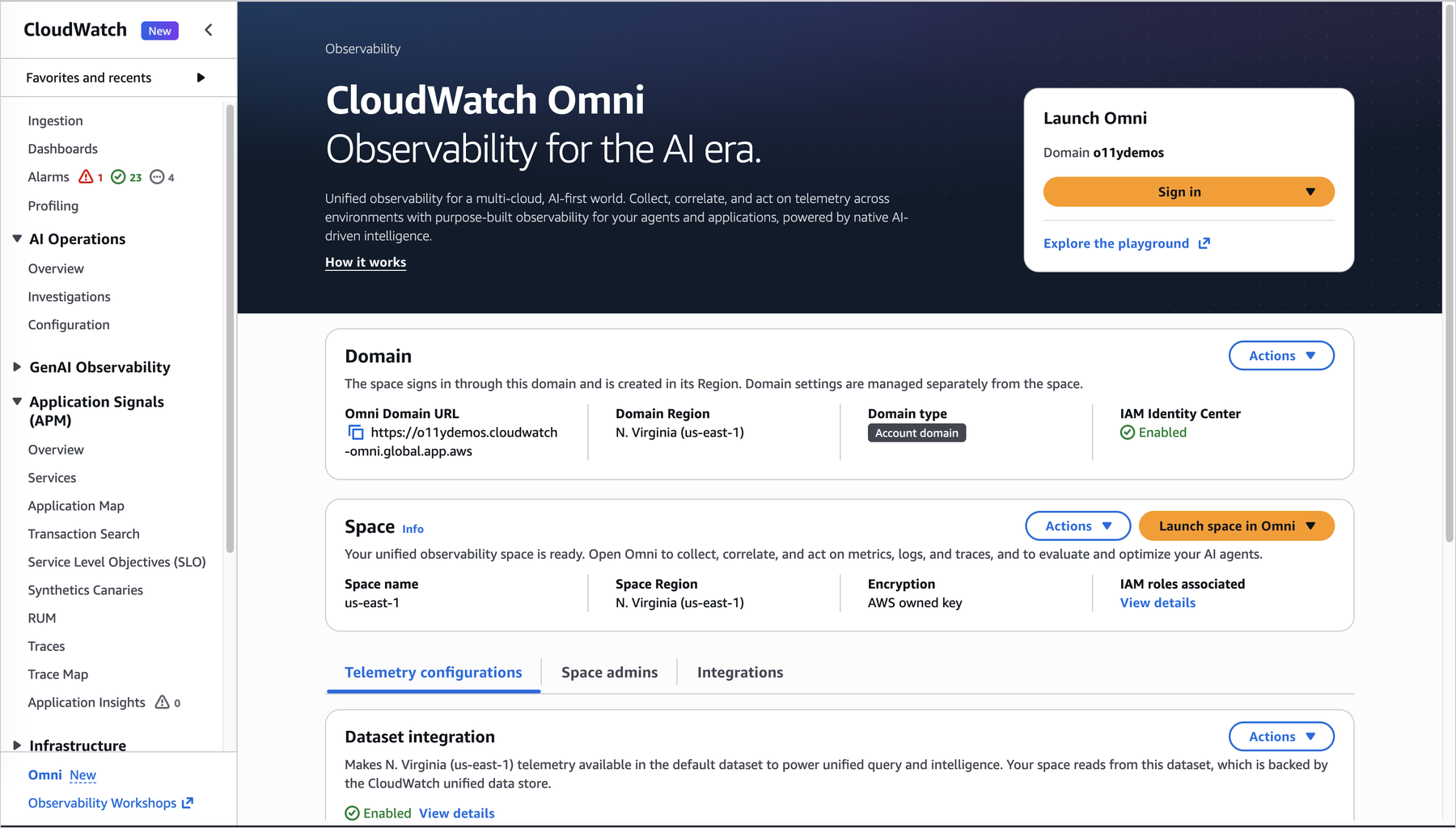
Built natively on OpenTelemetry standards, CloudWatch Omni allows engineering teams to visualize health metrics, analyze distributed traces, inspect logs, and manage alarms without requiring direct access to the AWS Management Console. Instead, Omni operates through dedicated organizational URLs secured by enterprise Single Sign-On (SSO), bringing developers, Site Reliability Engineers (SREs), database administrators, and managers into a singular, synchronized operational reality.
Main Facts: What is CloudWatch Omni?
At its core, CloudWatch Omni is a paradigm shift from infrastructure-centric monitoring to application-centric observability. For years, engineering organizations have struggled against alert fatigue, manual threshold tuning, and the cognitive overhead of piecing together disparate telemetry metrics during a high-pressure outage.
CloudWatch Omni addresses these pain points through three core pillars:
- A Unified Collaborative Workspace ("Spaces"): Teams organize their monitoring domains into "Spaces"—logical containers that group related applications and their corresponding telemetry. Access is managed via IAM Identity Center, integrating seamlessly with enterprise identity providers like Okta and Azure AD.
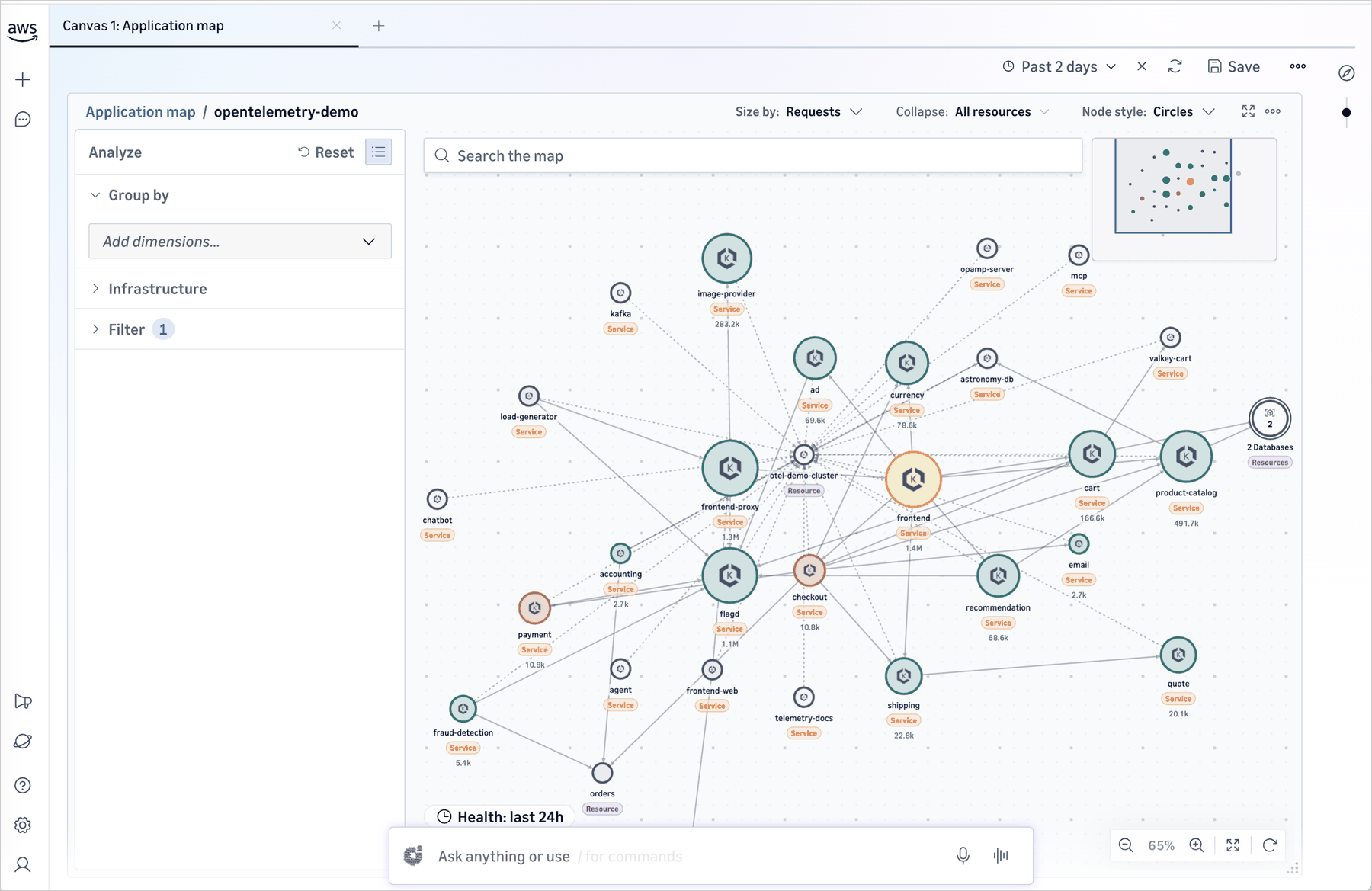
- Automated System Discovery and Adaptation: Rather than requiring engineers to manually curate static dashboards, Omni automatically discovers services, maps underlying dependencies, and dynamically adjusts to architectural changes. Teams simply declare high-level service level objectives (SLOs), latency budgets, and error rate thresholds, letting the system handle the rest.
- AI-Powered Investigations via Amazon DevOps Agent: Embedded directly into the workspace, the Amazon DevOps Agent acts as an active participant during incidents. It evaluates telemetry context, correlates anomalies, traces root-cause paths across dependency graphs, and suggests remediation strategies in real time.
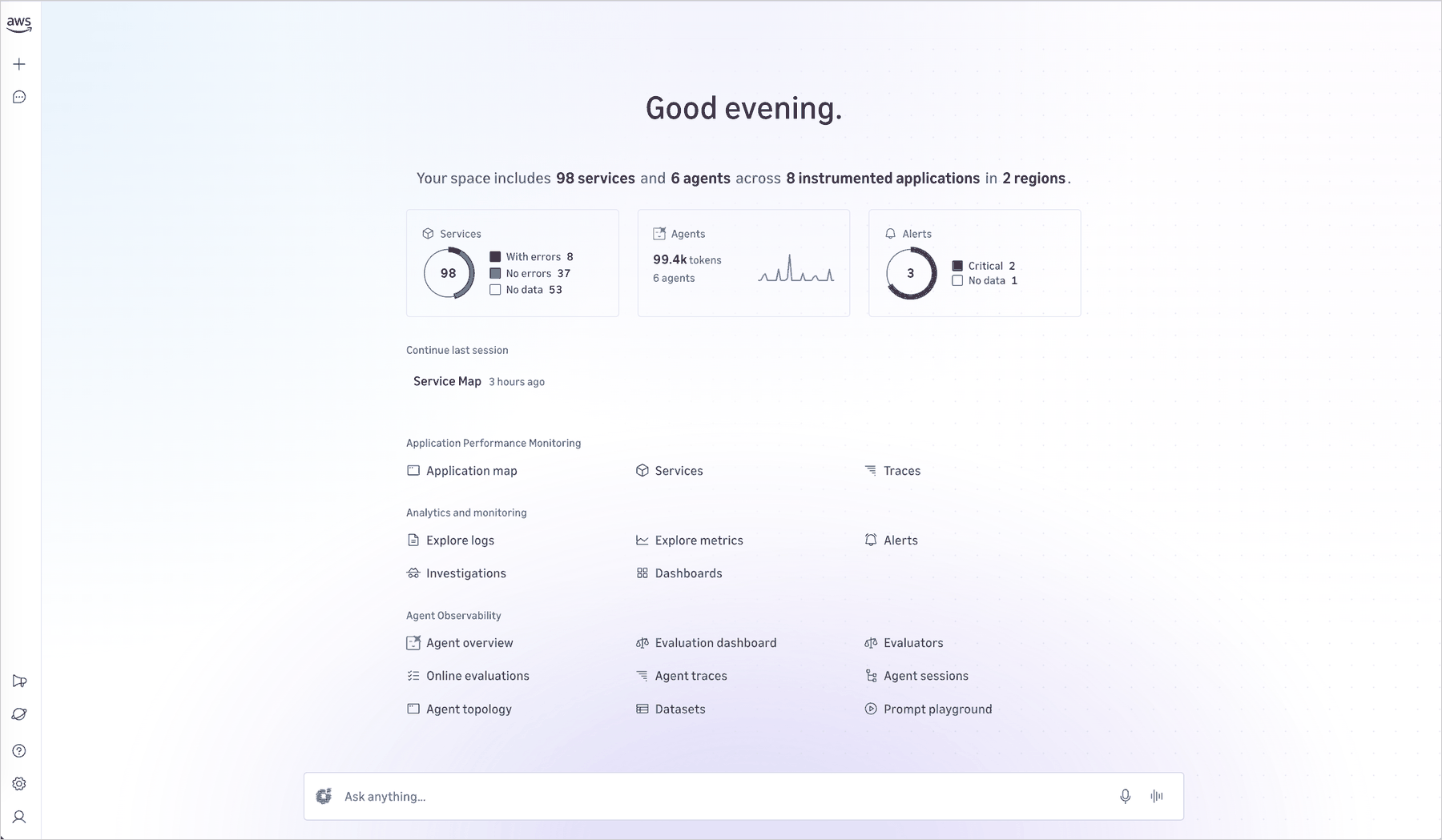
Furthermore, Omni treats generative AI and traditional application workloads with equal priority. Alongside its robust application observability capabilities, Omni provides purpose-built tools for monitoring AI agents—including evaluation frameworks, trace exploration, and real-time monitoring of non-deterministic model behaviors.
Chronology: The Evolution Toward Autonomous Observability
The journey toward CloudWatch Omni reflects the broader transformation of enterprise IT architectures over the past decade.

- The Monolith Era: Historically, applications were monolithic, and observability meant tracking CPU utilization, memory limits, and disk space on a handful of servers. CloudWatch served as a dependable, metric-driven repository for these foundational AWS resources.
- The Microservices Explosion: As organizations transitioned to microservices, containerization, and serverless architectures, the sheer volume of telemetry exploded. Logs, metrics, and traces became siloed across multiple tools. Engineers spent countless hours context-switching between different dashboards, piecing together incident narratives via fragmented Slack channels and screenshot archives.
- The Rise of Generative AI and Agents: Recently, the rapid adoption of generative AI and autonomous agentic workflows introduced non-deterministic systems into production environments. Traditional monitoring tools failed to capture the nuances of LLM token usage, prompt latency, and agentic decision trees.
- The Omni Breakthrough: Recognizing that modern debugging requires a unified narrative rather than a collection of isolated charts, AWS designed CloudWatch Omni to synthesize traditional application monitoring and agentic telemetry into a continuous, AI-assisted timeline. By removing the barrier of AWS Management Console access and introducing the Amazon DevOps Agent, AWS has moved the industry closer to autonomous, collaborative incident management.
Supporting Data and Architecture: Under the Hood of Omni
To understand the operational efficiency introduced by CloudWatch Omni, one must look at how it handles data ingestion and team collaboration.
Zero Data Movement
One of the most friction-reducing design choices in Omni is its reliance on existing data stores. When an organization configures a Space, Omni points directly to existing CloudWatch logs, metrics, traces, and alarms. There is no need for data duplication, expensive migration pipelines, or complex re-architecting. Workloads already instrumented via OpenTelemetry simply forward data to an OpenTelemetry Protocol (OTLP) endpoint, while existing CloudWatch data appears instantly.
The Anatomy of an Incident Workflow
To appreciate the time-savings Omni provides, consider a typical incident simulation:
- T+00 Minutes: An alarm triggers regarding elevated error rates within a high-traffic checkout service. CloudWatch Omni immediately spawns an investigation session pre-loaded with relevant context. The session highlights a deployment that occurred 10 minutes prior, alongside increased latency from a downstream payment API.
- T+03 Minutes: The on-call SRE reviews the automated correlation provided by the Amazon DevOps Agent. By pulling up the distributed trace view, the SRE isolates the failing endpoints and verifies that the payment API latency correlates with upstream infrastructure limits.
- T+07 Minutes: The SRE escalates the issue to the payments engineering team. Because Omni maintains a shared session history, the payment engineer joins the workspace with full visibility into the investigation thus far—including the DevOps Agent’s discovery of a recent configuration change in the payment provider’s API gateway.
- T+12 Minutes: Root cause identified, rollback executed, and incident resolved. Because Omni automatically archives the entire investigative timeline, the team bypasses the need to manually write a separate post-incident report.
Official Responses and Industry Perspectives
Daniel Abib, representing the engineering team behind the launch, emphasized that the platform was designed around the actual human behavior of incident response.
"Engineering teams spend a significant portion of their observability time maintaining dashboards, tuning thresholds, and switching between tools to piece together what happened during an incident," Abib noted in the release documentation. "When an issue crosses team boundaries, context gets lost in Slack threads and screenshots rather than flowing naturally to the next engineer. CloudWatch Omni changes this by organizing observability around your applications rather than individual signals."
Early industry analysts point out that by democratizing telemetry data through enterprise SSO and natural language querying, AWS is breaking down the traditional silos between development, operations, and business units. Non-technical managers can now query system health in plain English, gaining immediate insights into application performance without needing to interpret raw metric graphs.
Implications for the Enterprise
The release of Amazon CloudWatch Omni carries profound implications for DevOps strategies, enterprise budgeting, and security postures across industries.
1. Shift-Left and Cross-Functional Collaboration
By allowing non-AWS console users to access dedicated Spaces via Okta, Azure AD, or other SAML 2.0 identity providers, organizations can securely include broader teams in troubleshooting efforts. Customer support leads, product managers, and database administrators can collaborate within the exact same telemetry frame, vastly reducing Mean Time to Resolution (MTTR).
2. Operational Cost Efficiency
Maintaining custom dashboards, writing complex alerting rules, and paying for redundant third-party observability tools have long represented hidden enterprise tax burdens. Omni’s automated topology mapping and threshold-free monitoring drastically cut down on manual toil, freeing senior engineers to focus on feature delivery rather than dashboard maintenance.
3. Readiness for AI-Driven Workloads
As enterprises increasingly deploy generative AI models and autonomous agents, traditional monitoring is no longer sufficient. By offering a unified interface that supports both deterministic microservices and non-agentic AI workloads, AWS has future-proofed its observability portfolio, ensuring that developers maintaining complex AI pipelines have native visibility into agent behavior and failure modes.
Getting Started with CloudWatch Omni
Amazon CloudWatch Omni is generally available today. Existing CloudWatch customers can begin exploring the platform immediately with minimal friction:
- Console Access: Navigate to the Amazon CloudWatch console and click "Try CloudWatch Omni." Your existing logs, metrics, traces, and alarms will automatically populate your initial environment.
- Identity Integration: Administrators can configure organizational domains, connect identity providers via AWS IAM Identity Center, and establish specialized Spaces for different teams and environments.
- Multi-Environment Telemetry: Utilize built-in connectors to ingest telemetry from hybrid, multi-cloud, or on-premises environments, bringing all operational data into a unified pane of glass.
For detailed pricing information, API documentation, and regional availability, engineering teams can visit the official Amazon CloudWatch Omni portal or consult the Amazon CloudWatch Pricing Page. Feedback and community discussions can be shared via AWS re:Post or through standard enterprise AWS Support channels.