
The Day the Console Got Angry: Understanding and Solving the Web’s Most Persistent Focus Bug
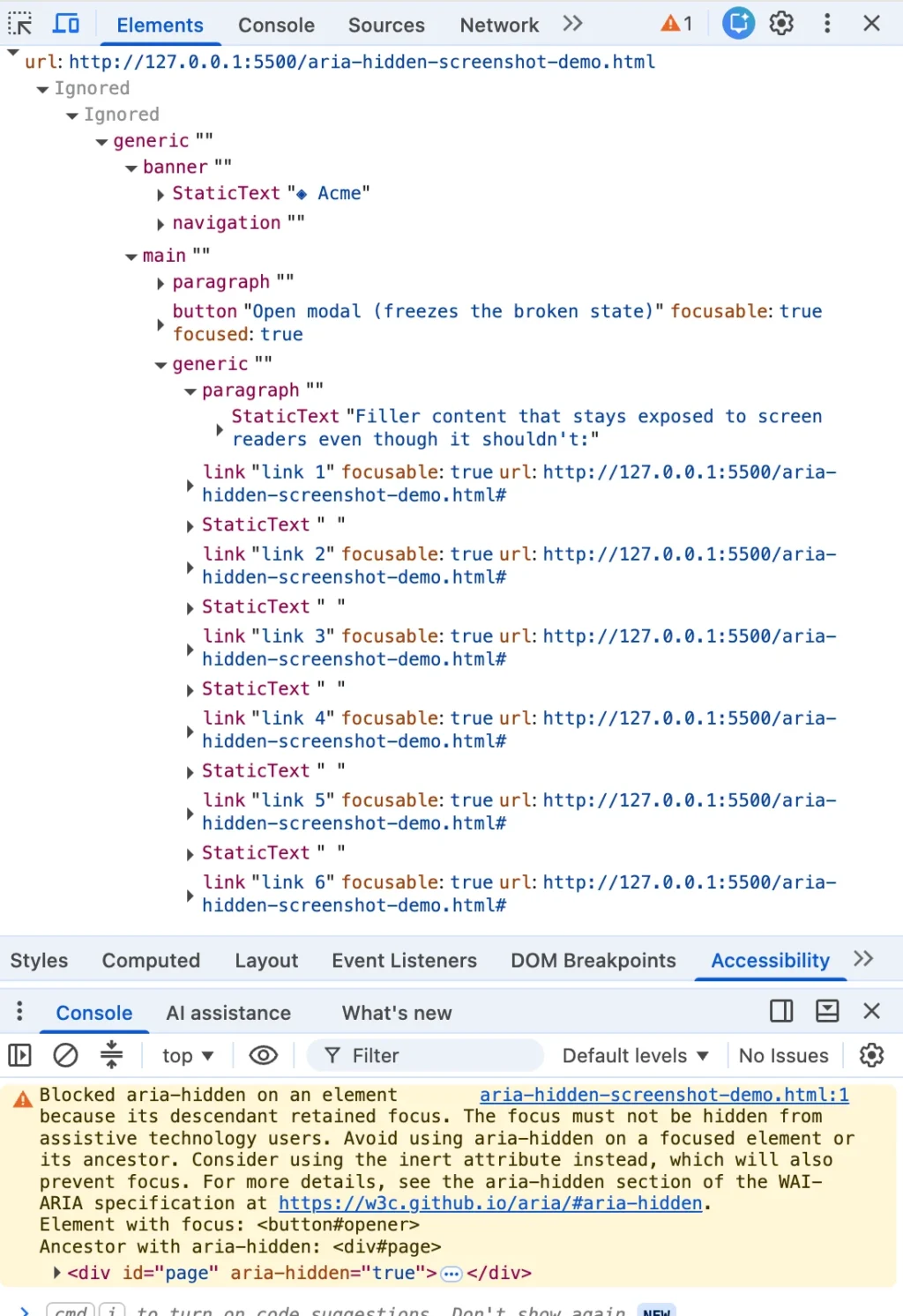
Every frontend developer knows the exact shade of frustrated mustard yellow the browser console turns when a dialog closes improperly. Highlight the message, drop it into a search engine, and you are instantly greeted by half the frontend internet. Whether you are building with Angular, Bootstrap, Ionic, or managing data through phpMyAdmin, this exact string echoes identically across repositories and tech stacks.
Yet, the top results on Google and Stack Overflow consistently bury the most crucial fact of all: the browser’s warning is correct. There is a real person on the other side of that warning—someone using a screen reader whose focus is about to drop into a profound usability hole on your page.
The most common "solutions" currently ranking online all do the same thing under different names: the blur() one-liner, the setTimeout wrapper around a close handler, or the aggressive trick of yanking the aria-hidden attribute off elements entirely. Each of these fixes quiets the console while quietly harming the disabled user the browser was trying to protect. If you have already shipped one of these band-aids to production, you are in massive company. You were failed by your search results, not by your own carelessness.
A Quick Shortcut Before We Begin
If your codebase allows it, there is one honest shortcut to bypass this entire class of bugs: migrate to the native HTML <dialog> element and call .showModal(). The browser then handles the entire focus dance for you, and this specific category of bug all but disappears. (Naturally, you will still need to handle cases where the original focus trigger has been removed from the DOM, which no browser can guess for you.) Everything else in this article is built for the rest of us—developers wired into component libraries or corporate design systems that cannot be torn out this quarter.
The Chronology of an Accessibility Crisis
To understand how the web arrived at this friction point, we have to look backward. Chromium has been quietly patching focusable aria-hidden nodes for years, but the warning itself rolled out in distinct, disruptive waves.
The Two Waves of Chromium Enforcement
- Summer 2024 (Chrome 127): The open-time variant—scolding developers about an element that "just received focus" while hidden—began clustering across open-source issue trackers in July and August. Bug reports flooded repositories like MUI (#43106), Ant Design (#50170), and Flowbite (#943).
- Late 2024 (Chrome 131): The close-time variant, featuring the "retained focus" wording, arrived with Chrome 131. Developers tracking nightly builds caught it live, mirroring issues in Bootstrap (#41005) and Angular (#30187).
Underneath these updates lies an older behavior. Chromium was already exposing focusable aria-hidden nodes back in early 2020, as recorded in ARIA Working Group issue #1185, where engineers proposed letting users hear where they are tabbing rather than experiencing total silence.
The pattern developers were defending against goes back even further to teams carelessly slapping aria-hidden on the entire <body> tag or giant wrappers whenever a modal opened. When portals misbehaved, this occasionally hid the modal too, entirely locking screen reader users out of web applications.
Supporting Data: The Four Root Causes of "Ghost Focus"
Every improper teardown ends at the same destination: focus sitting inside a region that has just been hidden. However, these issues arrive from four distinct directions. If you do not know which one you are looking at, you will apply the wrong fix.
1. The Close-Time Race (Hidden Mid-Goodbye)
You click a close button. The dialog starts its 200-millisecond CSS fade-out transition. Somewhere in those milliseconds of transition, focus is still parked on the close button, which sits inside the overlay the library just marked hidden. The transition hasn’t finished, focus hasn’t moved, and Chrome logs a "retained focus" warning. This accounts for roughly 70% of occurrences.
2. The Open-Time Inversion (The Trigger Left Behind)
Run the sequence backward. An overlay opens, and the library marks the background aria-hidden="true". However, the button the user just clicked lives in that background, holding focus for one brief beat before it transitions into the dialog. You get the open-time warning variant about an element that "just received focus" while obscured.

3. Nested Composition Conflicts (The Turf War)
You open a <dialog>, and inside it, you place a <select> element. The user opens the select, picks an option, and it closes. Suddenly, two components that each believe they are the "one true modal layer" fight over who gets to hide the rest of the page. Under React 19, this graduates from an annoyance to a fatal UI freeze, where focus drops to the body, the parent dialog re-hides itself with focus still inside, and keyboard navigation dies entirely.
4. Focus Leaves the Page
Nothing on your page changed; the user simply Alt-Tabbed or switched browser tabs while an overlay was open. Focus bookkeeping stranded an aria-hidden state on teardown with no live focus to reconcile against.
Official Responses and Ecosystem Reactions
The developer ecosystem’s initial response to these console warnings was swift and, unfortunately, destructive.
The Illusion of the blur() One-Liner
element.addEventListener('hide.bs.modal', () =>
    document.activeElement.blur();
);
This snippet became the internet’s favorite fix. It silences the warning because there is no longer a focused element inside your hidden subtree. But where does focus go? It goes nowhere, falling back to <body>.
For a mouse user, this is invisible. For a screen reader user, the reader goes silent, and their very next Tab press restarts navigation from the absolute top of the page. This is a direct WCAG 2.4.3 failure disguised as a bug fix.
Library Migrations and Native Adoption
As browser enforcement grew louder, major component libraries scrambled to adapt:
- Bootstrap: After attempting and closing an
inert-based pull request for version 5, Bootstrap 6 abandoned manual wrappers entirely in favor of nativeshowModal(). - Radix UI and Shadcn: Developers frequently leaned on
modal=falseto silence warnings, inadvertently creating non-modal dialogs that dismiss themselves mid-form in Safari when focus strays.
Implications: The Teardown Contract
If a clean console was never the true goal, what is? The warning is merely a proxy; the human user is the target. A proper fix must satisfy both the browser and the user by respecting a strict operational order: focus has to leave a region before that region becomes hidden or inert.
The Four-Step Teardown Contract
- Un-inert the background first:
inertblocks focus. If your trigger lives inside the background, focusing it while the background is still inert results in a silent no-op. - Move focus out synchronously: Send focus back to the trigger button before any hide-state lands.
- Inert the closing shell: Apply
inert(notaria-hidden) to the closing overlay so it can fade out peacefully without capturing focus or screen-reader attention. - Unmount after transition: Clean up DOM nodes only after CSS transitions officially conclude.
// The Correct Teardown Order
function closeModal()
  // 1. Un-inert background FIRST
  background.removeAttribute('inert');

  // 2. Move focus OUT before hiding
  triggerButton.focus();

  // 3. Apply inert to the closing shell
  overlay.setAttribute('inert', '');
  overlay.style.pointerEvents = 'none';
  overlay.classList.add('fade-out');

  overlay.addEventListener('transitionend', () => overlay.remove(),  once: true );
Conclusion
The browser console warning is not a piece of trivial software nagging. It is the browser telling you the harsh architectural truth about your application. When you silence it with a blind blur() call or a timing hack, you are trading a yellow line in your logs for a broken user experience for assistive technology users.
Embrace the teardown contract. Respect the order of operations. Ensure that when a user closes a modal, they land precisely where they started—ready to continue their journey through your application uninterrupted.








