The Future of Localized AI: Building Multimodal Capabilities Entirely in the Browser
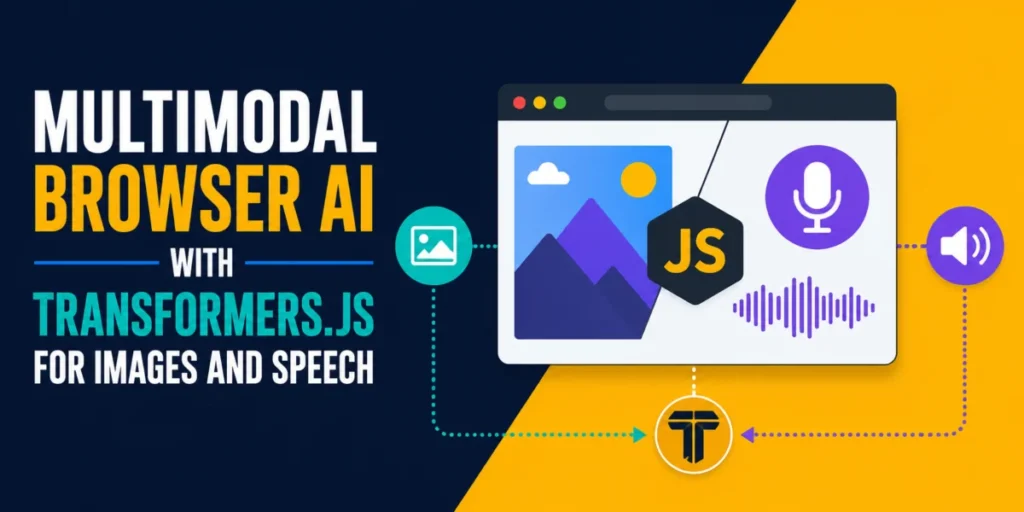
The landscape of artificial intelligence is shifting. For years, the paradigm of AI development has been tethered to the cloud: massive data centers, expensive GPU clusters, and the constant necessity of API calls to external servers. However, a new wave of client-side innovation is challenging this architecture. With the maturation of libraries like Transformers.js, developers are now empowered to bring sophisticated, multimodal AI capabilities—including image classification, descriptive captioning, and real-time speech transcription—directly into the web browser.
This shift represents more than just a technical curiosity. By running AI inference locally on the user’s device, organizations can eliminate latency, ensure absolute data privacy, and remove the recurring costs associated with cloud-based API tokens. This article explores how to architect these multimodal systems, the technical constraints of browser-based machine learning, and the implications for the future of web-based applications.
The Paradigm Shift: Why Local Browser AI Matters
The primary driver behind the adoption of in-browser AI is the "Privacy-by-Design" principle. When a user uploads a personal photo or records a voice note, their data remains within the isolated sandbox of their own browser. There is no transmission to a third-party server, no potential for data interception, and no storage of sensitive files in a cloud bucket.
Beyond privacy, the performance benefits are significant. Cloud-based AI is subject to the vagaries of network latency—the "round-trip" time required to send a file, process it, and receive a response. For real-time applications like voice dictation, this delay can be jarring. By leveraging the local GPU and CPU via WebAssembly (WASM) and WebGPU, developers can achieve near-instantaneous processing that feels native to the application.
A Technical Chronology: Implementing Multimodal Pipelines
Building a multimodal application using Transformers.js follows a modular, pipeline-based architecture. A "pipeline" is an abstraction that handles the complex lifecycle of a machine learning model, including downloading, loading weights into memory, tokenization (for text) or image preprocessing, and inference.
Task 1: Image Classification
The most accessible entry point for browser AI is image classification. By using the ViT-Base/16 (Vision Transformer) architecture, a developer can classify an image into one of 1,000 ImageNet categories. The process is straightforward:
- Initialize the Pipeline: Import the
pipelinefunction from the Hugging Face CDN. - Model Selection: Use a quantized model (like
Xenova/vit-base-patch16-224) to keep the initial download footprint under 100 MB. - Execution: Pass an image URL or a base64 string directly into the classifier. The library automatically handles the resizing and normalization of the image pixels to match the model’s expected input.
Task 2: Image Captioning
While classification is limited to fixed labels, image captioning represents a leap toward generative AI. Using the vit-gpt2-image-captioning model, the browser acts as a bridge between computer vision and language generation. The encoder interprets the visual features, and the GPT-2 decoder generates a coherent, natural-language sentence. This requires roughly 246 MB of data—a larger initial cost, but one that enables vastly more flexible user experiences, such as automated alt-text generation for accessibility tools.
Task 3: Speech Transcription
The integration of OpenAI’s Whisper model into the browser is arguably the most impressive feat of the current ecosystem. Whisper’s tiny.en model (78 MB) is optimized for English speech recognition. The crucial challenge here is audio preprocessing. The browser’s AudioContext must decode various formats (MP3, WAV, OGG) and resample them to 16,000 Hz, which is the exact frequency required by the Whisper architecture. By managing this conversion via the Web Audio API, developers can capture microphone input or uploaded files and transcribe them locally with remarkable accuracy.
Supporting Data: Efficiency and Hardware Performance
To understand the feasibility of this technology, one must look at the performance metrics on modern hardware. Running these models via WebAssembly (WASM) on an Apple M2 or a high-end Intel i7 processor yields inference times typically measured in milliseconds to a few seconds, depending on the model complexity.
| Task | Model Architecture | Download Size | Inference Time (Approx.) |
|---|---|---|---|
| Image Classification | ViT-Base | ~88 MB | 150-300ms |
| Image Captioning | ViT-GPT2 | ~246 MB | 800-1500ms |
| Speech Transcription | Whisper-Tiny | ~78 MB | 2000-5000ms |
Note: These figures represent cold-start inference times on a single-threaded CPU. Subsequent runs are often faster due to browser caching and memory optimization.
The Role of WebGPU: Unlocking Native Speeds
While WASM is highly compatible, it does not fully utilize the parallel processing power of modern integrated graphics. The advent of WebGPU, now supported in Chrome 113+ and other modern browsers, offers a 3x to 5x performance boost.
By checking for the existence of navigator.gpu, developers can write adaptive code that chooses between WASM and WebGPU. For enterprise-grade applications, utilizing WebGPU is no longer optional; it is the standard for ensuring that high-latency tasks like video frame analysis or continuous speech-to-text remain responsive.
Implications for Production Deployment
Transitioning from a proof-of-concept to a production-ready application requires addressing the "Main Thread Problem." JavaScript execution in the browser is single-threaded. If an AI model is running on the main thread, the entire UI will freeze, resulting in a poor user experience.
The solution lies in the Web Worker API. By offloading the pipeline() initialization and the inference calls to a background thread, the UI thread remains free to handle animations, user input, and state updates. Because Transformers.js tensors are not "transferable" in the same way simple JSON objects are, developers must be mindful of how they communicate data between the worker and the main thread, often using ArrayBuffers to maintain performance.
Privacy and Compliance
For industries like healthcare, legal, or finance, the ability to process data entirely client-side is a competitive advantage. It simplifies GDPR and HIPAA compliance, as the application developer never "sees" the raw data—it is processed on the client machine and effectively exists only in the volatile memory of the user’s browser.
The Path Forward: What Comes Next?
As we look toward the future, three trends will likely dominate the browser-AI space:
- Model Distillation: Researchers are actively shrinking models like Llama 3 or Mistral into "SLMs" (Small Language Models) that can fit comfortably within a browser’s memory allocation.
- Standardization: The WebNN (Web Neural Network) API is gaining traction, providing a standardized way for browsers to access hardware-accelerated AI, which will make current hacks (like
dtype: 'q8') obsolete. - Hybrid Architectures: We will see more applications that use a "local-first" approach, performing quick tasks on-device and offloading only the most complex, long-running context tasks to the server.
Conclusion
The ability to run multimodal AI in the browser is a foundational change in the web development toolkit. By moving from a centralized cloud architecture to a decentralized, local-execution model, developers are building a more private, responsive, and robust internet. While the technology requires careful management of model sizes and thread utilization, the barrier to entry has never been lower.
For developers, the call to action is clear: the models are ready, the hardware is capable, and the standard browser APIs are now sufficient to support the next generation of intelligent, private, and powerful web applications. Whether you are building a voice-controlled dashboard or an automated image-tagging tool, the future of AI is running on the user’s machine—right inside the browser tab.