
Mastering Motion: A Deep Dive into the CSS offset-path Property
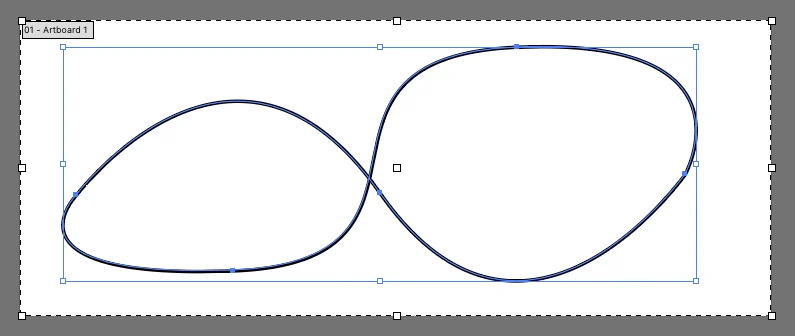
In the evolving landscape of web design, the ability to create sophisticated, fluid animations directly within CSS has shifted from a "nice-to-have" feature to an essential tool for modern developers. Among the most powerful tools in this arsenal is the offset-path property. It represents a paradigm shift in how we handle complex motion, moving away from rigid, multi-div animation hacks toward a declarative, path-based approach that feels more akin to vector illustration than traditional web styling.
Understanding the Core Mechanics
At its heart, the offset-path property defines a geometric path along which an element is intended to move. While properties like transform: translate() are excellent for simple linear movements, they struggle when an element needs to follow a curved, irregular, or complex route. offset-path bridges this gap by allowing developers to use SVG path data—the same syntax used in vector graphics—to dictate exactly where an element should travel.
Crucially, offset-path does not animate the element on its own; rather, it sets the stage. It creates the "track." The actual movement along that track is driven by the offset-distance property. By manipulating offset-distance from 0% to 100% via standard CSS @keyframes, the browser calculates the element’s position at every frame, ensuring a smooth transit along the defined geometry.
A Chronological Evolution: From motion-path to offset-path
To understand the current state of this property, one must look back at its origins. When first introduced to the W3C draft specifications, the feature was originally named motion-path. This naming convention extended to related properties such as motion-offset and motion-rotation.
As the W3C’s FX Task Force continued to refine the specification, a consensus emerged that "motion" was too broad a term for the property’s specific function. In the interest of semantic clarity, the committee opted to rename these properties to the offset-* prefix. This change was not merely aesthetic; it was intended to align with the property’s behavior of defining an offset from a specific coordinate system.
For developers maintaining legacy codebases, this transition period remains a significant point of consideration. While modern browsers have widely adopted the offset-* nomenclature, early implementations in Blink-based browsers (such as Chrome circa 2015-2016) relied heavily on the motion-* prefix. Consequently, the industry standard for production-ready code involves using both the legacy and the current syntax to ensure broad browser compatibility.
The Technical Implementation: Translating SVG to CSS
One of the most powerful aspects of offset-path is its seamless integration with SVG path syntax. If you are using professional design software like Adobe Illustrator or Inkscape, you can generate a complex path, export the SVG code, and extract the d attribute.
The Power of path()
The path() function is the primary value accepted by offset-path. When you copy a path string—a sequence of commands like M (move to), L (line to), and A (arc)—directly into your CSS, the browser interprets these coordinates relative to the element’s box or the SVG viewbox.
For example, a simple circular animation can be defined as:
.mover
  offset-path: path("M 5 5 m -4, 0 a 4,4 0 1,0 8,0 a 4,4 0 1,0 -8,0");
  animation: move 3s linear infinite;


@keyframes move
  100%  offset-distance: 100%;
Navigating Coordinate Systems
A critical nuance often missed by developers is the coordinate system. When applying offset-path to an HTML element, the path coordinates are interpreted as pixels by default. However, when applied to an element nested within an SVG, the path coordinates are mapped to the coordinate space of the viewBox. This distinction is vital for responsive design; if your SVG scales, your animation path scales with it, ensuring the motion remains perfectly aligned with the visual assets.
Controlling Orientation: The offset-rotate Property
Perhaps the most visually impressive feature of this specification is the automatic rotation of the moving element. By default, the offset-rotate property is set to auto. This causes the element to rotate in the direction of the path, creating the illusion of a car driving around a bend or an arrow following a curve.
Developers have granular control over this behavior:
auto: The element rotates to face the direction of the path.reverse: The element faces the opposite direction of the path.<angle>: You can force a specific rotation, such as90deg, which remains static regardless of the path’s curvature.auto <angle>: A combination that allows you to offset the auto-rotation by a specific degree, which is useful if the element’s "forward" orientation is not its default CSS orientation.
Official Specifications and Industry Status
The W3C’s "Motion Path Module" remains the definitive source of truth. According to the latest drafts, the property is designed to support more than just the path() function. Theoretically, it should support keywords like margin-box, border-box, and even url() references to external SVG elements.
However, current browser implementation status suggests that path() and none are the only truly reliable values across all major engines. Attempts to use url() to reference paths defined elsewhere in the DOM often encounter cross-browser inconsistencies, leading many senior developers to stick exclusively to inline path() data for production environments.
Implications for Web Performance
Compared to JavaScript-based animation libraries, offset-path is exceptionally performant. Because the calculation of the path and the translation of the element occur within the browser’s rendering engine, it avoids the overhead associated with the JavaScript main thread.
When animations are handled in the main thread via JavaScript, complex paths can lead to frame drops and jank, especially on mobile devices. By offloading this to CSS, the browser can optimize the animation, utilizing GPU acceleration where available. This makes offset-path an ideal choice for high-performance UI components, such as interactive infographics, loaders, and complex navigation menus.
Comparison with Alternatives
While offset-path is powerful, it is not the only way to achieve motion along a track.
The SMIL Legacy
Before CSS Motion Paths, developers relied on SMIL (Synchronized Multimedia Integration Language) within SVG. SMIL is powerful and allows for complex animations, but it has historically suffered from fragmented browser support and security concerns, leading to its eventual deprecation in some environments. While animateMotion is still widely used in legacy SVG files, it is largely considered a "retired" standard for new web development.
The GSAP Advantage
For projects requiring extreme complexity, such as interactive storytelling or game-like interfaces, the GreenSock Animation Platform (GSAP) remains the gold standard. GSAP’s MotionPathPlugin offers features that exceed the current CSS specification, including easier path drawing, velocity management, and robust support for older browsers. While offset-path is sufficient for 90% of use cases, GSAP provides the necessary power for the remaining 10% where precise timing and complex sequencing are non-negotiable.
Future Outlook and Conclusion
The journey of offset-path from a vendor-specific experimental property to a standardized CSS tool reflects the broader maturation of the web as a platform for motion graphics. As browsers continue to refine their implementation of the Motion Path Module, we can expect more robust support for url() references and advanced path shaping functions.
For the professional developer, mastering offset-path is an investment in creating more immersive and professional-grade user interfaces. By moving away from pixel-pushing via top and left properties and toward declarative, vector-based paths, we are not just writing cleaner code; we are building a more fluid and responsive web.
Whether you are crafting a simple transition or a complex interactive journey, the combination of offset-path, offset-distance, and offset-rotate provides the control needed to turn static pages into dynamic, engaging experiences. As the specification continues to solidify, keeping an eye on the official W3C drafts and browser support tables will remain essential for any developer looking to push the boundaries of what is possible in the browser.








