Claude Code: A Non-Developer’s Guide to Building AI-Powered Automations
The landscape of software development is undergoing a seismic shift. For decades, the ability to build custom applications and bespoke automations was gated by years of formal training in syntax, logic, and debugging. Today, that barrier has effectively evaporated. With the emergence of agentic AI tools like Anthropic’s Claude Code, the ability to program is no longer a prerequisite for being a programmer.
As AI educator Tyler Reed explains, some of the most prolific automation creators in the current digital ecosystem have never written a single line of traditional code. Instead, they leverage the power of large language models (LLMs) to bridge the gap between intent and execution. This article explores how to harness Claude Code to build your own automations, moving from a novice to a functional developer in just a few steps.
The Core Philosophy: Why Claude Code Changes the Game
Historically, building a simple automation—such as syncing your Google Calendar to a messaging platform—required a tedious, multi-step process. Developers had to navigate complex API documentation, manage sensitive secret keys, and spend hours scouring forums like Stack Overflow to troubleshoot minor syntax errors.
Claude Code eliminates this friction by serving as an "agentic" interface. It doesn’t just suggest code; it acts as a collaborator that can research technical requirements, establish secure connections between disparate applications, and execute the final logic. By utilizing natural language, users can now describe their desired outcome, and the AI handles the technical heavy lifting, effectively turning the user into an architect rather than a manual laborer.
The Prerequisites
Before diving into the command line, there are two foundational requirements:
- A Paid Subscription: While many AI tools offer free tiers, the heavy lifting of agentic coding requires the robust capabilities of a paid Claude Pro subscription. This ensures access to the most advanced models (Opus and Sonnet), which are essential for logical reasoning and context management.
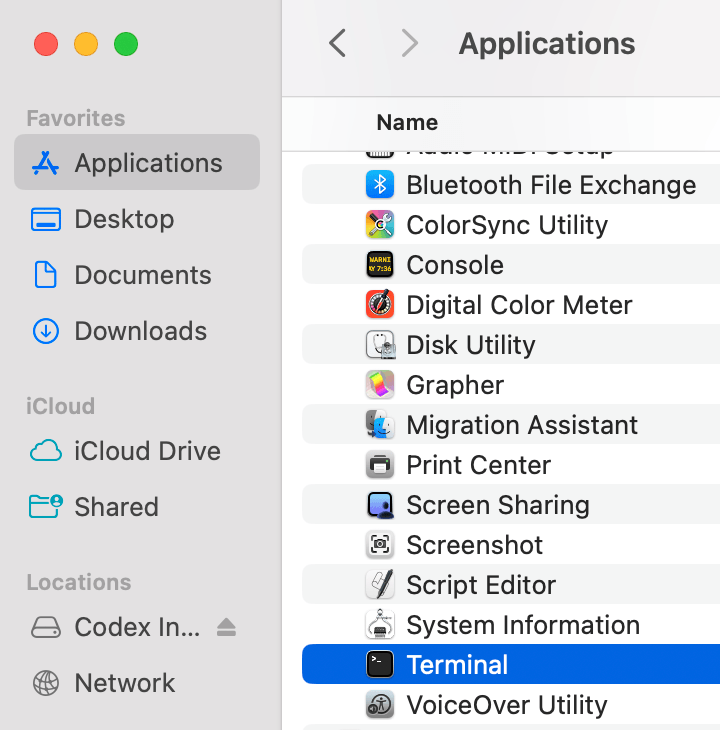
- Comfort with the Terminal: Claude Code operates via a Command Line Interface (CLI). For those accustomed to graphical user interfaces (GUIs), the terminal—a plain black window—can be intimidating. However, as Reed notes, it is simply a direct text-based bridge to your computer’s operating system. Once you understand the syntax, it is significantly more efficient than clicking through endless menus.
Chronology of Setup: From Zero to Automation
Getting Claude Code operational is a straightforward process, provided you follow the official protocols.
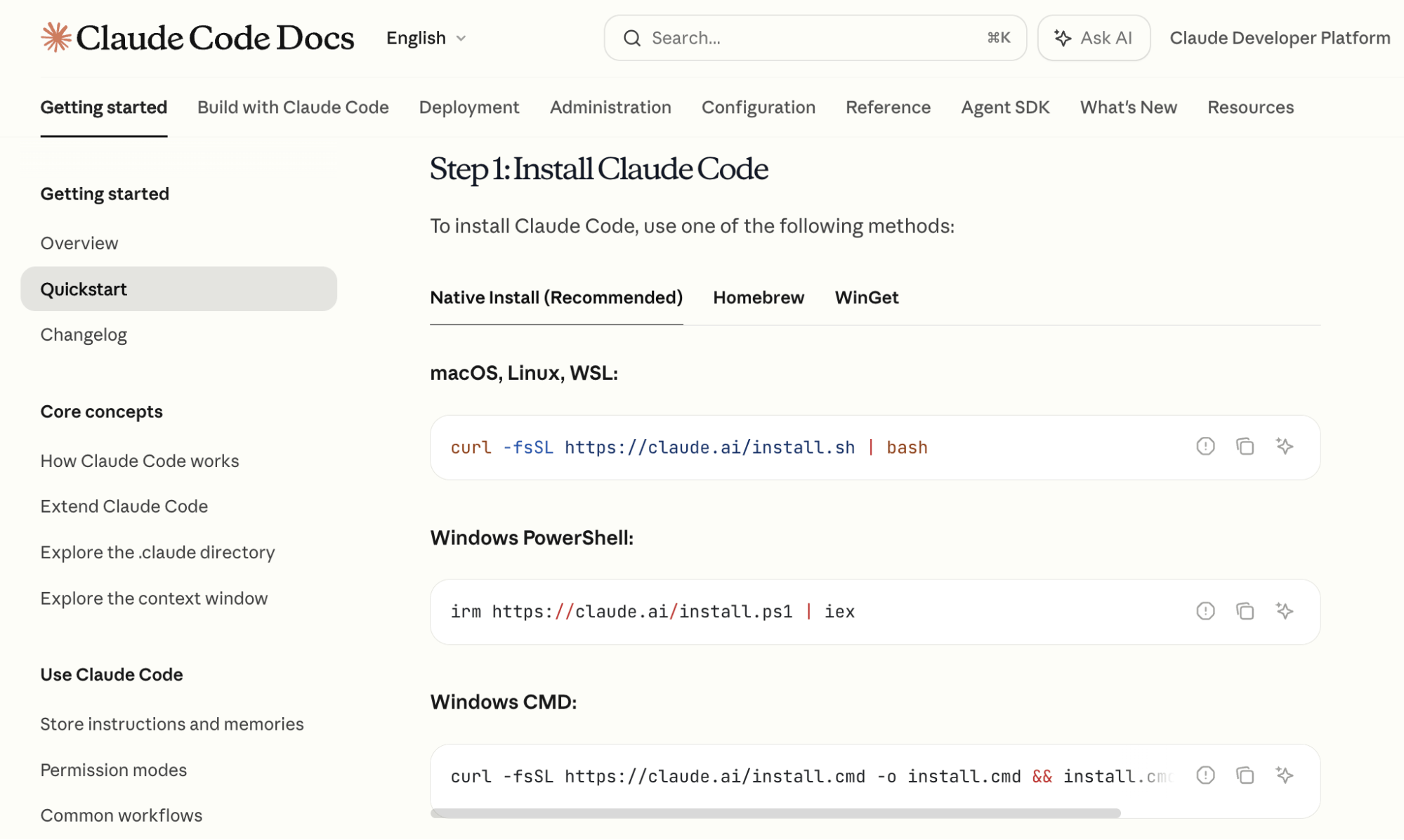
1. Installation
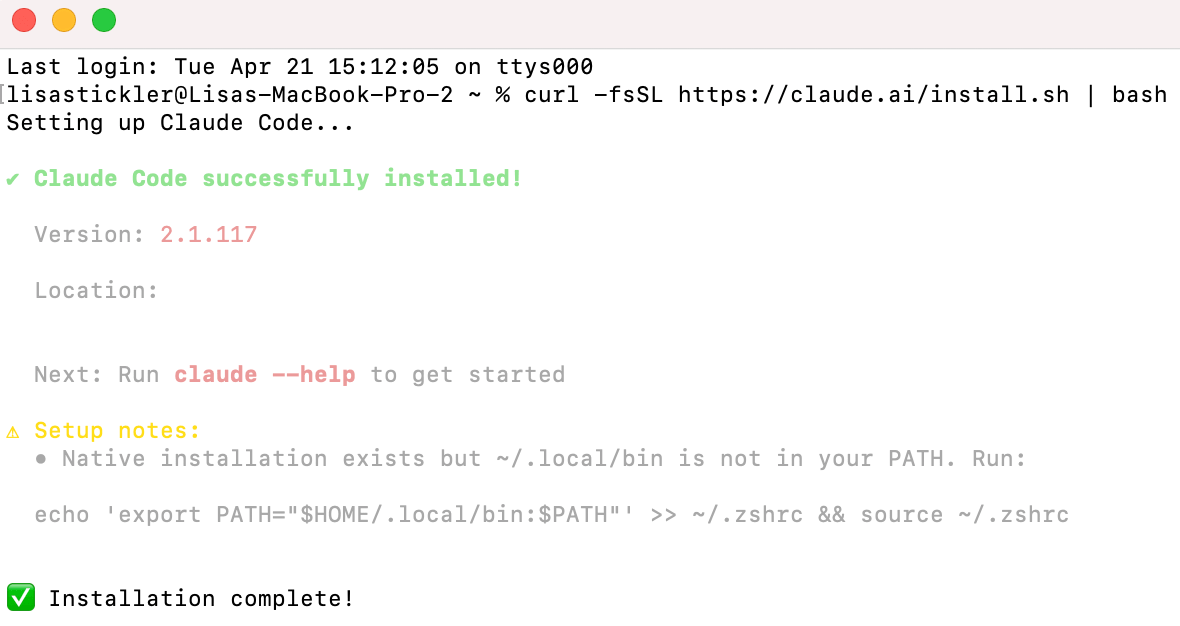
First, open your terminal (on macOS, use the Terminal app; on Windows, use PowerShell or Command Prompt). Navigate to the official Anthropic documentation to retrieve the specific installation script for your operating system. Copy the command, paste it into your terminal, and execute it.
2. Authentication
Once the installation finishes, type claude into the terminal. The system will trigger an authentication flow. This opens a browser window where you log in with your Claude credentials. Once authorized, the terminal window becomes your command center.
3. Model Selection
Claude Code allows you to switch between models dynamically. Use the /model command to list your options. A professional strategy, as recommended by Tyler Reed, involves a two-phase workflow:
- The Planning Phase: Utilize Claude 3.5 Opus. Its superior reasoning capabilities make it the best choice for mapping out project architecture and complex logic.
- The Implementation Phase: Once the plan is finalized, switch to Claude 3.5 Sonnet. Sonnet is optimized for speed and cost-efficiency, making it the ideal engine for writing and executing the actual code.
Advanced Features: Persistent Memory and Custom Skills
As you become more comfortable, two features will dramatically increase your productivity: Custom Skills and Markdown-based memory.
Custom Skills: Building Your Own "Plugins"
A "Custom Skill" is essentially a saved script of instructions for a repetitive task. If you frequently need to research competitor YouTube channels, you can ask Claude to:
- Search for specific channels.
- Identify high-performing videos from a set timeframe.
- Extract titles, descriptions, and audio files.
By instructing Claude to "Save this as a slash command," you create a permanent tool. The next time you need this data, you simply type /your-custom-command, and the AI initiates the entire workflow automatically.

Project Memory with CLAUDE.md
To ensure Claude doesn’t "forget" the context of your project between sessions, use the /init command. This creates a CLAUDE.md file in your project folder. This file acts as a living document of your project’s history, current progress, and future goals. Every time you open a new session, Claude reads this file first, ensuring that it remains aligned with the established project scope.
Case Study: Building a Daily Briefing Automation
To understand the practical application, let’s look at how to automate a daily schedule briefing between Google Calendar and Telegram.
Phase 1: Google Calendar Integration
Within the terminal, prompt Claude: "I want to access my Google Calendar. Tell me how to do this."
If the process seems daunting, follow the "Explain Like I’m Five" (ELI5) methodology. Claude will guide you through creating a project in the Google Developer Console, securing your OAuth credentials, and authorizing access. Because Claude is agentic, it will write the necessary code snippets to bridge your calendar data into a usable format.
Phase 2: Telegram Bot Setup
Telegram is an ideal partner for this automation due to its robust bot API. Type /telegram into your terminal. Claude will walk you through the creation of a bot via the "BotFather" interface on Telegram. Once the bot is live, it serves as the notification engine for your computer.
Phase 3: The Execution
With the connections established, define the final automation: "Read my Google Calendar every morning and send a summary of the next day’s schedule to my Telegram bot."
Claude will compile the script, confirm the permissions, and set the automation in motion. As long as your terminal session remains active, your digital assistant will proactively push updates to your phone, keeping you informed without requiring you to manually check your calendar.
Implications: The Democratization of Development
The rise of tools like Claude Code marks a fundamental shift in the digital economy. We are entering an era where "coding" is being abstracted away, replaced by "system design."
The Productivity Shift
For entrepreneurs and marketers, the implications are profound. Tasks that once required hiring a software developer or purchasing expensive middleware (like Zapier or Make.com) can now be handled in-house with greater flexibility and at a fraction of the cost.
Security and Ethical Considerations
It is critical to note that Claude Code is designed with safety in mind. By default, it requires explicit human authorization for any action that affects the computer—such as file creation, internet browsing, or directory editing. Users should treat these permissions as a security firewall, reviewing each request carefully to ensure they understand exactly what the AI is modifying on their machine.
The Future of Work
The ability to build custom tools is no longer a niche skill for computer scientists; it is becoming a core competency for the modern professional. As these models continue to evolve, the distinction between a "user" and a "creator" will continue to blur. By learning to communicate effectively with AI agents, individuals can unlock new levels of efficiency, turning their personal computers into powerful, automated engines of productivity.
As Tyler Reed suggests, the best time to start is now. By experimenting with simple automations, you are not just learning to use a tool—you are learning to build the future of your own workflow.