WordPress 7.1 "Mary Lou" Released: A Definitive Guide to New Design Controls, Developer APIs, and Browser-Side Media Processing
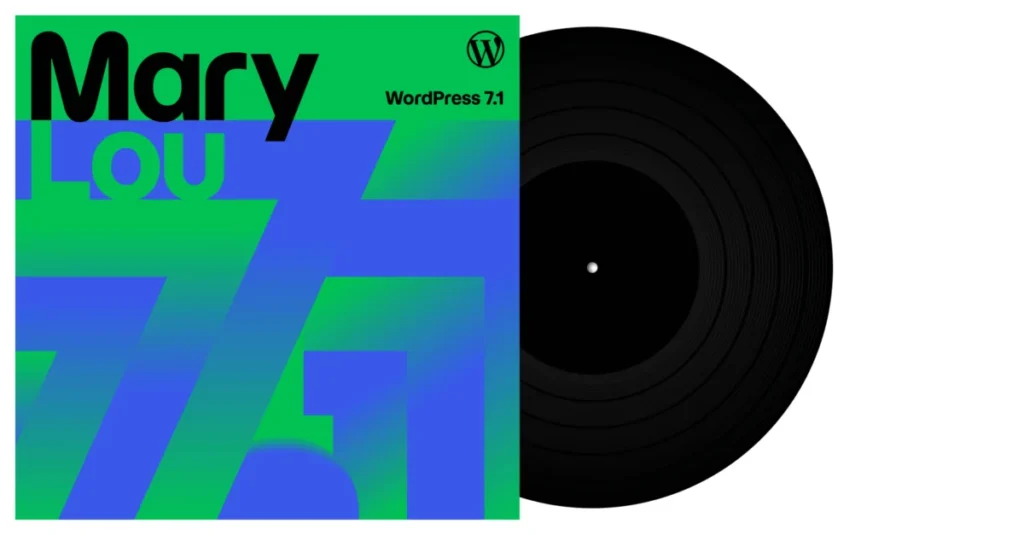
SAN FRANCISCO — The WordPress open-source project has officially announced the launch of WordPress 7.1, codenamed "Mary Lou" in honor of the pioneering jazz pianist, arranger, and composer Mary Lou Williams. Continuing the project’s tradition of dedicating major software iterations to iconic musical artists who redefined their respective crafts, version 7.1 bridges heavy architectural improvements with subtle user-experience refinements.
Built around the core workflows of modern web creation—admin navigation, layout design, content collaboration, and performance optimization—this milestone release incorporates over 1,500 enhancements and bug fixes. More than 800 global contributors, including over 170 first-time participants, collaborated to build the release, cementing its status as one of the platform’s most community-driven updates to date.

Main Facts: What Defines WordPress 7.1?
WordPress 7.1 arrives with a sweeping set of features aimed at solving long-standing layout, editing, and architectural challenges for both everyday site administrators and advanced plugin developers.
At a glance, the release introduces:

- Universal Admin Bar: The administrative toolbar now persists across the entire administrative and editing experience, granting immediate, consistent access to publishing tools regardless of whether a user is drafting a post or configuring global site layouts.
- Native Responsive Styling: Direct control over block appearance across varying screen sizes without the need for custom CSS, augmented by the ability to customize breakpoints directly inside
theme.json. - Centralized Media Editor Modal: A unified workflow for image manipulation, consolidating freeform cropping, aspect-ratio adjustments, horizontal/vertical flipping, fine-grained/snap rotation, and metadata editing into a single interface.
- In-Browser Image Processing: Offloading memory-heavy tasks—such as image compression, resizing, and thumbnail generation—to the browser using a WebAssembly (WASM) build of
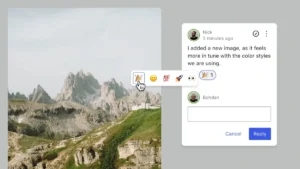
libvips, eliminating common server memory limits and PHP upload timeouts. - Rich Text & Mentions in Notes: Enhanced editorial collaboration tools that support inline formatting, clickable links,
@mentionsfor notifying specific team members, and fine-grained text selection for comments. - New Core Blocks & Developer APIs: The debut of dedicated Playlist and Tabs blocks, alongside a public SVG Icon API and an expanded Abilities API designed to power modern integrations, including AI-driven automations.
Chronology: The Road to "Mary Lou"
The development cycle for WordPress 7.1 followed a deliberate, milestone-driven timeline reflective of the Gutenberg project’s ongoing maturation. Following the foundations laid in previous iterations—such as the infrastructure work introduced in WordPress 6.9—the core development team initiated early scoping for 7.1 in early summer 2026.
- Early June 2026: Core contributors finalize the thematic dedication to Mary Lou Williams, tying her historical legacy of restless sonic reinvention and Harlem-apartment collaborative workshops to the software’s emphasis on flexibility and cooperative content production.
- July 2026: Initial beta phases roll out the browser-side image processing capabilities, sparking rigorous testing across various hosting environments to ensure WebAssembly compatibility with legacy server configurations.
- Late July to Early August 2026: Release candidates undergo intensive quality assurance, focusing heavily on accessibility (a11y) improvements, iframed post editor consistency, and public API stability.
- August 5, 2026: Publication of the WordPress 7.1 Field Guide, providing advanced documentation for theme authors and plugin developers ahead of the final deployment.
- August 2026: Official global launch of WordPress 7.1, accompanied by day-one translations across more than 20 locales, making it one of the most rapidly localized releases in the project’s history.
Supporting Data & Technical Breakdown
Behind the user-facing interface changes lies a robust technical engine. WordPress 7.1 focuses heavily on performance, developer ergonomics, and systemic consistency.

Performance and Media Management
Server resource exhaustion has historically plagued WordPress sites handling high-resolution media. Version 7.1 addresses this bottleneck by executing image compression and thumbnail generation via a browser-based WebAssembly port of libvips.
- Reduced Server Load: Heavy lifting occurs on the client machine, resulting in smaller file sizes transmitted to the server and a drastic reduction in PHP fatal errors related to memory limits.
- Modern Formats: Native support has been extended to AVIF, HEIC, and HDR gain maps, aligning the Media Library with output standards from modern smartphones and digital cameras.
- Resilient Uploads: Automatic retry protocols and live progress indicators protect users against dropped connections during bulk uploads. Furthermore, the Media Library now defaults to infinite scrolling, though users can revert to traditional pagination via personal preference settings.
Design Systems and Responsive Controls
The Site Editor and Post Editor receive critical architectural unification. The post editor is now fully iframed across all themes, isolating admin styles from the content canvas and ensuring that viewport-relative CSS units render predictably.

Furthermore, theme authors can now leverage theme.json to define custom mobile and tablet breakpoints. This allows developers to craft hyper-specific design rules for distinct device categories without writing custom media queries from scratch. Button blocks also receive native interactive styling capabilities, enabling direct configuration of hover, focus, active, and focus-visible states within the Global Styles interface.
Official Responses and Community Perspectives
The leadership and contributors behind WordPress 7.1 emphasize that the release represents a philosophical commitment to lowering barriers for content creators while expanding the ceiling for enterprise developers.

"Every WordPress release is an exercise in listening to our community," noted members of the cross-functional release squad. "By honoring Mary Lou Williams—an artist who constantly bridged classic composition with avant-garde bebop—we wanted to signal that WordPress 7.1 honors its foundational stability while boldly stepping into modern browser capabilities like WebAssembly and advanced collaborative workflows."
Core developers have highlighted the formalization of the Abilities API as a watershed moment for the ecosystem. Built upon previous architectural groundwork, the API features a filterable execution lifecycle, custom validation logic, and shared discovery protocols. According to core documentation teams, this layer is specifically designed to accelerate the development of secure, AI-driven automation tools within the WordPress ecosystem without compromising core security.

Implications: What WordPress 7.1 Means for Users, Devs, and Hosts
The deployment of version 7.1 carries distinct downstream effects for the three primary pillars of the WordPress ecosystem: end-users, developers, and hosting providers.
For Content Creators and Editors
The daily publishing experience is markedly smoother. The persistence of the admin bar eliminates navigational friction, allowing writers and editors to switch between content drafting and template adjustments without losing their place. The overhaul of inline Notes—supporting rich text, specific text-range anchoring, and team member notifications—brings WordPress closer to native document collaboration tools like Google Docs or Notion, streamlining editorial review pipelines.

For Theme and Plugin Developers
The public exposition of the SVG Icon API (wp_register_icon_collection(), wp_register_icon(), and wp_get_icon()) gives developers clean, native mechanisms to inject proprietary icon packs into the editor interface. Coupled with the new foundational Design System (featuring semantic design tokens and the ThemeProvider React component), developers can build custom admin screens that maintain strict visual harmony with native WordPress dashboards.
For Web Hosts and Infrastructure Engineers
Hosting providers stand to benefit significantly from the shift toward browser-side media processing. By offloading resource-intensive image scaling and compression to client-side WebAssembly, hosts will experience a drop in support tickets related to PHP memory exhaustion and execution timeouts during media-heavy site migrations or bulk uploads. Additionally, native environment-variable configurations for speculative loading allow hosts to optimize site-wide prefetching performance effortlessly.

Looking Forward
As WordPress 7.1 rolls out across millions of active installations worldwide, the open-source community has already turned its attention to subsequent maintenance cycles and future feature planning. With over 170 new contributors breaking into core development during this cycle, the project’s talent pipeline remains robust.
Site administrators are encouraged to review the official WordPress 7.1 Release Notes and the Field Guide before upgrading production environments. Comprehensive instructional resources, workshops, and tutorials are freely available via the Learn WordPress platform to help users master the new responsive design tools, media workflows, and collaboration features.