Main Facts: A New Era for WordPress Navigation and Development
The WordPress ecosystem has officially expanded beyond the confines of the server and the database, moving directly into the user’s browser. The official WordPress Browser Extension is now publicly available, offering a purpose-built suite of tools for content creators, administrators, and developers alike.
Users of Google Chrome and Chromium-based browsers can download the extension directly from the Chrome Web Store, while macOS users utilizing Safari can find it in the Mac App Store.
Built completely as an open-source extension, the tool serves multiple core functions:
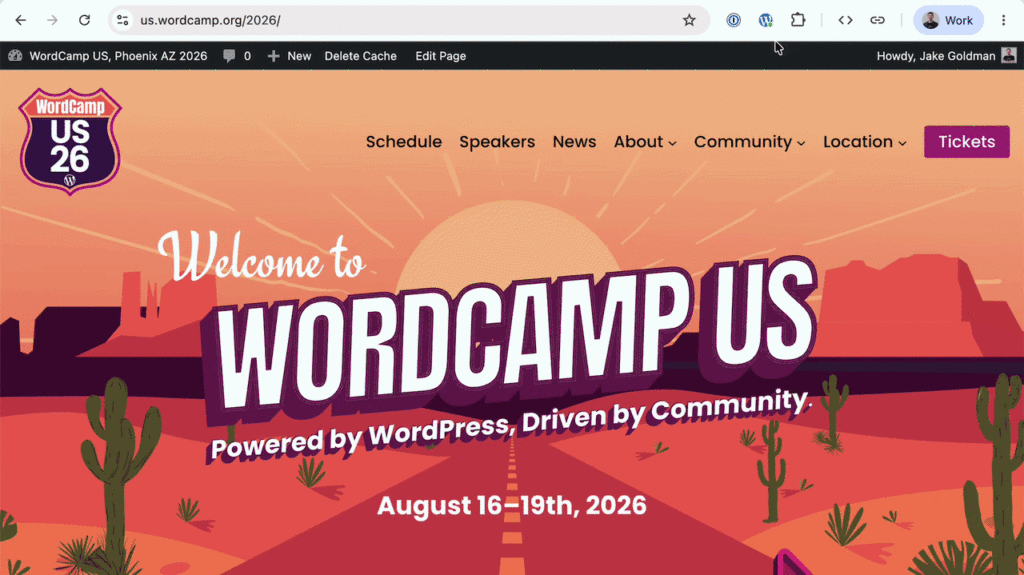
Admin Bar Management: It allows logged-in site administrators to cleanly hide the default WordPress admin bar from their view while preserving vital shortcuts within the browser toolbar.
Centralized Site Access: It provides an instant, locally stored launcher for all of your WordPress properties, keeping your dashboard and active editing environments just a click away regardless of what tab you currently have open.
Advanced Developer & Creator Utilities: It introduces specialized diagnostic tools, responsive preview windows, and cache-busting capabilities that function seamlessly across any WordPress site you visit, without requiring a single installed plugin.
Privacy remains a foundational pillar of the release. The extension operates entirely client-side. Preferences and your locally stored list of managed sites never leave your browser, ensuring complete data isolation with zero tracking or analytics.
Chronology: From Independent Concept to Official Project
The journey of the WordPress Browser Extension highlights how community-led innovation often lays the groundwork for core ecosystem tooling.
Phase 1: The Independent Spark
The tool originally started as an independent project conceived by developer Jake Gold. Frustrated by the classic friction points of managing WordPress sites in a browser—chiefly the way the persistent admin bar interferes with viewport accuracy and modern responsive design layouts—Gold set out to build a lightweight helper that could decouple navigation utilities from the website frontend.
Phase 2: Official Adoption and Collaboration
As the tool matured, it caught the attention of project leadership, eventually transitioning into an official project with active support from WordPress co-creator Matt Mullenweg.
To bridge the gap between a prototype and a production-grade release, key contributors stepped in. Fabian Kägy, a prominent WordPress core contributor and developer at digital agency Fueled (formerly 10up), played a vital role in shaping the extension’s early design architecture and user experience. Additional stability and features were added via patches from developer Khokan Sardar, alongside rigorous QA and testing cycles executed by a broader team of engineers at Fueled.
Phase 3: Public Release
Following extensive testing phases on GitHub, the project crossed the finish line in August 2026, officially launching on both the Chrome Web Store and the Mac App Store. Development remains active and transparent via the official GitHub repository, where developers can continue to submit bug reports, feature requests, and pull requests.
Supporting Data: Resolving the Viewport Dilemma
To understand why this extension represents a meaningful upgrade for daily WordPress users, one must examine the operational hurdles of the legacy admin bar.
The Problem with the Native Admin Bar
By default, whenever a user is signed into a WordPress site, an admin bar is injected into the top of the viewport. While convenient for quick access to the dashboard, post editor, and user profiles, it introduces several notable technical compromises:
Viewport Alteration: The bar physically pushes the webpage down or overlaps the top of the viewport. This means the visual experience of the site developer or content creator is fundamentally different from what an anonymous, logged-out visitor experiences.
Layout Interference: Modern web design heavily relies on advanced CSS features such as sticky headers, fixed navigation menus, and scroll-driven animations. The presence of the admin bar frequently introduces rendering artifacts, phantom spacing issues, and layout bugs that send developers hunting for nonexistent CSS errors.
Bloat and Clutter: As sites scale and administrators install various plugins, third-party developers often inject their own custom shortcuts, analytics metrics, and administrative menus into the bar. What starts as a clean utility can quickly become an unwieldy, cluttered banner.
The Extension Solution
While WordPress previously offered a profile setting to disable the admin bar entirely, doing so forced users to make an unappealing compromise: trading visual accuracy for administrative convenience, as turning off the bar stripped away all immediate navigation shortcuts.
The browser extension solves this trade-off completely. By tucking the core shortcuts into a discrete browser toolbar icon, users can completely hide the admin bar from the webpage canvas. If they need to jump back into the dashboard or open the specific block editor for the exact post, page, taxonomy, or template in view, it requires a single click on the browser extension menu—no dashboard navigation required.
Official Responses and Perspectives
The reception among core contributors, developers, and the broader WordPress community highlights a shared enthusiasm for browser-level tooling that bypasses the limitations of traditional plugin architecture.
"What began as a simple fix for a single UI tradeoff grew into something much broader: a way to recognize WordPress wherever you find it on the web, jump into your own sites from anywhere, and carry a small, powerful set of tools for testing and review."
— Project Development Overview
Developers have particularly praised the decision to move diagnostic capabilities outside of the WordPress installation itself. In the past, testing utilities—such as viewing block boundaries or clearing localized caches—often required installing site-specific debugging plugins or writing custom code snippets.
By shifting these utilities to a browser extension, developers can now analyze and interact with any WordPress site they encounter in the wild, utilizing a consistent toolset that leaves zero footprint on the underlying server environment.
Implications: What This Means for the Future of WordPress
The release of the official WordPress Browser Extension signals a subtle yet significant shift in how the platform approaches user experience and tooling.
1. Decoupling Tools from the CMS Core
Traditionally, WordPress functionality has been strictly confined to the backend dashboard or installed plugins. By building an extension that lives outside the CMS, the project demonstrates an openness to hybrid ecosystems—acknowledging that certain workflows (such as site management, rapid navigation, and frontend testing) are handled much more efficiently at the browser level than via server-rendered PHP.
2. Enhanced Developer Efficiency
For agencies, freelancers, and enterprise content teams managing dozens—or even hundreds—of distinct WordPress installations, context-switching is a massive productivity sink. The extension’s locally stored site launcher serves as an omnipresent command center. Whether a user is browsing a staging site, checking a client blog, or reviewing a live production environment, the extension instantly recognizes the platform, verifies authentication status, and routes the user directly to the correct editing context (including deep links into the Site Editor for block-theme-driven templates).
3. A Focus on Frontend Precision
As WordPress continues to double down on Full Site Editing (FSE) and complex visual layout systems, maintaining visual fidelity during the editing process is more critical than ever. Allowing creators to toggle block outlines, test responsive layouts in phone-sized preview windows, and perform instantaneous cache-busting directly from the browser ensures that what creators see on their screens accurately mirrors the end-user experience.
Looking Ahead
As the open-source community continues to iterate on the codebase via GitHub, adoption is expected to climb rapidly across the Chrome and Safari ecosystems. Whether you are a casual blogger looking to declutter your screen or a seasoned developer seeking a faster way to inspect site architecture, the WordPress Browser Extension transforms the browser from a passive viewing window into an active management hub.