Streamlining the Digital Wallet: Chrome’s Autofill Integration Revolutionizes Data Management
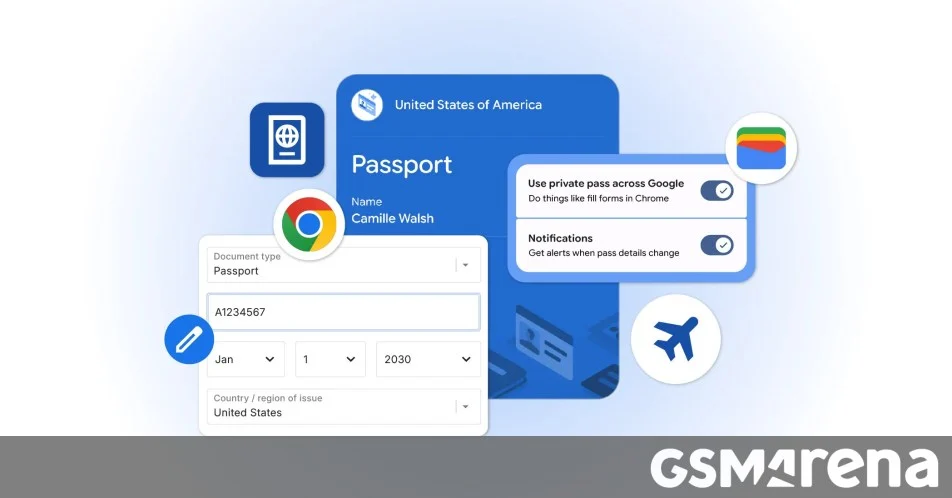
In a significant push toward a more frictionless browsing experience, Google has officially expanded the capabilities of its Chrome autofill feature, bridging the gap between static browser data and the dynamic utility of Google Wallet. This strategic update, which is rolling out across Android, iOS, and desktop platforms, transforms Chrome from a simple password and address storage tool into a centralized digital repository for sensitive identity documents. By integrating deeply with Google Wallet, the browser now allows users to expedite complex online tasks—ranging from airport check-ins to municipal parking payments—with unprecedented ease.
The Core Transformation: Moving Beyond Basic Credentials
For over a decade, Chrome’s autofill feature was largely limited to usernames, passwords, credit card numbers, and basic contact information. While useful, these capabilities often hit a wall when users encountered complex forms requiring government-issued IDs, travel credentials, or specialized membership numbers.
The latest update marks a departure from this limitation. Chrome users can now securely store and automatically populate fields with sophisticated data points, including driver’s license details, passport information, and Known Traveler Numbers (KTN). This shift is designed to eliminate the "form-filling fatigue" that often plagues users during high-stakes digital transactions. Whether a user is booking a last-minute flight or paying for city parking, the browser now acts as a secure intermediary between the user’s identity and the service provider’s request.
Chronology: The Evolution of Google’s Autofill Ecosystem
The journey toward this integrated experience has been a multi-year effort by Google’s product teams.
- The Early Era (2008–2015): Chrome’s initial foray into autofill focused on basic text fields. The primary objective was speed—reducing the time taken to type out billing addresses and contact details.
- The Payment Integration (2016–2020): Recognizing the growth of e-commerce, Google began prioritizing the integration of credit card autofill. This required the implementation of robust encryption and the introduction of biometric authentication (such as fingerprint scanning on Android and FaceID on iOS) to ensure security.
- The Digital Wallet Expansion (2021–2023): Google rebranded its payment suite to "Google Wallet," signaling an intent to include more than just credit cards. During this period, the company began experimenting with storing transit passes and event tickets.
- The Present Integration (2024): With the latest rollout, Google has successfully closed the loop. By allowing Chrome to draw directly from the Google Wallet infrastructure, the browser now functions as a universal "identity layer" for the web.
Supporting Data: Why Frictionless Forms Matter
The economic and psychological impact of form-filling friction cannot be overstated. According to various UX (User Experience) research studies, the average online conversion rate drops by approximately 3% for every extra field a user is required to manually type. In the context of travel and logistics, where speed and accuracy are paramount, these numbers are even more pronounced.
Industry data suggests that users are 40% more likely to abandon a transaction if they have to navigate away from the page to find physical documents like a passport or driver’s license. By bringing these data points directly into the browser’s autofill interface, Google is addressing a major pain point in the "conversion funnel." Furthermore, the shift toward mobile-first browsing means that users are increasingly reliant on their smartphones to handle administrative tasks, making the mobile-specific updates to Chrome a critical component of Google’s mobile strategy.
Security Protocols: The Architecture of Trust
A primary concern regarding the centralization of identity documents is the security of the data itself. If a browser holds access to a user’s passport and driver’s license, the potential for catastrophic data loss is significant. Google has addressed this with a multi-layered security strategy.
Encryption and Permission-Based Access
Google has explicitly stated that sensitive data stored within Chrome is encrypted both at rest and in transit. The "Autofill and Passwords" settings menu serves as the central command center for this information. The system is built on a "permission-only" architecture: Chrome will never auto-populate a passport number or a driver’s license field unless the user has explicitly authorized the browser to do so for that specific site.
Biometric Verification
On mobile devices, this feature leverages the existing biometric security protocols of the hardware. To fill sensitive information, Chrome will often prompt for a fingerprint or facial recognition scan. This ensures that even if a user leaves their phone unlocked, a third party cannot simply browse to a site and harvest the user’s identity data through autofill.
User Agency
Google emphasizes that users retain full control. Within the settings menu, users can audit, edit, or delete any piece of information saved in their Wallet-Chrome profile. This granularity is essential for compliance with global data protection regulations like GDPR (General Data Protection Regulation) and CCPA (California Consumer Privacy Act).
Official Responses and Strategic Vision
In a statement accompanying the rollout, Google’s product team emphasized that the goal is not just convenience, but the creation of a "seamless digital identity experience."
"Our mission has always been to make the web easier to use," a Google spokesperson noted. "By allowing Chrome to interface directly with Google Wallet, we are moving toward a future where your browser knows how to help you complete tasks, rather than just showing you the web. We are building an ecosystem where your identity information is portable, secure, and always under your control."
Industry analysts suggest this is part of Google’s broader effort to compete with Apple’s "Wallet" ecosystem. While Apple has long maintained a tight integration between its Safari browser, the Apple Wallet app, and iCloud Keychain, Google’s move is unique in its cross-platform universality. By bringing these features to Android, iOS, and desktop simultaneously, Google is effectively creating a "platform-agnostic" identity layer that works regardless of the hardware the user happens to be holding.
Implications: The Future of Digital Identity
The implications of this update extend far beyond simple convenience. As the web moves toward a more "identity-verified" model—where age verification, travel credentials, and digital permits are required for a growing number of services—the browser becomes the primary gateway for these interactions.
The Death of Manual Input
We are approaching a turning point where manual typing of personal identification information (PII) will become an antiquated practice. This reduces human error, which is particularly relevant in high-stakes fields like travel, where a single mistyped character in a passport number can lead to significant logistical delays.
A New Standard for Browser Security
By setting a high bar for the encryption of identity documents, Google is effectively forcing the browser market to adopt similar standards. Competitors like Mozilla (Firefox) and Microsoft (Edge) will likely be pressured to offer similar "Wallet" integrations to maintain parity in the user experience.
Privacy Concerns and the Data Monopoly
However, critics argue that this update increases Google’s central role in the user’s digital life. By aggregating passports, driver’s licenses, and payment methods within a single ecosystem, Google becomes an even more critical repository of sensitive human data. While Google insists that this data is not used for advertising purposes, the concentration of such high-value information remains a subject of ongoing debate among privacy advocates and regulatory bodies.
Conclusion
The expansion of Google Chrome’s autofill capabilities represents a significant milestone in the maturation of the mobile web. By effectively synthesizing personal identity data with browsing utility, Google has created a tool that saves time while adhering to modern security requirements. As users grow more accustomed to having their passports and licenses "on hand" within their browser, the digital landscape will likely become increasingly efficient. However, as with all advancements in data convenience, the burden remains on the user to stay informed, manage their permissions, and utilize the robust security tools that Google has provided to keep their digital footprint secure.
The move is a clear signal: the browser is no longer just a window to the internet; it is becoming the digital wallet of the modern age.