Streamlining the Workflow: The Official WordPress Browser Extension Arrives for Chrome and Safari
By Tech & Development Desk
Published: August 2026
Executive Summary & Main Facts
The ecosystem surrounding the world’s most popular Content Management System (CMS) has taken a significant leap forward with the official launch of the WordPress Browser Extension. Available now for Google Chrome, Chromium-based browsers, and macOS users utilizing Safari, this open-source utility aims to redefine how administrators, content creators, and developers interact with their digital properties.
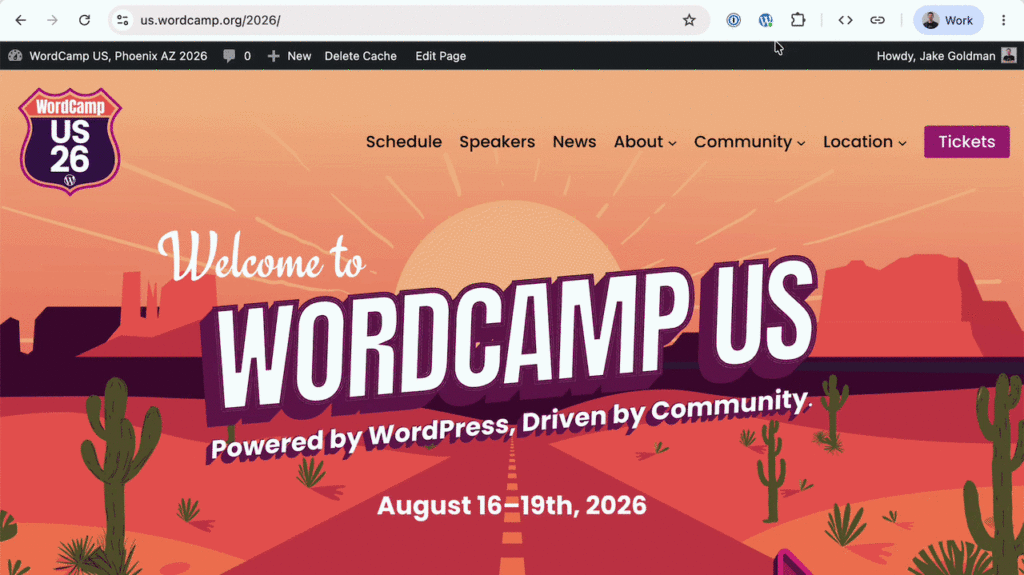
At its core, the extension solves a decades-old friction point in the WordPress user experience: the ubiquitous admin bar. While the admin bar offers invaluable shortcuts to the dashboard, post editor, and user profiles, it permanently occupies valuable viewport space. This intrusive overlay often distorts modern web designs—particularly those utilizing sticky headers, complex CSS grid layouts, or scroll-driven animations—creating phantom bugs that frustrate designers. Historically, users had to choose between living with a cluttered viewport or disabling the admin bar entirely in their user profile, thereby sacrificing critical, one-click access to editing tools.
The new browser extension bridges this gap. By removing the admin bar from the rendered webpage while preserving its functionality within the browser toolbar, it delivers the best of both worlds. Furthermore, the tool expands far beyond simple layout management. It functions as a universal WordPress detector across the web, a centralized launcher for multiple websites, and a robust suite of local developer tools—all while maintaining strict adherence to user privacy by operating entirely client-side without tracking or external telemetry.
The Genesis and Chronology of a Developer Tool
To understand the impact of the WordPress Browser Extension, one must look at its evolution from a grassroots community solution to an officially endorsed project.
The Independent Roots
The project did not originate in a corporate boardroom or a core development sprint. It began life as an independent utility conceived by developer Jake Gold (@jakemgold), who sought a lightweight mechanism to tame the admin bar without sacrificing workflow efficiency. Frustrated by the visual pollution introduced by the bar on design-heavy client sites, Gold prototyped a browser-level solution that intercepted the visual DOM injection of the admin bar, repositioning its core shortcuts into a discrete popup menu.
Official Adoption and Core Integration
As the utility matured, it caught the attention of WordPress co-founder Matt Mullenweg, who recognized its potential to universally enhance the user experience across millions of self-hosted and WordPress.com sites. The project was subsequently adopted into the official WordPress GitHub organization.
Development accelerated rapidly with contributions from notable community figures. Fabian Kägy, a core contributor and professional developer, helped architect and refine the extension’s early design paradigms. Meanwhile, developer Khokan Sardar contributed critical patches to ensure seamless cross-browser compatibility. Comprehensive testing, bug hunting, and architectural feedback were heavily supported by engineering teams at Fueled (formerly 10up), transforming a clever weekend project into a polished, enterprise-ready browser utility.

Deep Dive: Features, Architecture, and Supporting Data
The feature set of the WordPress Browser Extension is intentionally tailored to address the daily friction points faced by power users, site maintainers, and agency developers.
1. Intelligent Admin Bar Management
By default, the extension can be configured to suppress the WordPress admin bar globally or on a site-by-site basis. When an administrator navigates to a front-end page of their site, the viewport remains pristine, exactly as a standard visitor sees it. However, the toolbar icon transforms to indicate active WordPress status and login state. Clicking the icon instantly exposes the familiar admin shortcuts—such as "Edit Post," "Edit Page," or direct links to template-backed pages within the Site Editor for block-theme architectures—without requiring a round-trip reload to the backend dashboard.
2. Universal Site Launcher
For professionals managing a portfolio of dozens or hundreds of WordPress websites, navigation can become a logistical chore. The extension incorporates a locally stored site launcher. As you log into various WordPress instances during your daily routine, the extension remembers and indexes them locally. This creates a centralized, persistent directory of your managed properties accessible from any tab in your browser, regardless of what site you are currently visiting.
3. Out-of-the-Box Developer Utilities
Perhaps the most innovative aspect of the extension is its suite of client-side developer tools. Traditionally, diagnostic utilities required installing specific plugins on every individual WordPress installation—a security and maintenance overhead. The browser extension bypasses this entirely, delivering universal developer capabilities directly to the browser:
- Block Boundaries: Instantly overlay visual outlines around rendered blocks on any Gutenberg-powered page to inspect layout hierarchies.
- Responsive Viewports: Quickly launch a simulated mobile- or tablet-sized preview window to test responsive design breakpoints.
- Cache Busting: Force a hard reload with cache-busting parameters to immediately verify recent asset updates.
- State Clearing: Clear cookies, local storage, and session caches dedicated to the active WordPress site with a single click.
Technical Architecture and Privacy Guarantees
Operating at the browser level requires reading DOM structures to identify WordPress signatures (such as generator meta tags, REST API endpoints, and login cookies). According to the official repository documentation, the extension operates entirely on the local device. When the extension needs deeper context than the raw page provides, it queries the active site directly. No browsing history, site lists, credentials, or telemetry data are ever transmitted to third-party servers.
Official Responses and Community Reception
The release has been met with widespread enthusiasm across developer forums, social media channels, and the official WordPress make blogs.
In discussions surrounding the launch, maintainers emphasized that the extension represents a shift in how WordPress core thinks about tooling. Instead of bloating the core codebase or requiring a fragmented ecosystem of administrative plugins, core contributors are increasingly looking at browser-level integrations to solve client-side developer problems.
Fabian Kägy noted during the development phase:

"We wanted to build something that felt native to the browser while respecting the deep, complex architecture of modern WordPress—especially as we move deeper into the block-editor and Site Editor era. Keeping these tools out of the database and inside the browser keeps sites fast and uncluttered."
Early adopters on the Chrome Web Store and Mac App Store have praised the extension for its zero-configuration setup, minimal memory footprint, and the immediate visual relief it brings to front-end development and client presentations.
Implications for the WordPress Ecosystem
The launch of the official WordPress Browser Extension carries several broad implications for designers, developers, and the broader CMS landscape:
Elevating the Client Presentation Experience
Agencies and freelancers frequently present work-in-progress websites to clients directly from live staging servers. Previously, the presence of the admin bar—complete with plugin update warnings, comment counts, and SEO metrics—often distracted non-technical clients from evaluating the actual design. By effortlessly hiding the bar while retaining instant access to editing context, agencies can deliver a cleaner, more professional presentation experience.
A New Paradigm for Developer Tooling
By shifting diagnostic tools (like block outlining and cache busting) out of plugins and into an open-source browser extension, WordPress is establishing a new standard for developer ergonomics. This decoupling ensures that developers do not leave residual testing code or unnecessary plugins active in production environments, thereby enhancing overall site security and performance.
Open-Source Collaboration
As an open-source initiative hosted under the official WordPress GitHub organization, the extension serves as a model for community-driven feature expansion. With contributions welcomed via pull requests and issue tracking publicly managed, the tool is expected to evolve rapidly alongside upcoming major releases of WordPress Core and the Gutenberg editor.
Availability and Getting Started
The official WordPress Browser Extension is completely free and open source. Users can download it today:
- Google Chrome & Chromium Browsers: Available via the Chrome Web Store.
- macOS (Safari): Available via the Mac App Store.
- Source Code & Contributions: Developers interested in reviewing the code, submitting bug reports, or contributing patches can visit the Official GitHub Repository.