Streamlining the Workflow: The Official WordPress Browser Extension Arrives for Chrome and Safari
Executive Summary: Bridging the Gap Between Frontend Browsing and Backend Management
In an ambitious move to refine the daily workflows of millions of publishers, developers, and content creators, the WordPress project has officially launched its dedicated browser extension. Available now for Google Chrome and other Chromium-based browsers via the Chrome Web Store, as well as for Apple’s Safari browser via the Mac App Store, this open-source utility promises to fundamentally alter how users interact with their websites.
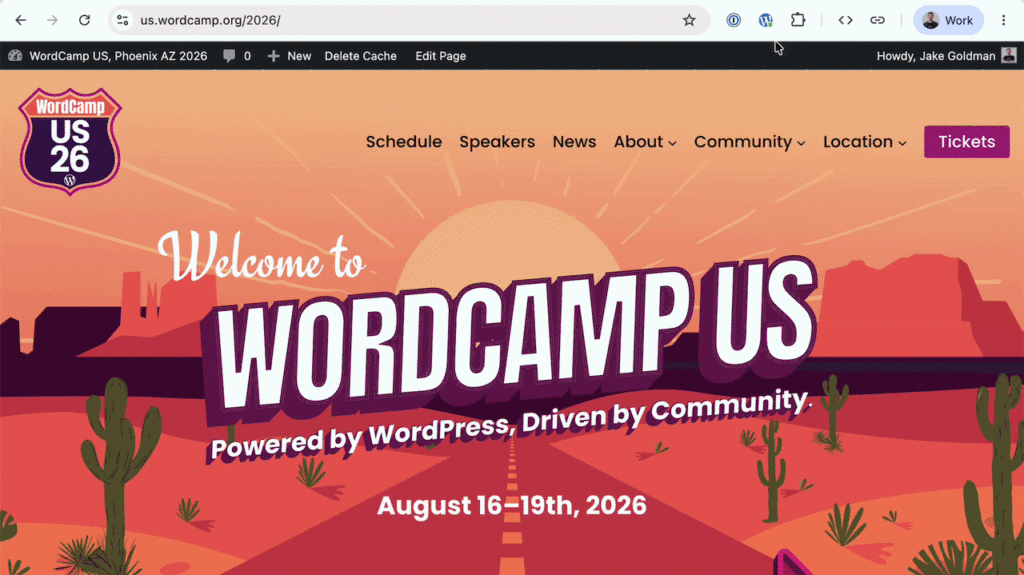
For nearly two decades, the WordPress admin bar has been a ubiquitous companion for logged-in administrators traversing their sites. While functional, it has long forced users into an uncompromising dilemma: keep the bar visible—thereby disrupting the natural viewport, obscuring sticky headers, and creating phantom layout bugs—or disable it entirely through user profiles, sacrificing immediate access to vital shortcuts.
The new WordPress Browser Extension solves this age-old UX friction. By cleanly decoupling administrative shortcuts from the live webpage viewport, the extension tucks essential tools neatly into the browser toolbar. Beyond merely hiding the admin bar, the open-source tool functions as a universal site launcher, an intelligent detector of WordPress-powered infrastructure, and a robust suite of lightweight developer utilities. Operating entirely client-side with zero tracking or external data transmission, this release marks a significant milestone in user-centric tooling for the world’s most popular content management system.
Chronology of Development: From Independent Passion Project to Official Release
To understand the significance of the WordPress Browser Extension, one must trace its evolution from a grassroots developer fix into a formalized, core-supported ecosystem tool.
Phase 1: The Independent Spark
The tool initially materialized as an independent project spearheaded by developer Jake Gold. Frustrated by the classic trade-offs of the native admin bar—where frontend visual accuracy was continually compromised for backend shortcut convenience—Gold set out to build a lightweight script that could cleanly strip the DOM of the administrative overlay while preserving quick access to core functions. What began as a localized solution for a single annoyance quickly expanded in scope, morphing into a utility designed to identify WordPress instances across the web, centralize site launchers, and assist with rapid quality assurance testing.
Phase 2: Official Adoption and Core Support
As the utility matured, it caught the attention of prominent figures within the open-source community, receiving active support and sponsorship from WordPress co-creator Matt Mullenweg. Recognizing its potential to benefit the broader ecosystem, the project transitioned into an official WordPress initiative hosted within the official GitHub organization.
Phase 3: Collaborative Refinement
The transition to an official project accelerated its development trajectory. Fabian Kägy, a prominent WordPress core contributor and engineer at Fueled (formerly 10up), played a pivotal role in shaping the extension’s early design architecture and user experience patterns. Additional momentum came from developer Khokan Sardar, who contributed critical patches and enhancements, alongside a dedicated cohort of QA testers from Fueled who rigorously stress-tested the extension across diverse browser environments.
Today, the project lives openly on GitHub, welcoming community contributions, bug reports, and continuous feature iterations from developers worldwide.

Core Features and Supporting Data: Dissecting the Toolkit
The WordPress Browser Extension packs an impressive array of features into a remarkably small footprint. Designed with performance and discretion in mind, the tool enhances productivity without imposing on system resources.
1. The Death of Viewport Pollution
By default, the WordPress admin bar injects a persistent HTML block at the top of the viewport for authenticated users. On modern, highly dynamic sites featuring sticky navigation bars, CSS scroll-driven animations, or complex responsive layouts, this injection frequently shifts layout metrics by 32 pixels. This discrepancy often forces developers down rabbit holes chasing non-existent CSS bugs.
The extension neatly eliminates this issue. Users can configure the tool to automatically suppress the admin bar across designated sites or globally by default. If a shortcut is needed, bringing the full administrative interface back requires just two effortless clicks—entirely bypassing the need to navigate back to the user profile settings page.
2. Intelligent Site Detection and Contextual Navigation
When browsing the web, the extension’s toolbar icon acts as a subtle, non-intrusive indicator, instantly signaling whether the currently viewed page runs on WordPress and whether the user is actively authenticated.
For sites managed by the user, clicking the extension opens a localized launcher populated with deep-link shortcuts. Rather than merely dropping the user at a generic dashboard, the extension provides direct navigation to the editor for the exact post, custom post type, taxonomy term, or page currently in view. For modern block themes utilizing full-site editing, template-backed pages open directly within the Site Editor, drastically cutting down the clicks required to execute minor content updates.
3. Client-Side Developer Utilities
Historically, testing specific frontend behaviors required installing dedicated plugins or relying on clumsy bookmarklets. The WordPress Browser Extension bundles several sophisticated developer tools directly into the browser:
- Block Outlines: Instantly draws structural boundaries around rendered blocks on the page, offering a clear visual map of how a Gutenberg layout is constructed.
- Viewport Testing: Launches an immediate, phone-sized preview window to test responsive design parameters on the fly.
- Cache-Busting Reloads: Forces a clean page reload to bypass aggressive caching layers during active development.
- Storage Management: Clears cookies and local browser storage specifically for the active WordPress domain with a single click.
Because these utilities reside natively within the browser extension rather than inside the WordPress plugin directory, they are universally accessible across every WordPress installation a user visits, requiring no backend installation privileges.
Privacy Architecture: Client-Side Security First
In an era where software utilities are frequently scrutinized for telemetry collection and data harvesting, the WordPress Browser Extension was engineered from the ground up with a strict privacy-first mandate.

Operating entirely on the local device, the extension inspects the Document Object Model (DOM) of the immediate page to determine its underlying architecture. When additional verification is necessary, it queries the specific local site directly.
Crucially, user preferences, site lists, and administrative shortcut histories are stored exclusively within the local browser environment. No telemetry is gathered, no user behavior is tracked, and no data is transmitted to external servers. This commitment to data sovereignty ensures that enterprise-level clients and privacy-conscious developers can adopt the tool without violating internal security compliance frameworks.
Industry Implications and Future Outlook
The launch of the official WordPress Browser Extension signals a subtle yet profound shift in how the platform approaches developer experience and workflow efficiency. By moving utility tools out of the traditional plugin ecosystem and into the browser, WordPress is acknowledging that modern web publishing is a multi-site, multi-platform endeavor.
Empowering the Agency and Freelance Ecosystem
For digital agencies, freelancers, and enterprise content teams managing dozens—or even hundreds—of disparate WordPress installations, context-switching is a massive productivity drain. The extension’s locally stored site launcher acts as a centralized command center, transforming the browser toolbar into an agile dashboard. Developers no longer need to bookmark individual wp-admin login URLs or wade through cluttered bookmarks bars.
Raising the Bar for Open-Source Tooling
By incubating the project through community-driven open-source channels—culminating in stable releases on both the Chrome Web Store and the Mac App Store—the WordPress project demonstrates a modern approach to software delivery. It validates that community innovations, when properly supported and refined by core contributors, can swiftly graduate into official ecosystem standards.
As development continues on GitHub, users and contributors are encouraged to test the extension, submit bug reports, and contribute patches. Whether you are a casual blogger looking to reclaim your website’s viewport or a seasoned developer managing enterprise block themes, the WordPress Browser Extension is poised to become an indispensable asset in your daily digital toolkit.