
The Angry Mustard Console: Why Accessibility Warnings Are Overruling Web Developers
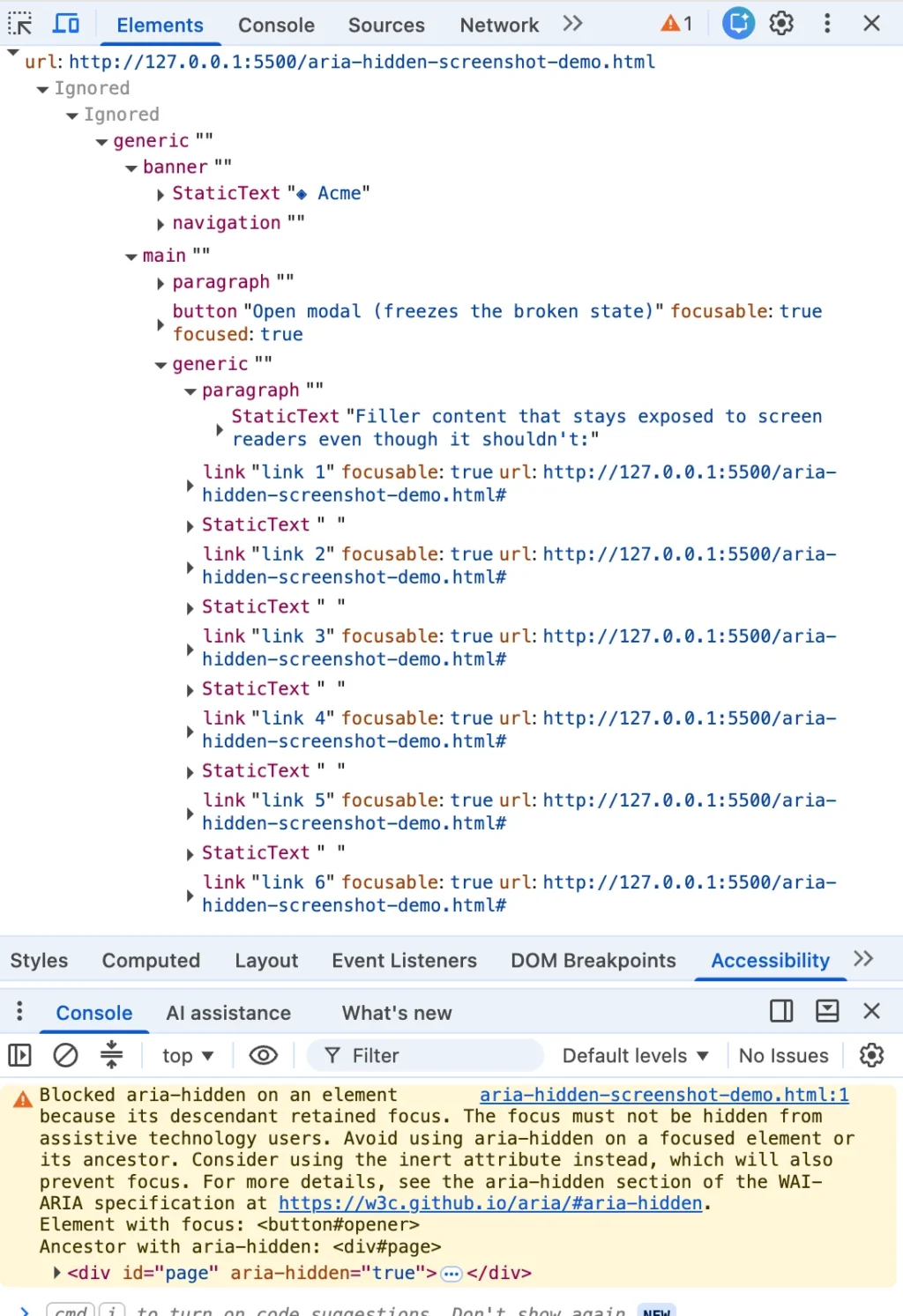
Every modern web developer knows the sinking feeling of watching a diagnostic tool light up with an angry mustard-yellow console warning. You highlight a cryptic error message, paste it into a search engine, and instantly find yourself shoulder-to-shoulder with half the front-end internet. Whether you are building in Angular, Bootstrap, Ionic, or wrestling with phpMyAdmin, this exact string pops up identically.
Yet, the top search results routinely bury the most critical truth: the browser’s warning is correct. There is a real person on the other side of that warning—someone relying on a screen reader whose focus is about to drop into a sudden accessibility black hole on your page.
The most common fixes ranking at the top of search engine results all rely on the same flawed patterns under different names: the blur() one-liner, the setTimeout wrapper on the close handler, or the trick of aggressively yanking the aria-hidden attribute off the DOM. Each of these quick fixes quiets the developer’s console while quietly harming the user the browser was trying to protect. If you have already shipped one of these workarounds, you are in massive company. You were failed by your search results, not your own carelessness.
Chronology of a Silent Architectural Crisis
To understand how the web arrived at this accessibility crossroad, one must examine the timeline of how browsers began aggressively policing developer markup. Chromium-based browsers have been quietly patching focusable aria-hidden nodes for years, but the warnings surfaced in two distinct waves that caught the ecosystem flat-footed.
The Open-Time Inversion (Summer 2024)
Around the release of Chrome 127 in July and August 2024, the first wave of warnings hit developer consoles. These messages scolded teams about elements that "just received focus" while residing inside a hidden region. Issue trackers across major component libraries—including MUI (#43106), Ant Design (#50170), and Flowbite (#943)—suddenly flooded with complaints. Developers viewed these messages as annoying new lints, failing to recognize that Chromium was attempting to prevent screen reader dead-ends.
The Close-Time Race (Late 2024)
Months later, Chrome 131 introduced the "retained focus" wording. On November 5, 2024, a developer filed Bootstrap issue #41005, catching the warning live in beta builds. Angular issue #30187 followed closely behind in December. The core behavior, however, was not new. Chromium had been exposing focusable aria-hidden nodes since early 2020, as recorded in ARIA Working Group issue #1185, where engineers sought to ensure screen reader users "at least hear where they are tabbing to, instead of complete silence."
The harsh reality is that modal teardown code had been broken for years before reaching developer consoles. The browser had simply been quietly repairing the broken tree in the background, rendering the bug invisible to teams until the browser decided to speak up.
The Four Ways Your Code Creates Ghost Focus
Every modal-related accessibility violation ultimately results in the same dangerous state: focus sitting comfortably inside a region that has suddenly been marked hidden. However, these bugs arrive from four distinct architectural directions.
[Modal Open/Close Event]
        │
        ├─► 1. Close-Time Race (Fade-out transition retains focus)
        ├─► 2. Open-Time Inversion (Trigger left behind in background)
        ├─► 3. Nested Composition Conflicts (Dialog vs. Select turf wars)
        └─► 4. External Focus Leaks (Alt-Tab or browser tab switching)
1. Hidden Mid-Goodbye (The Close-Time Race)
You click a close button. The dialog starts its fade-out transition. Somewhere during those 200 milliseconds of CSS animation, focus remains parked on the close button, which sits safely inside the overlay the library just marked as hidden to trigger the fade. The transition hasn’t finished, focus hasn’t moved, and Chrome logs a "retained focus" warning.
2. The Trigger Left Behind (Open-Time Inversion)
Running the process in reverse, an overlay opens, and the library marks the background aria-hidden="true". However, the button the user just clicked lives in that background, holding focus for a brief beat before anything moves it into the dialog. You get the alternate warning about an element that "just received focus."
3. The Turf War (Nested Composition Conflicts)
You open a <dialog> element and place a <select> dropdown inside it. The user opens the select, chooses an option, and the select closes. Suddenly, two independent components—each believing they are the sole modal layer—fight over who gets to hide the rest of the page. Under React 19, this friction graduates from an annoyance to a fatal navigation freeze.

4. The User Walked Out (External Focus Leaks)
Nothing in your page changed; the user simply left. They had a menu open and hit Alt+Tab or switched browser tabs, stranding an aria-hidden state on teardown with no live focus to reconcile against.
Supporting Data: Why Popular Quick Fixes Fail
When faced with these console warnings, developers historically reached for quick workarounds that prioritized a quiet terminal over user experience.
| "Fix" Strategy | What It Does to the Console | What It Does to the Screen Reader User | WCAG Violation |
|---|---|---|---|
The blur() One-Liner |
Silences warnings | Strands focus on <body>; user must restart navigation from the top of a long page. |
WCAG 2.4.3 (Focus Order) |
setTimeout Shims |
Intermittently quiets logs | Relies on race conditions; fails under CPU load or concurrent rendering. | WCAG 4.1.2 (Name, Role, Value) |
Stripping aria-hidden |
Removes warnings entirely | Allows users to tab out of active modals into background content, breaking modal boundaries. | WCAG 2.4.3 (Focus Order) |
Setting modal=false |
Clears console alerts | Renders dialogs that dismiss themselves mid-form when focus leaves. | Unexpected Context Shift |
The internet’s favorite one-liner—appending document.activeElement.blur() to a modal’s close handler—forces focus to nowhere. Because the browser must place focus somewhere, it falls back to the <body> element. Screen readers go silent or read the page title, and the user’s next Tab press restarts their journey from the absolute top of the document.
Official Responses and Standards Shifts
The tension between browser vendors and component library maintainers highlights a fundamental disagreement over responsibility.
Maintainers argue that deprecation warnings dropped abruptly onto stable APIs for years feel punitive, especially when legacy patterns mirrored official documentation. Conversely, browser engineers maintain that hiding focusable elements from assistive technologies violates the core contract of web accessibility.
Official standards bodies are actively closing these loopholes. The W3C ARIA Working Group explored standardization around heuristic ignoring of ARIA attributes, pushing the ecosystem toward native web primitives.
Furthermore, major libraries are rewriting their foundations. Bootstrap 6, for instance, abandons manual wrapper management entirely, migrating natively to the HTML <dialog> element and its built-in top-layer handling.
Architectural Implications: The Four-Step Teardown Contract
To permanently resolve these issues without harming users, developers must abandon superficial hacks and adopt a strict execution order. Focus must leave a closing region before that region becomes hidden or inert.
Implementing a bulletproof, accessible modal teardown requires a strict four-step operational contract:
- Un-inert the background first: If your trigger lives inside the background wrapper, removing the
inertattribute must happen before attempting to focus the trigger, or.focus()will silently fail. - Move focus home synchronously: Restore focus to the trigger button immediately, before any hiding state or CSS transition commits.
- Inert the closing shell: Apply the
inertattribute (notaria-hidden) to the dying overlay so it remains completely unreachable by assistive tech and keyboard navigation during its exit animation. - Unmount after transition: Clean up event listeners and remove the element from the DOM only after the CSS transition successfully concludes.
// The Correct Teardown Order
function closeModalSafe()
  // Step 1: Un-inert background so the trigger can accept focus
  background.removeAttribute('inert');

  // Step 2: Move focus OUT synchronously
  triggerButton.focus();

  // Step 3: Inert the closing shell for its exit transition
  overlay.setAttribute('inert', '');
  overlay.classList.add('fade-out');

  // Step 4: Clean unmount on transition end
  overlay.addEventListener('transitionend', () => overlay.remove(),  once: true );
By prioritizing the user’s navigational experience over a quiet terminal, development teams can align their codebases with modern browser standards—ensuring that accessibility warnings reflect genuine architectural health rather than forced developer workarounds.








