
The Ghost in the Console: Why That Angry Mustard Warning About aria-hidden and Modal Focus Is Actually Saving Your Users
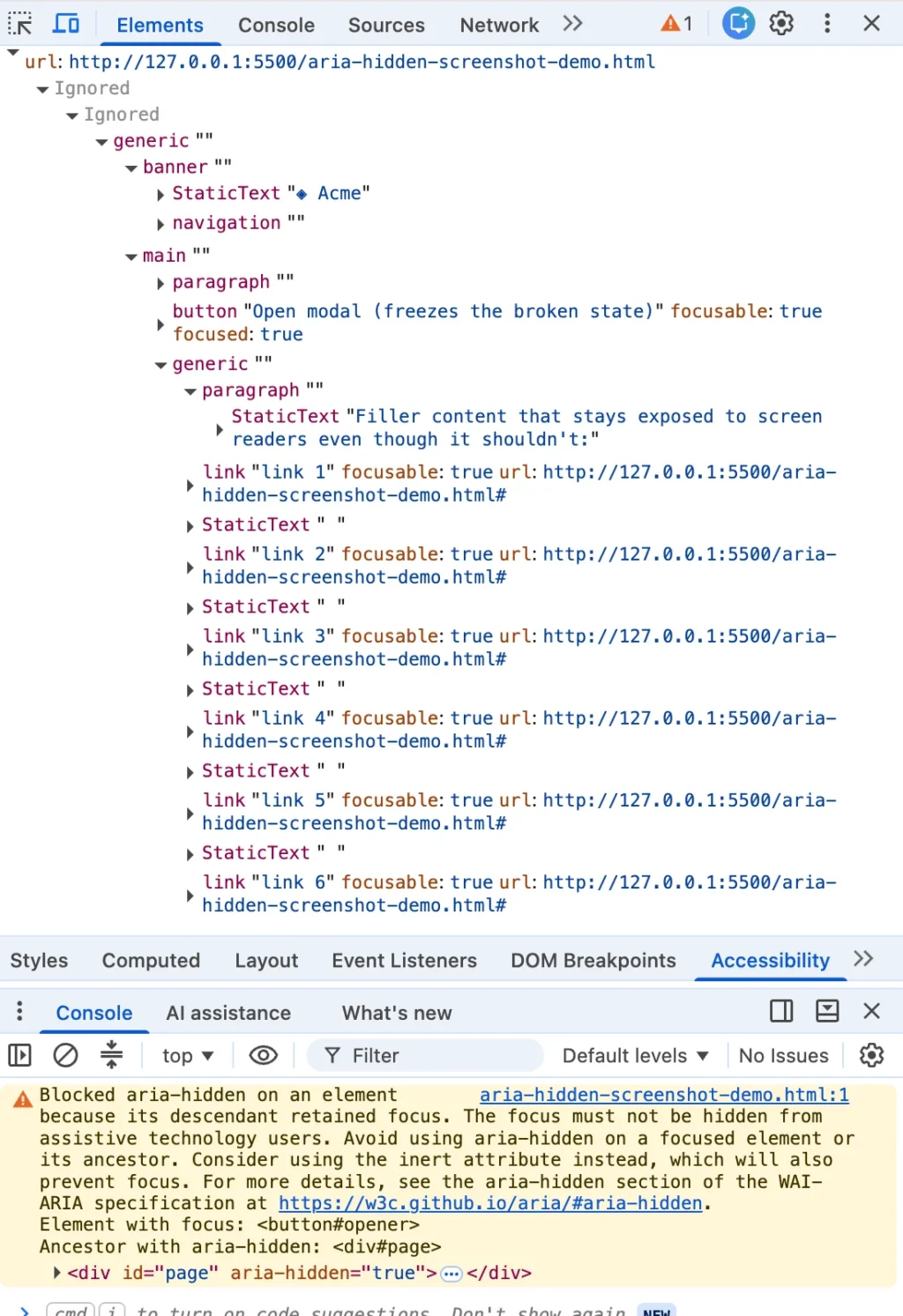
You closed a dialog, and the console suddenly lit up in a shade of angry mustard. You highlighted the error message, dropped it into a search box, and were unceremoniously spat out here alongside half the front-end engineering world. This exact string turns up identically whether your application is running Angular, Bootstrap, Ionic, or phpMyAdmin.
Here is the part that the top-ranking search results consistently bury: the warning is correct. There is a real person on the other side of that browser runtime—someone utilizing a screen reader whose focus is about to drop into an invisible hole right in the middle of your web page.
The fixes ranking highest across the web all deploy the same fundamental mistake under different names: the blur() one-liner, the setTimeout wrapper you wrap the close handler in, or the trick where you violently rip the aria-hidden attribute off the DOM tree.
Each one of these workarounds quiets the console while quietly harming the human being the browser was trying to protect. If you have already shipped one of these band-aids into production, you are in enormous company. You were failed by your search results, not by your own carelessness. I know, because I shipped one of those exact fixes too.
Main Facts: The Anatomy of Ghost Focus
Before reading another word, here is one honest shortcut: if your project can migrate to the native <dialog> element and call .showModal(), do that, close this tab, and get your afternoon back. The browser handles the entire focus dance natively, and this entire class of accessibility bugs all but disappears. (Naturally, you will still need to handle the edge case where the element focus should return to has been removed from the DOM, which no browser can guess for you.)
Everything past this point is for the rest of us—developers wired into a monolithic component library, a legacy design system, or a micro-frontend architecture that cannot be ripped out this quarter.
The core reality of the issue boils down to a single instruction: focus has to leave a region before that region becomes hidden or inert. That is the entire secret. Everything else is footnotes, edge cases, and the hard-earned lessons of learning it the expensive way.
The Chronology of an Error
In practice, this is a strict order-of-operations problem. Most modal closing code already contains the right pieces, just executed in the wrong sequence.
// WRONG: The order most modal code ships with
function closeModal()
  // Background hidden while focus is STILL inside it — generating ghost focus
  overlay.setAttribute('aria-hidden', 'true');
  overlay.classList.add('fade-out');
  overlay.addEventListener('transitionend', () => overlay.remove());

  // Focus restored after the hide has already committed; too late
  triggerButton.focus();


// RIGHT: Hand the page back, then focus leaves, then the region goes inert
function closeModal()
  // Un-inert FIRST: inert blocks focus, so the trigger can't receive focus while the background is still inert
  background.removeAttribute('inert');

  // Move focus OUT before anything gets hidden
  triggerButton.focus();

  // Apply inert, not aria-hidden, on the closing shell
  overlay.setAttribute('inert', '');
  overlay.style.pointerEvents = 'none';
  overlay.classList.add('fade-out');
  overlay.addEventListener('transitionend', () => overlay.remove());
The wrong version reads top-to-bottom exactly the way a developer would narrate closing a modal out loud. But the browser applies that hide the moment the statement runs, before the focus move on the next line can even execute. It is all one synchronous execution task. The damage lives entirely in the ordering and the invalid accessibility state that exists between those two statements.
Get the order right, and the result is entirely boring—which is the exact point of good UX. The user hits Esc, hears focus land back on the button they opened the modal with, and carries on with their task.
Get it wrong, and the user lands on the <body> element, hears dead silence or just the raw page title, and has to press Tab from the very top of a long document all the way back to wherever they were. That second experience is precisely what the browser warning exists to prevent.
Chronology: How Chromium Forced the Issue
For years, developers treated the word "warning" as advisory—yellow, non-blocking, someone else’s problem to deal with after the product release. That single word did an immense amount of damage because it implied options where none existed. By the time you saw the message in your console, the browser had already looked at your markup, decided you were wrong, and shipped a completely different accessibility tree to the operating system than the one you wrote.
The Rollout of Chromium Warnings
Chromium has been quietly patching accessibility trees for far longer than the console warnings have existed. The modern warnings arrived in two distinct waves:
- The Open-Time Variant: Scolding developers about an element that "just received focus" began appearing across issue trackers around Chrome 127 in the summer of 2024, clustering heavily in July and August across major design systems like MUI (#43106), Ant Design (#50170), and Flowbite (#943).
- The Close-Time Variant: The "retained focus" warning arrived months later alongside Chrome 131 in late 2024. Developers catching it live in Beta and Nightly builds filed Bootstrap #41005 on November 5, 2024, followed quickly by Angular #30187 in December.
Behind these warnings lay an architectural paradox baked into aria-hidden. The attribute pulls content out of the accessibility tree, but it does not pull that content out of the keyboard focus order. Two different browser subsystems operate independently, with nothing keeping them synchronized.
Thus, an element can be fully focusable and completely imperceptible to a screen reader at the exact same time. The instant the Tab key lands on it, you create ghost focus: the screen reader fires a focus event for a node it has been explicitly told does not exist, looks it up, finds nothing permitted to describe, and yields total silence.

Supporting Data: The Four Traps in the Wild
Every manifestation of this bug ends at the same destination: focus sitting inside a region that just went hidden. However, they approach from four different directions.
┌────────────────────────────────────────────────────────┐
│               THE FOUR WAYS TO GHOST FOCUS             │
├──────────────────────────┬─────────────────────────────┤
│ 1. Hidden Mid-Goodbye    │ Close-time race during CSS  │
│                          │ fade transitions.           │
├──────────────────────────┼─────────────────────────────┤
│ 2. The Trigger Left Behind│ Open-time inversion during  │
│                          │ modal mounting.             │
├──────────────────────────┼─────────────────────────────┤
│ 3. The Turf War          │ Nested composition (Select  │
│                          │ inside a Dialog).           │
├──────────────────────────┼─────────────────────────────┤
│ 4. The User Walked Out   │ Focus stranded via Alt+Tab  │
│                          │ or window switching.        │
└──────────────────────────┴─────────────────────────────┘
1. Hidden Mid-Goodbye (The Close-Time Race)
You click the close button. The dialog starts its fade-out animation. Somewhere within those 200 milliseconds of CSS transition, focus is still parked on that close button, which sits safely inside the overlay the library just marked hidden. The transition hasn’t finished; focus hasn’t gone anywhere. Chrome flags the retained focus.
Historically, frameworks like Bootstrap restored focus to the trigger on a transition-end event (hidden.bs.modal), leaving a window of vulnerability during every single frame of the animation.
2. The Trigger Left Behind (Open-Time Inversion)
Running the process in reverse, the overlay opens, and the library marks the background aria-hidden="true". However, the button the user just clicked lives in that background, and for a brief beat, it still holds focus before being moved into the modal. The browser detects a hidden region with a focused node inside.
3. The Turf War (Nested Composition Conflicts)
You open a <dialog>, and inside it, you place a native <select> element. The user opens the select, picks an option, and the select closes. Suddenly, two separate components—each believing they are the one true modal layer—are fighting over who gets to hide the rest of the page. Under React 19, this shifts from an annoyance to a critical failure. Changes in unmounting timing mean focus drops to the <body> for a microsecond; the parent dialog reads this as an "outside click" and re-hides itself with the user’s focus trapped inside, freezing keyboard navigation entirely.
4. The User Walked Out (Focus Leaves the Page)
Nothing on your page changed, but the user hit Alt+Tab or switched browser tabs while an overlay was active. Focus bookkeeping strands an aria-hidden state with no live focus target to reconcile against, tripping internal assertions in libraries like Material Web and Ionic.
Official Responses and Ecosystem Reactions
The ecosystem’s initial response to these warnings was a scramble for quick fixes. Unfortunately, nearly every popular remedy made the underlying user experience measurably worse.
The Danger of the blur() One-Liner
// The internet's favorite one-liner
element.addEventListener('hide.bs.modal', () =>
  document.activeElement.blur(); // "Fixes" the warning
);
Calling blur() with no subsequent focus target drops focus straight onto the <body>. The console warning clears because there is no longer a focused element inside your hidden subtree—in fact, there is no meaningful focus state at all.
For a mouse user, this is invisible. For a screen reader user, the application goes deaf and mute, and the very next Tab press forces them to restart navigation from the top of the entire document. This is a direct violation of WCAG 2.4.3 (Focus Order), dressed up as a clean console fix.
Timing Hacks and Attribute Stripping
- The
setTimeoutShim: Relying on a timer to shift focus a tick later bets that the browser paint finishes before the focus call runs. Under heavy CPU load or concurrent rendering, this fails intermittently, producing flaky bugs that are impossible to reproduce locally. - Stripping
aria-hidden: Deleting the attribute entirely makes the warning go away because nothing is hidden. However, it breaks the basic modal contract, allowing users to tab straight out of the active modal and into background controls. modal=falseEscapes: Setting components to non-modal while keeping visual backdrops causes mobile and desktop browsers to dismiss dialogs prematurely when users attempt to interact with form elements.
Implications: The Teardown Contract
The durable solution requires abandoning the pursuit of a quiet console in favor of prioritizing the user experience. The definitive teardown contract relies on four unyielding steps:
- Un-inert the background container so that focus can legally travel back to its origin.
- Move focus synchronously to the trigger element before any hide states commit.
- Apply
inert(notaria-hidden) to the closing shell so it can fade out safely without capturing pointer events or exposing ghost focus. - Unmount or hide the element only after CSS transition events have fully settled.
The React Implementation Reality
In React-based architectures, state updates are batched through a scheduler, introducing dangerous race conditions between render cycles and DOM focus. To prevent this, developers must capture trigger elements prior to state mutations and leverage imperative side effects rather than view-state flags for background inertness:
function useModalTeardown()
  const triggerRef = useRef(null);
  const backgroundRef = useRef(null);

  const open = useCallback((setOpen) =>
    triggerRef.current = document.activeElement;
    if (backgroundRef.current) backgroundRef.current.inert = true;
    setOpen(true);
  , []);

  const close = useCallback((setExiting) =>
    if (backgroundRef.current) backgroundRef.current.inert = false;
    triggerRef.current?.focus();
    setExiting(true);
  , []);

  return  triggerRef, backgroundRef, open, close ;
If background inertness must live within React state, developers must reach for flushSync to force immediate DOM commits before executing .focus() calls.
Conclusion
The web development community spent years treating accessibility warnings as cosmetic linting errors rather than structural diagnostics. When Chrome introduced these alerts, the initial frustration from maintainers was understandable, but the underlying principle remains unassailable: you cannot hide a focused control from a screen reader and call it an accessible modal.
The console warning is not an annoying piece of browser nagging; it is your architecture speaking out loud, exposing exactly what happens to disabled and assistive technology users the moment developers stop watching. Clean consoles were never the finish line. Designing software that respects every user across the DOM tree is.








