The Rise of the AI Workforce: A Comprehensive Guide to Mastering OpenClaw
The landscape of artificial intelligence is shifting from conversational chatbots to autonomous agents—digital workers capable of executing complex tasks with minimal human intervention. At the forefront of this revolution is OpenClaw, an open-source platform designed to democratize the creation of AI agents. Described by industry leaders as the "iPhone moment" for AI, OpenClaw promises to bridge the gap between high-level engineering and everyday business utility.
This report explores the mechanics of OpenClaw, provides a technical roadmap for deployment, and analyzes the broader implications of an autonomous AI workforce.
Main Facts: What is OpenClaw?
OpenClaw is an open-source orchestration layer that allows users to build, deploy, and manage AI agents without writing a single line of code. While traditional AI tools like ChatGPT or Claude require constant prompting within a browser tab, OpenClaw operates as a persistent entity that lives on a server, interacts via messaging apps, and possesses the "eyes and hands" to navigate the web autonomously.
The Three Pillars of OpenClaw
According to experts Mike Russell and Michael Stelzner, OpenClaw’s utility rests on three technical "unlocks" that distinguish it from standard LLM interfaces:
- Persistent Communication: OpenClaw integrates directly into existing messaging ecosystems like Telegram and Slack. This removes the friction of logging into a specific portal, allowing users to "text" their AI workforce as they would a human colleague.
- Autonomous Computer Control: Unlike sandboxed AI, OpenClaw can take over a computer interface. It can open browsers, click buttons, navigate complex SaaS platforms, and execute workflows that do not have public APIs.
- Long-Term Memory: One of the primary limitations of modern LLMs is "context drift" or the loss of information between sessions. OpenClaw manages its own memory through plain-text files, allowing it to remember business constraints, personal preferences, and past project details indefinitely.
Chronology: From Installation to Your First Autonomous Task
Setting up an AI agent requires a shift from "using a tool" to "managing a server." The following chronology outlines the path from initial deployment to the execution of a functional bot.
Phase 1: Infrastructure Selection
The first step in the OpenClaw journey is deciding where the agent will reside. Because the agent requires high uptime to be effective, experts recommend a Virtual Private Server (VPS) over a local machine.
- The VPS Route: Utilizing providers like DigitalOcean, Hetzner, or Linode ensures the agent is online 24/7. An entry-level "droplet" or cloud instance typically costs approximately $5 per month.
- The Local Route: For those prioritizing privacy or hardware they already own, a Raspberry Pi 5 or a spare Mac Mini can serve as a host. However, if the machine sleeps, the agent "dies," neutralizing its autonomous benefits.
Phase 2: Installation and Model Integration
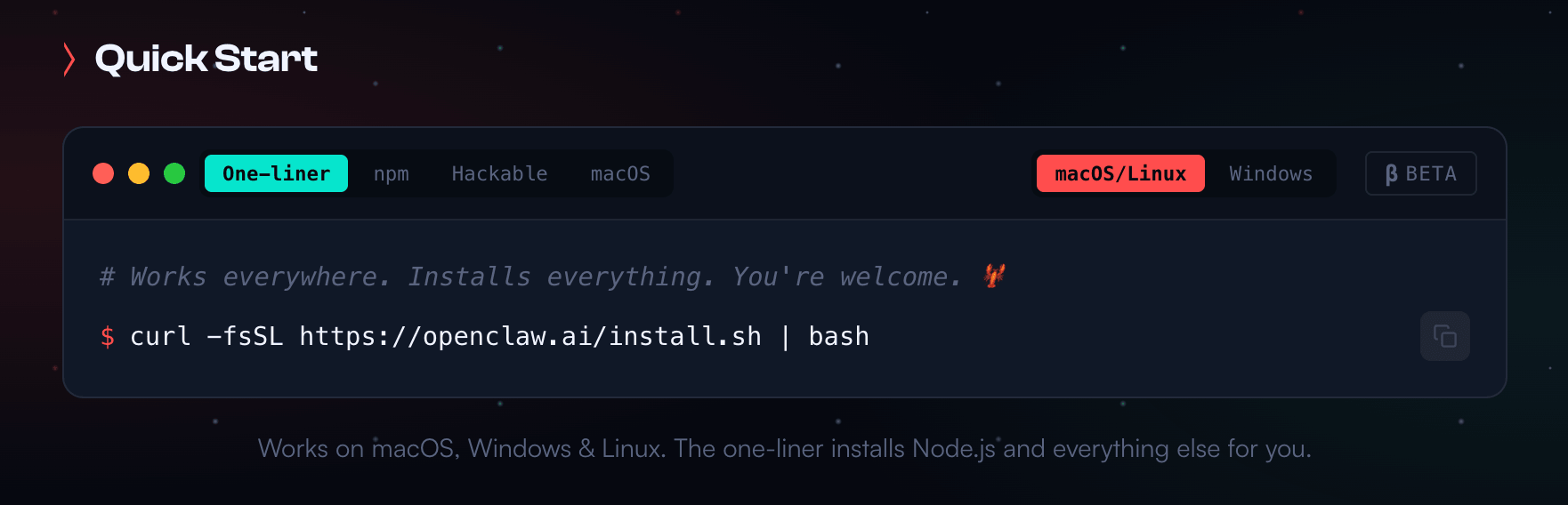
Modern hosting providers now offer "one-click" installers for OpenClaw, significantly lowering the barrier to entry. Once the environment is ready, the user must provide the "brain"—the Large Language Model (LLM).
- Anthropic (Claude): Claude 3.5 Sonnet is often cited as the "gold standard" for agentic work due to its superior reasoning and coding capabilities. Users are advised to use API access rather than consumer subscriptions to avoid terms-of-service violations.
- OpenAI (GPT-4o): A robust alternative that explicitly supports integration with agentic frameworks.
- Google Gemini: While compatible, some users have reported inconsistencies in Gemini’s ability to execute complex "tool calls" (the commands that let the AI use external software).
Phase 3: The Initialization Prompt
Upon first launch, OpenClaw requires a "birth certificate"—an initialization phase where it learns who it is serving. A typical successful initialization involves the agent researching its owner. By providing a name and business URL, the agent scrapes the web to build a profile of the user’s history, tone, and objectives, which it then commits to its long-term memory.
Supporting Data: Real-World Use Cases and Technical Capabilities
The power of OpenClaw is best demonstrated through its application in high-repetition environments. Two primary case studies highlight its versatility.

Case Study A: The Social Media Automation Agent
Mike Russell utilizes an OpenClaw agent to manage an automated X (formerly Twitter) account for his "Creator Magic" brand. The agent performs the following tasks autonomously:
- Content Harvesting: It downloads new YouTube videos from his channel.
- Editing: It identifies key moments and "chops" them into short-form clips.
- Distribution: It drafts and posts threads, appending a disclaimer that the content was AI-generated.
- Optimization: Using the "Auto Research" framework, the agent analyzes view counts and engagement metrics to recursively improve its writing style for future posts.
Case Study B: The Personal Health Triage
In a more intimate application, Russell connected OpenClaw to his Garmin health data and 23andMe DNA results. Despite Garmin lacking a simple public API for certain metrics, the agent researched and installed a Python library to bridge the gap.
- Data Analysis: The agent analyzed five years of health patterns to identify lifestyle correlations with peak fitness.
- Proactive Coaching: Because the agent has a "memory," it can proactively warn the user against certain foods or behaviors based on their specific biological markers during casual conversation.
Technical Efficiency: APIs vs. Browser Navigation
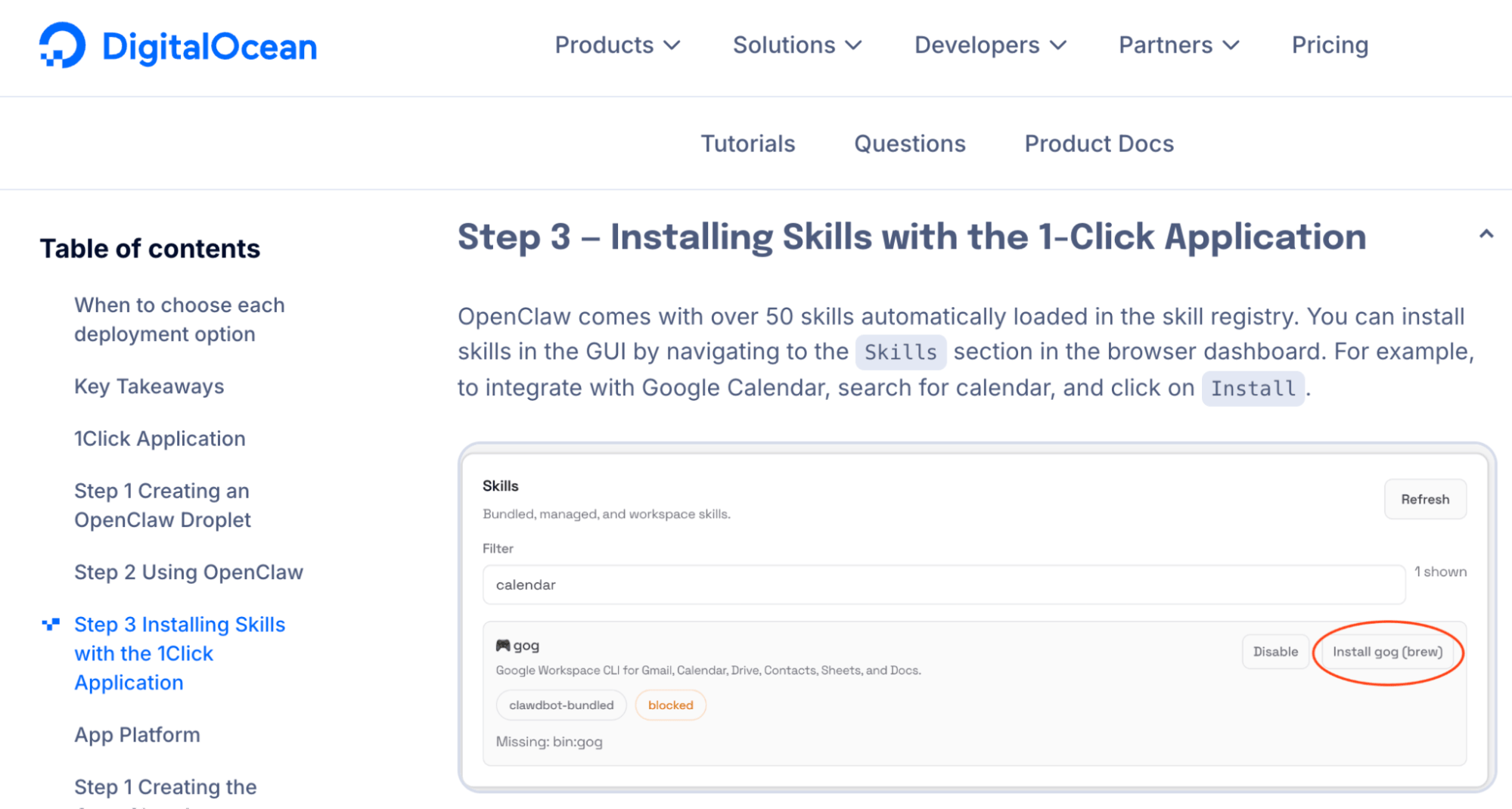
While OpenClaw can navigate a website like a human (clicking buttons and scrolling), this is computationally expensive and slow. Supporting data suggests that the most efficient agents use Command Line Interface (CLI) tools. For example, by installing the Google Workspace CLI, an OpenClaw agent can process a Gmail inbox 10 times faster than it could by "looking" at the Gmail website.
Official Responses and Community Context
The development of OpenClaw has not been without its hurdles. The project, led by developer Peter Steinberger, underwent three name changes in rapid succession due to branding and trademark considerations before settling on OpenClaw.
Addressing Security Concerns
A common critique of autonomous agents is the potential for security breaches, as the agent often requires access to sensitive login credentials.
- Official Stance: Developers emphasize that OpenClaw is as secure as the server it sits on.
- Mitigation: The recommended protocol involves setting up a robust firewall that closes all unnecessary ports and using isolated messaging bots (via Telegram’s "BotFather") to ensure the agent only sees the messages intended for it. Unlike WhatsApp, where an agent might inadvertently read every group chat message, Telegram allows for a "sandboxed" communication environment.
The Developer Perspective
The consensus among the open-source community is that OpenClaw represents a shift toward "Local-First AI." By allowing users to own their memory files (stored as simple Markdown text), OpenClaw ensures that if the service ever goes down, the user still owns the "intelligence" and history of their agent.
Implications: The Future of the "Custom AI Workforce"
The emergence of platforms like OpenClaw signals a transition from the "Gig Economy" to the "Agent Economy." For marketers and business owners, the implications are profound.
1. The Death of Low-Level Admin
Tasks like "Gmail Triage"—where an agent scans an inbox at 8:00 AM, deletes spam, and ranks urgent client emails by priority—are no longer the domain of human virtual assistants. These can be automated for the cost of a $5/month server and a few cents in API fees.
2. The Rise of Recursive Improvement
Perhaps the most significant implication is the ability of agents to learn "Skills." In OpenClaw, a "Skill" is a saved workflow that the agent can call upon later. As a user corrects an agent’s mistake, that correction is saved. Over months of interaction, the agent becomes a bespoke reflection of the owner’s business logic.
3. Ethical and Transparency Shifts
As seen in Russell’s X account, the rise of autonomous agents necessitates a new era of transparency. The industry is moving toward a standard where AI-driven interactions are clearly labeled, preserving trust while maximizing efficiency.
Conclusion
OpenClaw is not merely a new tool; it is a framework for building a digital extension of oneself. While the initial setup requires a modest technical hurdle—selecting a VPS and configuring an API—the reward is a persistent, thinking partner that reclaims the most valuable asset any business owner possesses: time. As the platform matures, the barrier between an idea and an autonomous execution will continue to dissolve, ushering in a world where everyone manages a team of agents.