
Beyond the Static: How Adam Argyle’s ‘Prop For That’ Bridges the Gap Between JavaScript and CSS
In the ever-evolving landscape of front-end development, the line between static styling and dynamic interactivity has historically been defined by the friction of implementation. For years, CSS developers have relied on JavaScript as a necessary intermediary to handle real-time data—such as cursor coordinates, scroll progress, or system time—and translate that data into visual feedback. Today, that paradigm is shifting.
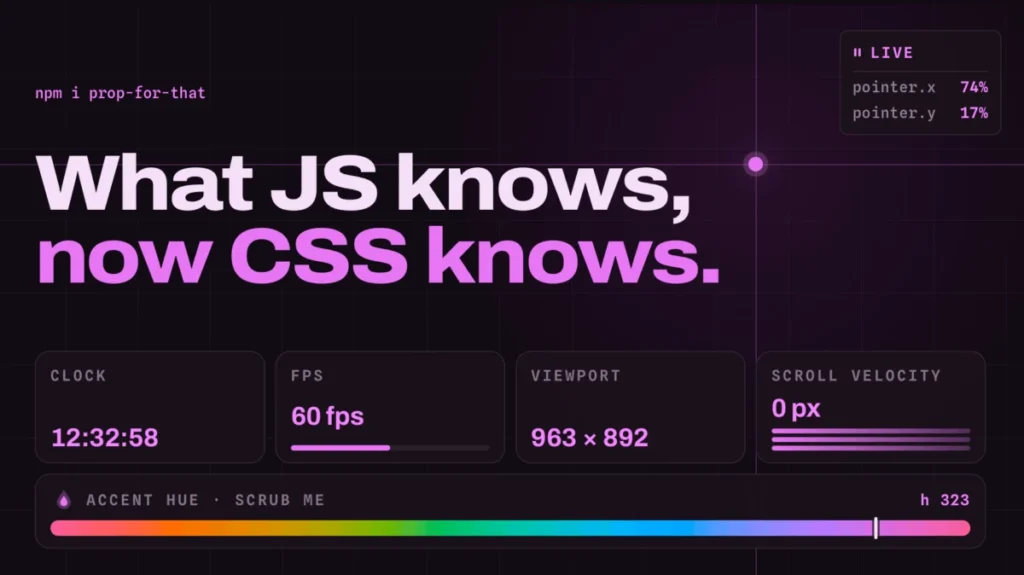
Adam Argyle, a prominent figure in the web design community and the creator of the popular Open Props library, has unveiled his latest project: Prop For That. This utility represents a significant leap forward in how developers can synchronize live browser states with CSS variables, effectively stripping away the "boilerplate bloat" that has traditionally burdened developers who want to create highly reactive interfaces.
The Core Concept: Bridging the Reactive Gap
At its heart, Prop For That is an abstraction layer that solves a fundamental problem: CSS cannot natively "see" ephemeral browser states like mouse position, scroll velocity, or current clock time. Traditionally, if a developer wanted to rotate an element based on the user’s mouse position, they would need to write a custom JavaScript event listener, calculate the coordinates, and then manually inject those values into CSS variables via the DOM.
Prop For That renders that workflow largely obsolete. By leveraging a declarative approach via HTML data attributes, the library handles the underlying JavaScript "heavy lifting." Developers simply declare their intent in the HTML, and the library automatically updates a set of custom CSS properties in real-time. This allows CSS to function as a truly reactive engine, capable of responding to the user’s environment without the developer having to write a single line of procedural JavaScript logic.
A Chronology of CSS Evolution
To understand the significance of Prop For That, one must look at the trajectory of CSS variable management over the last decade.
The Era of "JavaScript-First" Interactivity
In the mid-2010s, the community moved toward "CSS-in-JS," where styles were managed through JavaScript objects. While this provided access to application state, it introduced significant performance overhead and moved away from the declarative nature of traditional CSS.
The Rise of Custom Properties (CSS Variables)
With the widespread adoption of CSS Custom Properties (e.g., --my-var), the industry saw a renaissance. Developers began using JS to update these variables, as seen in Chris Coyier’s landmark tutorials on tracking cursor position. However, this process remained manual and verbose—requiring addEventListener, getBoundingClientRect, and constant style.setProperty calls.
The Open Props Influence
Adam Argyle’s previous project, Open Props, introduced a robust set of pre-configured design tokens for colors, shadows, and spacing. It set the stage for a new standard of "CSS-first" development. Prop For That is the logical successor to this philosophy, moving from static design tokens to dynamic "behavioral" tokens.
Supporting Data and Technical Implementation
The magic of Prop For That lies in its simplicity. By utilizing a data-attribute-driven API, the library remains framework-agnostic. Whether a developer is working in React, Vue, Svelte, or vanilla HTML, the implementation remains identical.
The Syntax of Simplicity
Consider the ease of tracking a pointer. In a traditional setup, you might have 15–20 lines of JavaScript code to track mouse movement. With Prop For That, the implementation is reduced to a single HTML attribute:
<div class="tracker" data-props-for="pointer"></div>The library automatically populates variables such as --live-pointer-x and --live-pointer-y. The styling then becomes a matter of standard CSS:
.tracker
  transform: translate(calc(var(--live-pointer-x) * 1px), calc(var(--live-pointer-y) * 1px));
The Performance Factor
One of the most common criticisms of JavaScript-heavy interactivity is the potential for layout thrashing. Because Prop For That is optimized to tap into the browser’s requestAnimationFrame cycle, it ensures that property updates are synced with the browser’s paint cycle. This minimizes the risk of jank, providing a fluid, 60fps experience that feels native to the browser.
Implications for Web Design
The release of this library signals a broader trend in web development: The "CSS-ification" of interaction.
Democratizing Advanced UI
For junior developers or designers who are less comfortable with complex JavaScript event loops, Prop For That acts as a gateway to high-end UI patterns. Complex interactions—like parallax effects based on scroll, dynamic progress bars, or time-of-day-based themes—are now accessible through simple markup.
Clean Codebases
By offloading state-tracking to a dedicated library, the main application code becomes significantly cleaner. The logic of "how to track a mouse" is abstracted away, allowing the developer to focus on the "what to do with that data" (the visual presentation). This separation of concerns is a hallmark of maintainable, enterprise-grade software.
Challenges and Future Outlook
While the tool is powerful, it is not without its considerations. Relying on a third-party library for state management introduces a dependency. As with all front-end tools, developers must weigh the benefit of simplified syntax against the weight of the library bundle.
Furthermore, as browser APIs evolve, we may eventually see native CSS functions that replace the need for such libraries entirely. Proposals like the CSS Anchor Positioning and improvements to CSS Motion Path suggest that the browser is slowly gaining the abilities that Prop For That currently provides. However, until those features reach universal cross-browser support, tools like this remain the bridge to a more dynamic web.
Conclusion: A Shift in Perspective
Adam Argyle’s Prop For That is more than just a utility library; it is a philosophy shift. It challenges the developer to stop asking "How do I write the JavaScript to make this move?" and start asking "What CSS property should respond to this input?"
By treating browser states as first-class citizens within the CSS ecosystem, the library empowers creators to build interfaces that feel alive, responsive, and deeply integrated with the user’s current context. As we move toward a web that is increasingly defined by personalized, motion-rich experiences, tools that simplify this level of reactivity are not just convenient—they are essential.
For those interested in exploring the practical applications of this technology, the official documentation and demo site serve as a masterclass in modern CSS capabilities. Whether you are building a simple landing page or a complex interactive dashboard, Prop For That offers a streamlined, performant, and undeniably elegant way to bring your projects to life.
Quick Summary of Capabilities
- Pointer Tracking: Real-time X/Y coordinates for custom interactions.
- Scroll Velocity: Smooth transitions based on user scrolling speed.
- Form State: Easy styling based on validation or input status.
- Time-based Props: Effortless implementation of light/dark modes or time-of-day UI changes.
As the industry continues to prioritize user experience and performance, the "Prop For That" approach offers a glimpse into a future where the browser does more, the code does less, and the developer’s vision is realized with minimal friction.








