
Rethinking the Toggle: Why UI/UX Experts Say It’s Time to Ditch the Three-State Dark Mode Switch
In the modern digital landscape, dark mode has graduated from a niche developer preference to a baseline expectation for almost every website and application. Yet, despite its ubiquity, web designers are still wrestling with the minutiae of how users actually interact with theme switchers.
A recent debate ignited on Bluesky and expanded across the developer blogosphere—sparked by prominent web standards expert and UI/UX researcher Lea Verou—is challenging standard conventions. The core proposition is as provocative as it is simple: Why are websites forcing a clunky, three-state UI option onto visitors when a streamlined two-state control can effortlessly accomplish the exact same thing?
This deep dive explores the mechanics of this UI/UX debate, breaking down the arguments against the traditional "Light / Dark / System" picker, evaluating how two-state controls function in practice, and examining the broader implications for front-end design systems.
Main Facts: The Anatomy of the Dark Mode Debate
For years, the gold standard for website theme toggling has been a three-state control. Typically housed within a site’s navigation bar or footer, these widgets present users with three distinct options:
- Light Mode
- Dark Mode
- System Default (matching the operating system’s current aesthetic)
While this approach appears user-friendly on the surface, Verou argues that it introduces unnecessary cognitive friction. By presenting three separate choices, designers force users to stop, think, and intentionally manage a setting that should ideally fade into the background.
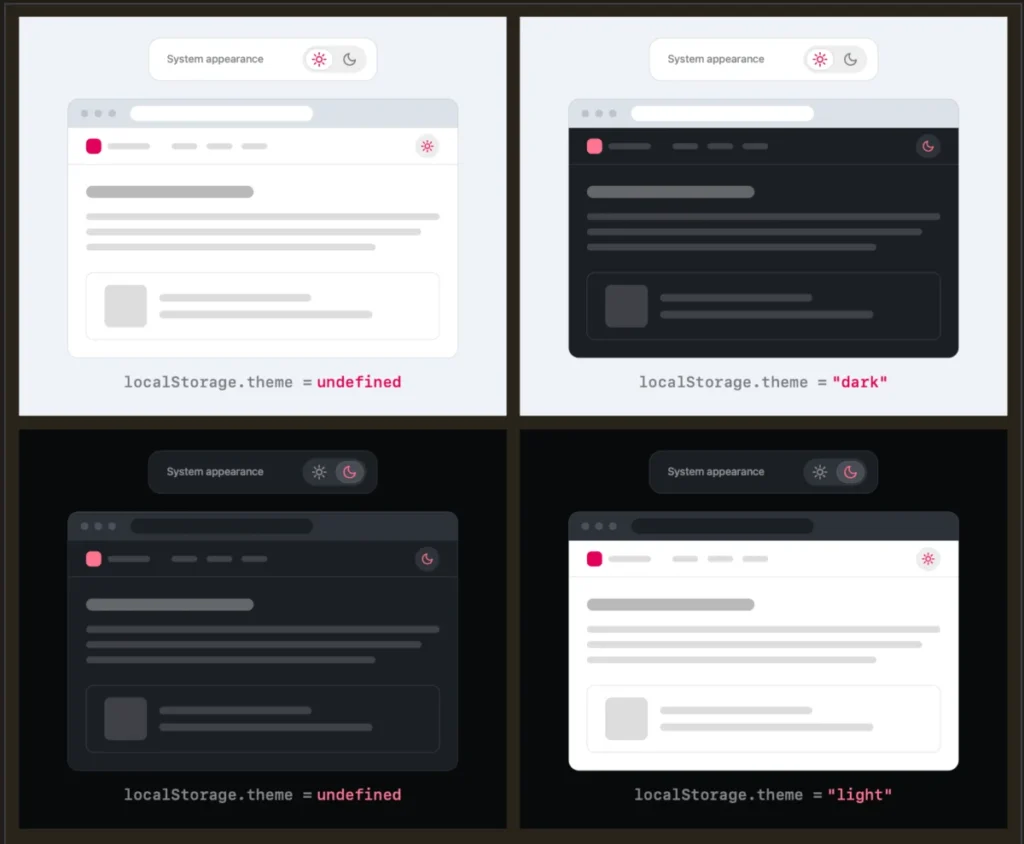
Instead, Verou advocates for a minimalist two-state control. Under this paradigm:
- Default State: The website automatically respects the user’s system preferences without requiring any initial interaction.
- The Override: If the user dislikes the system default (for instance, if their OS is in dark mode, but they prefer a light-themed reading experience on a specific site), they click a simple toggle to override it just once.
- Persistence: That preference is instantly saved to the browser’s
localStoragefor all future sessions.
The debate touches on a fundamental tenet of good design: reducing user friction. Theme switching is rarely a primary user intent. People visit news sites to read articles, e-commerce platforms to shop, and documentation sites to solve technical problems. Managing a website’s color palette is an auxiliary task, and the UI should reflect that secondary status by staying out of the way.
Chronology: How the Controversy Unfolded
The conversation surrounding dark mode toggles evolved rapidly over a series of online discussions and blog posts:
- Early 2026 (The Initial Spark): Lea Verou published an initial deep-dive technical blog post titled "Dark Mode Toggles," analyzing the psychological and structural flaws of conventional theme pickers and advocating for a smarter, two-state user experience.
- August 2026 (The Bluesky Discourse): The debate spilled over onto social platforms like Bluesky, where front-end developers and UI designers began dissecting Verou’s architectural diagrams and scenario breakdowns. Commentators highlighted the intersection between browser-level styling and site-level overrides.
- Mid-August 2026 (The Follow-Up): Responding to the wave of community feedback, edge cases, and edge-case questions regarding state reversion, Verou published a follow-up piece summarizing the community discourse. She clarified vital distinctions—most notably, that this streamlined two-state guidance specifically targets persistent navigation toggles rather than isolated settings menus.
Supporting Data and UX Mechanics: How Two-State Controls Solve Three-State Problems
To understand why a two-state control is mathematically and functionally sufficient, we have to look at how user intent intersects with system settings.
The State Matrix
When a user visits a website, they fall into one of a few scenarios. They either have no strong opinion—meaning they are completely content with whatever their operating system dictates—or they have a rigid preference for a specific mode on that domain.
- No Preference: The site inherits the OS theme (Light or Dark). The user does nothing. Zero cognitive load.
- Active Override: The system is in Dark mode, but the user prefers Light mode for this specific platform. They click the toggle once. The site switches to Light mode, and the browser saves this state to
localStorage.
The brilliance of this pattern is that it elegantly bridges the gap without needing an explicit "System" button. If a user toggles a site to light mode, they have explicitly stated: "I want to override my system settings for this domain."
The "Toggling Back" Dilemma
Critics of the two-state model often raise a valid edge case: What happens if a user starts with a light system preference, manually toggles the site to dark, and later decides they want to go back? If they click the toggle again to return to light, are they setting a manual override to light, or are they successfully clearing the localStorage value to return to the system dynamic state?
Verou and participating UX designers argue that this scenario is largely a non-issue. As Verou notes:
"Remember, this control is entirely tangential to the actual user goal for visiting the website. Even if their intent were to pin light instead of reverting to System (light), this is something they would only notice once these diverge, i.e. the OS switches to dark. At that point, fixing it is a single click away. It’s such an easy fix, that there is no point in dwelling on it further."
In short, because theme switching is a low-stakes, low-frequency action, the rare edge case of an unintended manual lock-in does not justify cluttering the global navigation interface for 100% of visitors.
Perspectives and Community Responses
The developer community has responded to Verou’s proposals with a mix of enthusiastic validation and nuanced critiques regarding browser ecosystems.
The Problem with Forced OS Parity
One of the most compelling insights generated during the Bluesky thread came from developer Chris Coleman, who pointed out a deeper systemic issue in modern web development:
"All I ever wanted was for my OS to be dark, not every website I look at. It was a huge leap by the browser vendors to tie all web content to that system preference. Anyway, I think the light/dark preference should be in the browser, and what you propose seems perfectly in line with that."
This perspective highlights a friction point in modern computing. Operating systems feature system-wide dark modes because dark pixels can save battery life on OLED screens and reduce eye strain in low-light environments (like late-night coding sessions). However, a high-contrast dark theme that works brilliantly in an integrated code editor or terminal may look abrasive or poorly designed on a content-heavy publishing platform with fine typography and custom branding.
When browser vendors automatically forced prefers-color-scheme to cascade blindly onto every web property, it shifted the burden onto web developers to build override mechanisms—often resulting in bloated three-state UI components.
When Are Three States Still Appropriate?
To maintain design objectivity, Verou’s framework does acknowledge rare exceptions where a tri-state control remains genuinely useful. These include:
- Settings Panels: Inside a dedicated account settings or accessibility page where users explicitly expect granular control over all application behaviors.
- Complex Multi-Theme Engines: Applications that feature more than just binary light/dark options (e.g., high-contrast modes, sepia tones, or brand-specific color palettes) where a binary toggle mathematically fails to express the full spectrum of choices.
However, for the ubiquitous sun-and-moon icon sitting in a main navigation bar, the two-state override model wins hands down.
Implications for Future Web Design
As web design trends lean heavily toward minimalism, micro-interactions, and reducing visual noise, the movement to rethink dark mode toggles carries significant implications for front-end architecture.
- Cleaner Navigation Bars: Removing the "System" option reduces the physical footprint of navigation menus. For mobile viewports, where screen real estate is fiercely contested, eliminating unnecessary buttons creates a cleaner, more focused user experience.
- Reduced Cognitive Load: Hick’s Law states that the time it takes to make a decision increases with the number and complexity of choices. By cutting the choices down from three to two (or even hiding the toggle entirely when the system state matches user expectations), sites reduce micro-hesitations during navigation.
- Re-evaluating Defaults: Developers are increasingly realizing that the best UI is often no UI. If a website can intelligently defer to system settings while providing a seamless, single-click escape hatch for outliers, it respects the user’s time and attention far better than a persistent, tri-state settings widget.
Conclusion
The debate sparked by Lea Verou is a masterclass in modern UI/UX refinement. It proves that even the most standardized patterns—like the ubiquitous light/dark/system theme picker—deserve rigorous critical evaluation. By shifting away from noisy three-state controls and embracing intelligent, persistent two-state overrides, web designers can clean up their navigation bars, minimize cognitive friction, and deliver a smoother experience for every visitor.
Ultimately, the best dark mode toggle is the one you never have to think about until you actually need it.








