
The Invisible Trap: Why Your Browser’s Mustard Console Warning Is Actually a Lifeline for Users
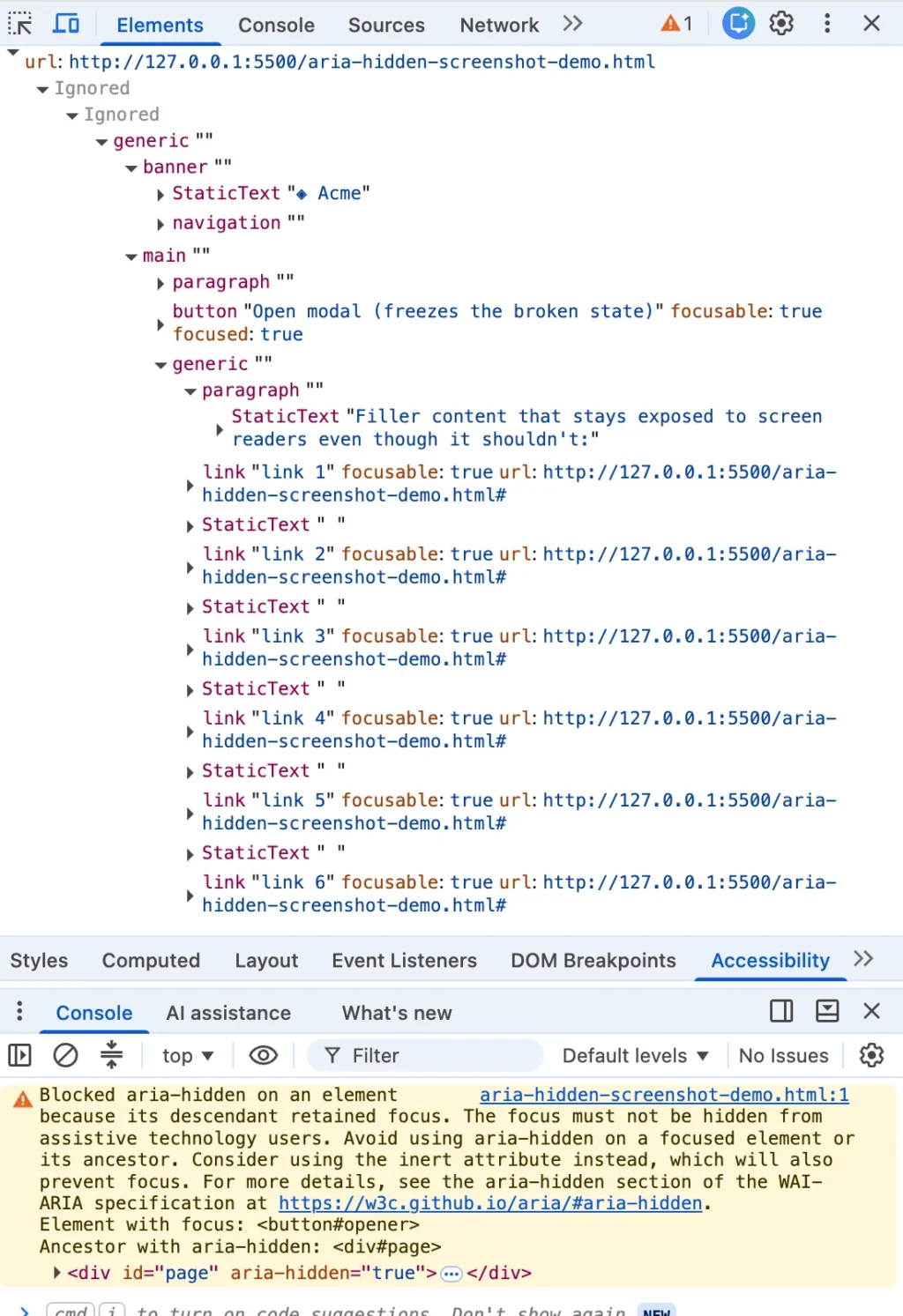
It is a scenario familiar to front-end developers across the globe: you close a dialog box, and the browser console instantly flares with an angry mustard-colored warning. You highlight the error message, drop it into a search engine, and are unceremoniously dumped onto a sprawling forum thread shared by developers working across Angular, Bootstrap, Ionic, and phpMyAdmin. Everyone is grappling with the exact same string of code, and everyone wants it gone.
Here is the inconvenient truth that the top-ranking search results consistently bury: the browser’s warning is entirely correct. On the other side of that screen is a living, breathing person—often someone using a screen reader—whose focus is about to plummet into an abyss created by your page’s underlying architecture.
The most common fixes floating around developer forums—such as the blur() one-liner, a hastily wrapped setTimeout, or the trick of stripping away the aria-hidden attribute—all share a common flaw. Each one quiets the console while quietly harming the vulnerable user the browser was trying to protect. If you have already shipped one of these temporary patches, you are in massive company. You were failed by your search results, not by your own carelessness.
Chronology of an Architectural Blind Spot
To understand how the modern web arrived at this accessibility crisis, we have to look at how browser engines and UI frameworks have evolved. The friction between rendering engines (like Chromium) and developer frameworks did not happen overnight; it is the result of years of cascading implementation choices.
The Rise of Ghost Focus (2020–2024)
The underlying technical conflict stretches back to early 2020. As recorded in W3C ARIA working group discussions, engineers began noticing a dangerous paradox baked into the aria-hidden attribute. The attribute successfully pulls content out of the accessibility tree, but it does not pull that content out of the keyboard focus order.
Because these two systems historically failed to stay in sync, an element could be rendered completely imperceptible to a screen reader while remaining fully focusable via a keyboard. The moment a user tabbed into that hidden space, "ghost focus" was born.
The Two Waves of Chromium Enforcement (2024)
Rather than remaining a silent architectural flaw, browsers began fighting back. Chromium-based browsers introduced loud, developer-facing warnings in two distinct waves throughout 2024:
- The Open-Time Inversion (Summer 2024): Beginning around Chrome 127, developers noticed scolding messages warning about elements that "just received focus" while hidden inside newly opened modals. Bug reports clustered rapidly across major libraries like Material-UI, Ant Design, and Flowbite.
- The Close-Time Race (Late 2024): Arriving around Chrome 131, a second wave of warnings emerged, targeting "retained focus." Developers using frameworks like Bootstrap and Angular discovered that their teardown code was leaving focus trapped inside dying, fading DOM elements.
Firefox and Safari have historically handled these edge cases silently, without surfacing a parallel console warning. Google’s decision to make Chromium loud and abrasive sparked initial frustration, but it ultimately dragged a pervasive accessibility flaw out of the shadows.
Supporting Data and the Anatomy of Failure
To unpack why these warnings matter, we have to look closely at what happens when a modal closes. Most modal components execute a sequence of actions that reads logically to the human eye, but proves catastrophic to assistive technology:

// THE WRONG WAY: The order most modal code ships with
function closeModal()
  // Background hidden while focus is STILL inside it
  overlay.setAttribute('aria-hidden', 'true');
  overlay.classList.add('fade-out');
  overlay.addEventListener('transitionend', () => overlay.remove());

  // Focus restored AFTER the hide has already committed; too late
  triggerButton.focus();
Because the browser applies the hide statement the instant it runs—synchronously, before the focus move on the next line can execute—a dangerous microsecond of invalid state occurs. The user’s screen reader experiences complete silence. They press a key, the machine acknowledges nothing, and they are left stranded at the top of a long document, forced to tab blindly downward.
The Four Manifestations of the Bug
Developers generally encounter this issue in one of four distinct scenarios:
- The Close-Time Race: The modal fades out, but focus remains on the close button while the wrapper is marked hidden.
- The Open-Time Inversion: A modal opens, and the trigger button in the background holds focus for a beat before shifting into the dialog.
- Nested Composition Conflicts: A component like a
<select>orpopovernested inside a<dialog>triggers competing modal layers, causing complete focus freezes under modern frameworks like React 19. - External Focus Departure: The user Alt-Tabs away from the browser window entirely, stranding an orphaned
aria-hiddenstate.
Official Responses and Ecosystem Reactions
The developer ecosystem’s reaction to these console warnings has been fraught with friction. Maintainers of major component libraries initially pushed back, arguing that the sudden influx of warnings stemmed from browser-side changes rather than architectural regressions in their codebases.
However, the pressure proved impossible to ignore. Major UI ecosystems have rapidly shifted their underlying strategies:
- Bootstrap 6: Recognizing the systemic limitations of managing manual focus and
aria-hiddenstates in version 5.x, Bootstrap 6 completely overhauled its modal architecture to rely on the native HTML<dialog>element and the browser’s native top-layer management. - React Aria and Floating UI: These modern primitives have avoided widespread fallout by enforcing strict, synchronous focus-scope management during layout effects, preventing the rendering scheduler from breaking execution order.
- The W3C Working Group: Discussions throughout 2025 and into 2026 have centered on formalizing browser heuristics regarding how assistive technologies handle hidden subtrees, pushing the standards body closer to a unified reality where manual
aria-hiddenhacks are permanently deprecated.
Implications and the Correct Path Forward
If silencing the console warning with a blur() call or a setTimeout shim is a trap, what is the proper solution? The fix relies on a strict order of operations: focus must leave a region before that region becomes hidden or inert.
Furthermore, developers should embrace the HTML inert attribute rather than relying on aria-hidden for structural teardowns. Unlike aria-hidden, inert completely strips an element and its descendants from sequential focus navigation, pointer events, and the accessibility tree simultaneously.
Here is the correct, robust teardown contract in vanilla JavaScript:
class ModalController
  #trigger = null;
  #background = null;

  open(dialog, backgroundElement)
    this.#trigger = document.activeElement;
    this.#background = backgroundElement;

    // 1. Make background inert before opening
    this.#background.setAttribute('inert', '');
    dialog.hidden = false;
    dialog.querySelector('[autofocus], button, [href], input')?.focus();


  close(dialog)
    // STEP 1: Un-inert the background first so focus can safely return
    this.#background.removeAttribute('inert');

    // STEP 2: Move focus OUT synchronously before any hiding states apply
    this.#trigger?.focus();

    // STEP 3: Make the dying shell inert during its CSS fade-out
    dialog.setAttribute('inert', '');
    dialog.style.pointerEvents = 'none';
    dialog.classList.add('is-closing');

    const done = () =>
      dialog.hidden = true;
      dialog.classList.remove('is-closing');
      dialog.removeAttribute('inert');
      dialog.style.pointerEvents = '';
    ;

    const finish = (e) =>
      if (e && e.target !== dialog) return;
      dialog.removeEventListener('transitionend', finish);
      dialog.removeEventListener('transitioncancel', finish);
      done();
    ;

    const style = getComputedStyle(dialog);
    const dur = parseFloat(style.transitionDuration)
Conclusion: Prioritizing the User Over the Console
Ultimately, a clean console was never the true goal of software engineering. You can eliminate every mustard-colored warning from your browser tools, but if you do so by stranding keyboard and screen reader users at the top of an inaccessible page, your application has failed its core purpose.
The browser’s warning is not an arbitrary annoyance; it is an early-warning system for your application’s architecture. By respecting the strict order of operations between focus management and layout visibility, we can build web experiences that satisfy automated browser checks while remaining genuinely welcoming to every human being on the other side of the screen.








