
The Anatomy of a Console Error: Why Your Modal’s "Ghost Focus" Is Failing Screen Reader Users
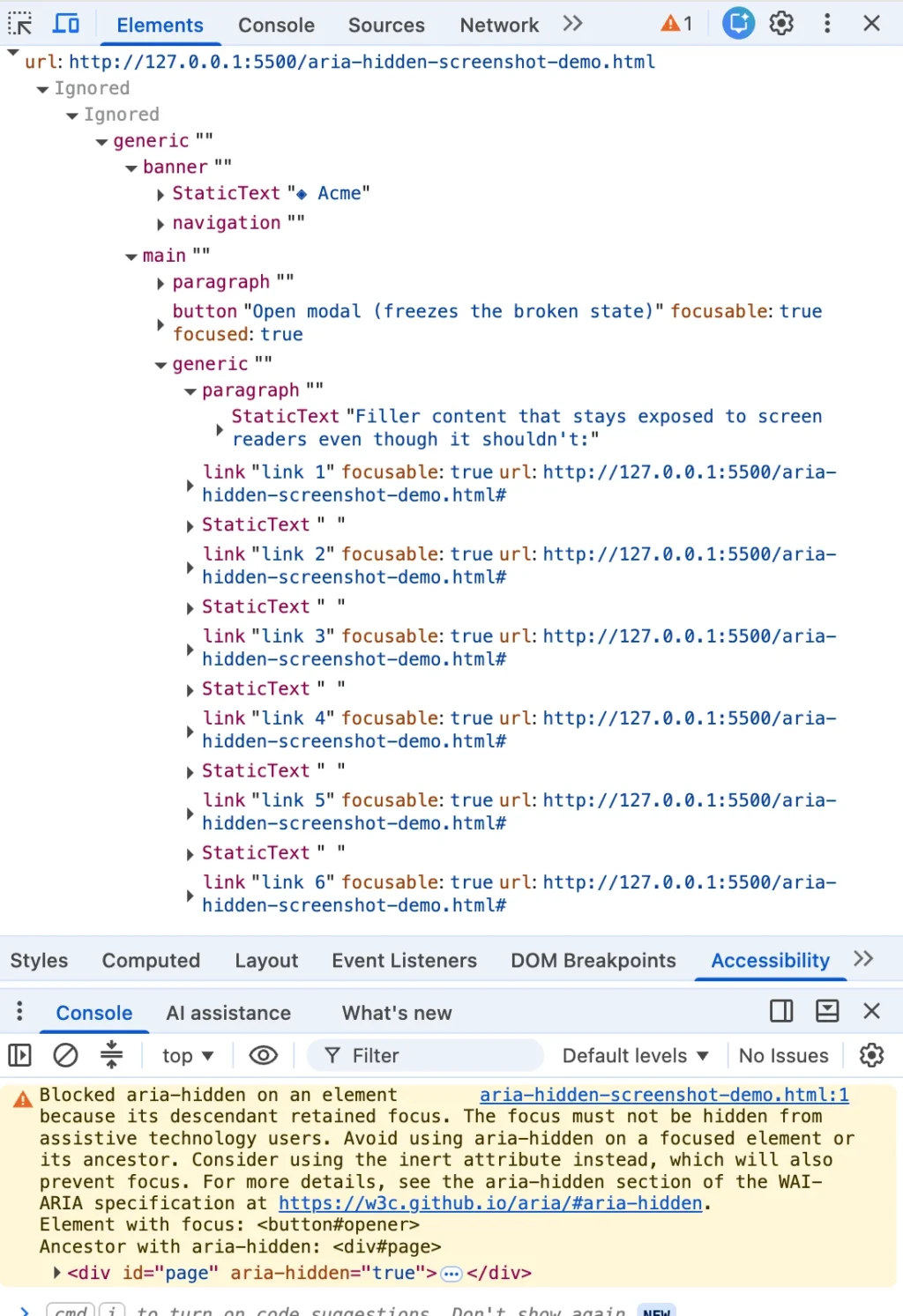
You closed a dialog, and the browser console flashed that familiar, frustrating shade of angry mustard. You highlighted the error message, dropped it into a search engine, and landed here alongside half the front-end engineering world. Whether you are building with Angular, Bootstrap, Ionic, or managing data through phpMyAdmin, this exact string crops up identically.
Here is the vital detail that the top search results routinely bury: the browser’s warning is correct. There is a real person on the other side of that warning—someone relying on a screen reader whose focus is about to drop into an accessibility black hole on your web page.
The quick fixes ranking at the top of Google and Stack Overflow all offer the same under-the-radar workarounds under different names: the blur() one-liner, the setTimeout shim wrapped around the close event, or the CSS trick where developers hastily yank the aria-hidden attribute off a wrapper.
Every single one of these remedies quiets your browser console while quietly damaging the user experience for the exact people the browser was trying to protect. If you have already shipped one of these shortcuts to production, you are in enormous company. You were failed by your search results, not by your own carelessness.
The Ultimate Shortcut: Native Dialogs
Before diving deeper into the architecture of accessibility bugs, there is one honest shortcut that can solve this entire class of issues: if your project allows it, migrate to the native HTML <dialog> element and call .showModal().
The browser handles the entire focus dance natively, and this entire category of bugs vanishes. (You will still need to handle edge cases where the element designated to receive returning focus has been removed from the DOM, but no browser can guess that business logic for you.) Everything past this point is for developers wired into component libraries or corporate design systems that cannot be torn out this quarter.
The Chronology of an Architectural Clash: How We Got Here
To understand why this issue exploded across GitHub trackers in late 2024, we have to look back at how browsers, component libraries, and screen readers evolved alongside modern web applications.
The Hidden Roots (2020–2023)
The underlying browser behavior isn’t new. Chromium-based browsers were already exposing focusable aria-hidden nodes back in early 2020. Architectural discussions—such as W3C ARIA Working Group issue #1185—reveal that engineers like Aaron Leventhal proposed exposing these nodes intentionally so that screen reader users could "at least hear where they are tabbing to, instead of complete silence."
Historically, teams would aggressively slap aria-hidden on the <body> element or giant page wrappers whenever a modal opened. Through portal and markup mistakes, this sometimes accidentally hid the modal too, locking screen reader users out of entire applications.
The First Wave: Open-Time Inversions (Summer 2024)
By mid-2024, Chromium engines began tightening enforcement around focus management. The "open-time" variant of the warning—scolding developers about an element that "just received focus" inside a hidden subtree—began clustering across issue trackers around Chrome 127.
Between July and August 2024, high-profile component repositories lit up with bug reports: Material-UI logged issue #43106, Ant Design filed #50170, and Flowbite encountered #943.
The Second Wave: Retained Focus at Close (Late 2024)
Months later, the "retained focus" variant arrived alongside Chrome 131 in late 2024. Developers updating their local environments suddenly saw their console outputs flooded with warnings during modal teardowns.
On November 5, 2024, a developer filed Bootstrap issue #41005, catching the warning live in Chrome 131 Beta and Nightly builds. Angular components matched this with issue #30187 in December. Two distinct waves, governed by the exact same underlying browser architecture.
Supporting Data: The Four Ways You Hit the Wall
Every path leads to the same destination: focus sitting inside a region that has just been marked hidden. However, these bugs arrive from four distinct directions. If you cannot identify which scenario you are facing, you will apply the wrong fix.
+-------------------------------------------------------------------------+
|                       THE FOUR MASKING MECHANISMS                       |
+------------------------------------+------------------------------------+
| 1. Hidden Mid-Goodbye (Close-Time) | Overlay fades out; button retains  |
|                                    | focus inside an aria-hidden shell. |
+------------------------------------+------------------------------------+
| 2. The Trigger Left Behind (Open)  | Modal opens; background gets       |
|                                    | aria-hidden while trigger is lit.  |
+------------------------------------+------------------------------------+
| 3. Turf Wars (Nested Composition)  | Select inside Dialog; two modal    |
|                                    | layers fight over page-hiding.     |
+------------------------------------+------------------------------------+
| 4. User Walked Out (Page Blur)     | Alt+Tab or tab switch strands an   |
|                                    | aria-hidden state on teardown.     |
+------------------------------------+------------------------------------+
1. Hidden Mid-Goodbye (The Close-Time Race)
You click the close button. The dialog starts its fade-out transition. Somewhere within those 200 milliseconds of CSS transitions, focus is still parked squarely on the close button. That button sits inside the overlay that the component library just marked hidden to initiate the fade. The transition hasn’t finished; focus hasn’t gone anywhere; and Chrome logs the retained-focus warning.
2. The Trigger Left Behind (Open-Time Inversion)
Run the scenario in reverse. The overlay opens, and the library marks the background aria-hidden="true". However, the button the user just clicked lives in that background, and for a split second, it still holds focus before anything moves it into the dialog. You get the alternate warning: an element that "just received focus" is trapped inside a hidden region.

3. The Turf War (Nested Composition Conflicts)
You open a <dialog>, and inside it, you place a <select> element. The user opens the select, picks an option, and the select closes. Now, two distinct components—each believing they are the "one true modal layer"—are fighting over who gets to hide the rest of the page.
Under React 19, this friction graduates from annoying to fatal. Radix UI issue #3701 (Select inside Dialog causes an aria-hidden focus freeze) highlights how updated unmounting timings cause focus to briefly drop to <body>. The parent dialog misinterprets this as a click outside its boundaries, re-hiding itself while the user’s focus remains trapped inside.
4. The User Walked Out (Focus Leaves the Page)
Nothing in your page changed; the user simply hit Alt+Tab or switched browser tabs while a menu was open. Focus bookkeeping stranded an aria-hidden state on teardown with no live focus to reconcile against. If browser maintainers struggle to keep their own complex widgets clean, the problem is clearly architectural, not a lack of engineering skill on your team.
Official Responses and Engine Behavior
How do browser vendors view this conflict? The disparity between how Blink (Chrome), Gecko (Firefox), and WebKit (Safari) handle the issue is telling.
Firefox and Safari do not surface a comparable console warning for focused content inside hidden subtrees. Whatever those engines do regarding hidden accessibility trees, they execute silently.
Chrome made a deliberate architectural choice to make developers feel the problem. A silent fix allows broken code to ship indefinitely because the browser papering over your mistake is indistinguishable from your code being correct. As the saying goes: loud is uncomfortable, but loud is honest.
W3C ARIA Working Group Developments
The standards bodies are steadily closing the gap on these ambiguities. Discussions under W3C ARIA issue #2422 evaluated whether browsers should standardize heuristic ignoring of mismatched ARIA attributes. As these guidelines mature, the consensus is clear: you cannot hide a focused control from assistive technology and call it an accessible application.
Implications: Why Every Quick Fix Made Things Worse
When developers encounter console noise during a release crunch, they reach for pattern-matching shortcuts. Let’s analyze why the internet’s favorite fixes compromise user safety.
The blur() One-Liner
// The internet's favorite one-liner
element.addEventListener('hide.bs.modal', () =>
  document.activeElement.blur();
);
When you call blur() without moving focus somewhere intentional, focus goes nowhere. The browser must place focus somewhere, so it defaults to <body>. The console error clears because no active element remains inside the hidden subtree—effectively stranding the user’s navigation at the top of the document. For a screen reader user, this is a direct violation of WCAG 2.4.3 (Focus Order).
Timing Hacks (setTimeout)
Wrappers using setTimeout or requestAnimationFrame bet that the render cycle finishes before the focus call executes. On a high-end development machine, this gamble usually wins. Under heavy CPU throttling, on budget mobile devices, or during React concurrent rendering schedules, it fails intermittently—creating ghost states that are nearly impossible to reproduce locally.
Stripping Attributes or Disabling Modals (modal=false)
Some developers write MutationObservers to ruthlessly strip aria-hidden attributes or drop down to non-modal implementations. While this satisfies automated checks, it strips away the fundamental keyboard trap required for modal dialogs, letting users tab straight out of active overlays into background content.
The Correct Architecture: The Teardown Contract
Solving this problem permanently requires adhering to a strict ordering contract: Focus must leave a region before that region becomes hidden or inert.
Furthermore, because inert blocks focus entirely, you must lift background inertness before attempting to focus the trigger button.
The Four-Step Teardown Pattern
- Un-inert the background first: Remove the
inertattribute from the background document so the trigger button can receive focus. - Move focus synchronously: Send focus back to the triggering element before any hiding states are committed.
- Inert the closing shell: Apply
inert(notaria-hidden) to the dying modal shell so it remains unreachable by screen readers and keyboards during its exit animation. - Unmount on transition end: Clean up event listeners and remove the element from the DOM once CSS fade-out transitions conclude.
Vanilla JavaScript Implementation Reference
class RobustModalManager
  #trigger = null;
  #background = null;

  constructor(backgroundElement)
    this.#background = backgroundElement;


  open(dialog)
    // Capture return target BEFORE shifting focus into the dialog
    this.#trigger = document.activeElement;
    this.#background.setAttribute('inert', '');
    dialog.hidden = false;
    dialog.querySelector('[autofocus], button, [href], input')?.focus();


  close(dialog)
    // Step 1: Un-inert background so the trigger can accept focus
    this.#background.removeAttribute('inert');

    // Step 2: Move focus home synchronously
    this.#trigger?.focus();

    // Step 3: Inert the closing shell during its animation frame
    dialog.setAttribute('inert', '');
    dialog.style.pointerEvents = 'none';
    dialog.classList.add('is-closing');

    // Step 4: Safely unmount after CSS transitions complete
    const finishTeardown = (e) =>
      if (e && e.target !== dialog) return;
      dialog.removeEventListener('transitionend', finishTeardown);
      dialog.removeEventListener('transitioncancel', finishTeardown);

      dialog.hidden = true;
      dialog.classList.remove('is-closing');
      dialog.removeAttribute('inert');
      dialog.style.pointerEvents = '';
    ;

    const style = getComputedStyle(dialog);
    const duration = parseFloat(style.transitionDuration)
Conclusion: The Metric That Matters
A clean browser console was never the true engineering goal. You can drive warning counts to zero and, at every step down that road, make your web application measurably worse for the exact people those warnings were designed to protect.
Console warnings are merely a proxy; real users navigating via assistive technology are the target.
When your tooling complains about focus states inside hidden subtrees, do not reach for a mute button or a deceptive one-liner. Listen to what the architecture is telling you, reorder your teardown sequences, and ensure that every user—sighted or blind, keyboard-driven or mouse-reliant—experiences a seamless, unbroken journey across your interface.








