The Democratization of Code: How Claude Code is Transforming AI Automation for Everyone

The barrier to entry for building complex digital automations has effectively collapsed. For decades, the ability to bridge the gap between disparate applications—such as connecting a calendar to a messaging service—was gated behind a steep learning curve requiring fluency in programming languages, API documentation, and server management. Today, that wall is being dismantled by Anthropic’s latest breakthrough: Claude Code.
Claude Code is an agentic AI tool that functions as a command-line interface (CLI) powerhouse, enabling users to build, automate, and integrate applications using nothing more than natural language. According to AI educator and consultant Tyler Reed, the misconception that one needs a developer background to build powerful AI tools is rapidly becoming obsolete. In fact, some of the most prolific creators in the AI automation space have never written a single line of manual code.
The Shift: Why AI Coding is No Longer for Developers Only
The traditional process of software integration was a grueling, technical ordeal. It required developers to spend hours—sometimes days—poring over API documentation, generating secret keys, managing authentication tokens, and troubleshooting cryptic errors on forums like Stack Overflow.
Claude Code changes this paradigm by serving as an intelligent agent. Instead of the user writing the code, the user provides the intent. The AI conducts the necessary research, identifies the technical requirements, writes the functional code, establishes the connections, and executes the task.
"The models are now so capable that your intent is the only programming language you need," notes Reed. By abstracting away the "how" and focusing entirely on the "what," Claude Code allows entrepreneurs, marketers, and creative professionals to build custom tools that would have previously required a software engineering team.
Prerequisites: Preparing to Deploy Claude Code
Before diving into the terminal, there are two fundamental realities to acknowledge for anyone looking to leverage this technology.
1. The Subscription Requirement
To access the full suite of capabilities offered by Claude Code, a paid Anthropic subscription is necessary. While the barrier to entry is low, the power of the model—specifically the reasoning capabilities required for complex task execution—is unlocked through the Claude Pro plan. For beginners, the $20/month subscription provides the compute and reasoning power needed to build and iterate on automations without limitation.
2. Embracing the Command-Line Interface (CLI)
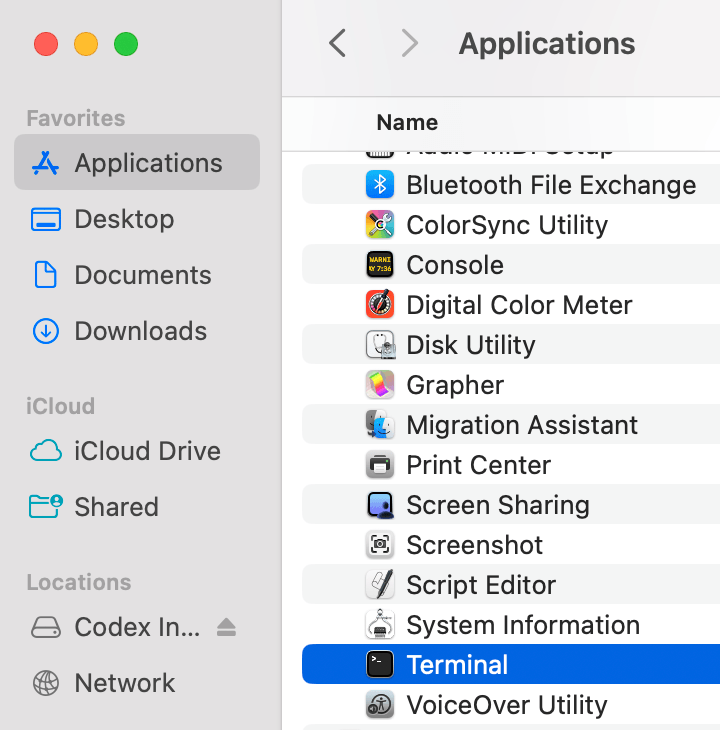
Unlike the user-friendly web interface of standard chatbots, Claude Code operates within a terminal environment. For those who have never seen a command-line interface, it appears as a simple, text-based black screen. While it may seem daunting, it is essentially a direct, conversation-based conduit to the AI.
A critical safety feature of Claude Code is its "Human-in-the-Loop" protocol. By default, the tool will not execute any action that impacts your system—such as writing files, editing folders, or browsing the web—without your explicit permission. Each action triggers a prompt, ensuring that the user retains absolute control over the AI’s behavior.

A Step-by-Step Guide: From Installation to Execution
Getting started with Claude Code follows a streamlined, modern installation process that requires minimal technical friction.
The Installation Chronology
- Access the Terminal: On macOS, use the "Terminal" app; on Windows, use the "Command Prompt" or "PowerShell"; on Linux, utilize your standard terminal shell.
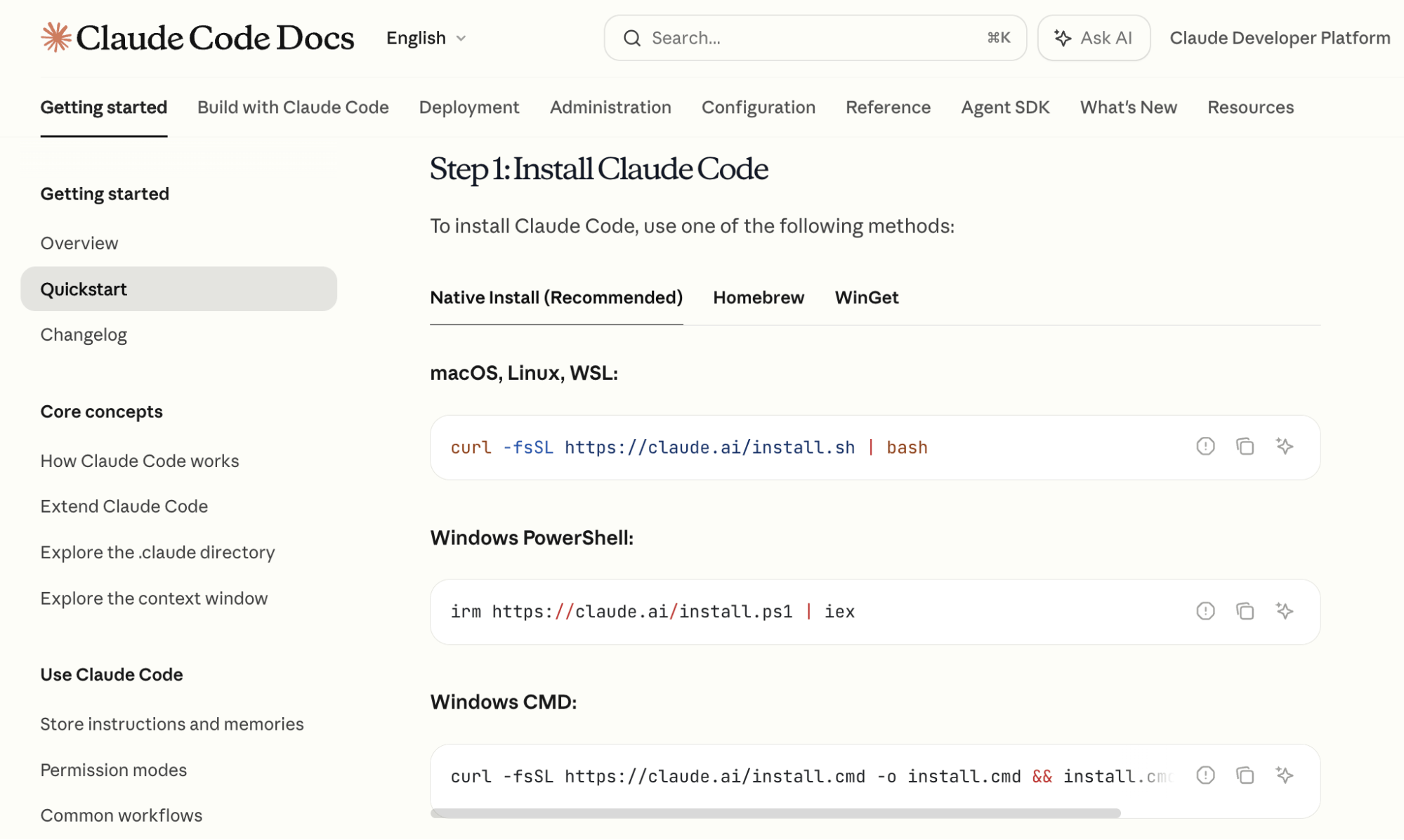
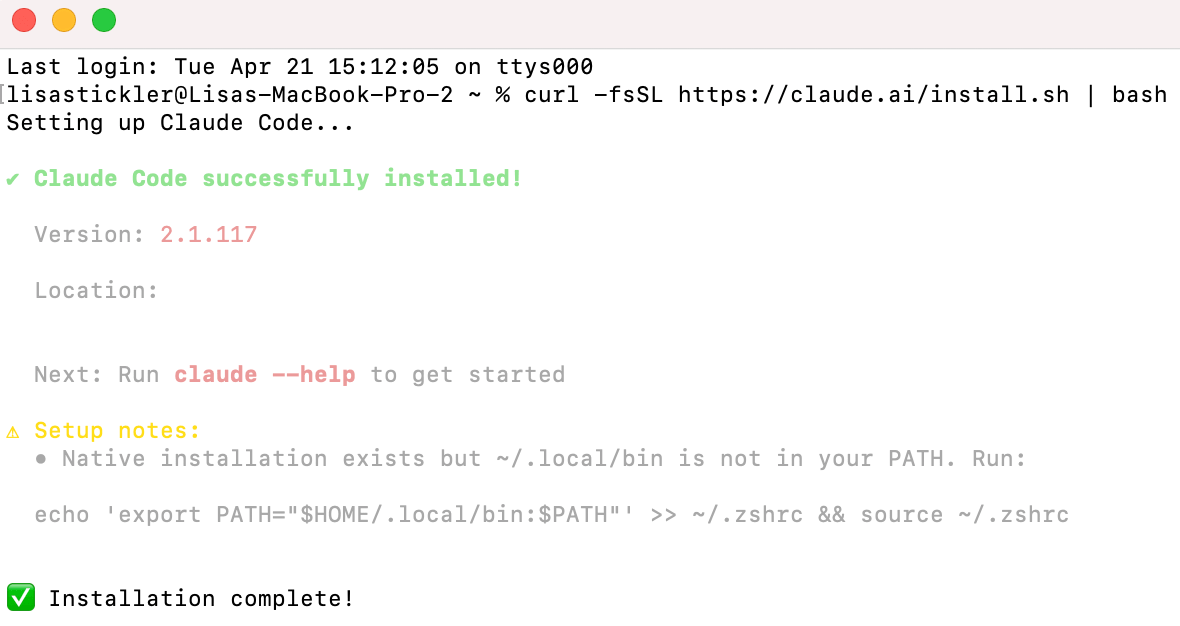
- Execute Installation: Visit the official Anthropic documentation and copy the provided installation command. Paste this into your terminal and press Enter.
- Authentication: Once the installation finishes, type
claudeinto the terminal. This will trigger a browser-based authentication flow. Once you log in with your primary Claude credentials, your environment is linked to your subscription. - Initialization: You are now ready to begin issuing commands.
Mastering the Interface: Essential Slash Commands
Within the terminal, Claude Code uses "slash commands" to manage its environment. Two of the most important commands for a beginner to master are:
- /model: Allows you to toggle between different versions of Claude. Tyler Reed suggests a strategic workflow: use Claude 3.5 Opus for the planning and architectural phase due to its superior reasoning, and switch to Sonnet for the actual execution and coding phase to balance speed and efficiency.
- /compact: As you interact with the model, the "context window" (the AI’s short-term memory) fills up. Typing
/compactinstructs Claude to summarize the conversation, clearing the clutter while maintaining the essential project details so you can continue working without starting from scratch.
Advanced Features: Persistent Memory and Custom Skills
Once you have mastered the basics, two features stand out as the primary catalysts for scaling your productivity: Custom Skills and Markdown Referencing.
Creating Custom Skills
A "Custom Skill" is essentially a saved workflow. If you perform a repetitive task—such as researching competitor YouTube channels—you can instruct Claude to build a skill for it. By providing a prompt such as: "Search for my top 5 competitors, extract their top videos from the last two weeks, and download the audio for analysis," Claude writes the underlying script and saves it as a slash command. You can then trigger this entire multi-step process with a single, short command in future sessions.
The Power of CLAUDE.md
To maintain project continuity, you should always initialize a project with the /init command. This creates a CLAUDE.md file—a persistent, human-readable summary of the project’s state. Every time you restart your session, Claude automatically reads this file, ensuring it "remembers" the project’s goals, progress, and rules, preventing the need to re-explain your objective every time you log in.
Case Study: Building a Daily Telegram Briefing
To illustrate the potential of Claude Code, consider the "Daily Briefing" automation. This project connects your Google Calendar to Telegram, ensuring you receive a summary of your schedule on your phone every morning.
Phase 1: Calendar Integration
Inside the terminal, ask Claude: "I want to have access to my Google Calendar. Tell me how to do this." Claude will guide you through the process, including OAuth authentication and the retrieval of necessary API keys. If the instructions seem overly technical, simply add the phrase "Explain like I’m five" to your prompt, and Claude will simplify the guidance into plain English.
Phase 2: Telegram Bot Setup
Type /telegram into your terminal. The AI will walk you through the creation of a Telegram bot—a simple, automated messaging account. Once configured, this becomes your private, secure channel for receiving updates from your computer.
Phase 3: The Execution
Once the connections are established, issue the final command: "Read my Google Calendar and send me a Telegram message every morning with a summary of the next day’s schedule." Claude writes the script, tests the connection, and confirms the automation is active. As long as your terminal session remains running, your assistant will dutifully push your schedule to your phone each morning.

Implications for the Future of Work
The rise of tools like Claude Code marks a significant pivot in the digital economy. We are moving away from an era where "coding" was a bottleneck, and toward an era where "problem-solving" is the primary value proposition.
By offloading the syntax, debugging, and infrastructure management to AI agents, individuals are empowered to build bespoke software solutions that fit their unique workflows. For the small business owner, the marketer, or the creator, this means that the software tools they use can finally be as unique as their business models.
The technology is no longer reserved for those who know how to write code; it is reserved for those who know what they want to build. As Claude Code continues to evolve, the distinction between "user" and "developer" will continue to blur, ushering in a new age of personal and professional automation.