Breaking Free from Platform Lock-In: The Blueprint for Portable AI Workflows

In the rapidly evolving landscape of artificial intelligence, many professionals and marketers have fallen into a comfortable but dangerous trap: platform dependency. By anchoring their entire operational infrastructure—prompts, project configurations, and data context—within a single AI tool like ChatGPT, Claude, or Gemini, businesses are inadvertently creating a single point of failure.
What happens when your primary platform suffers a prolonged outage? What if model performance fluctuates, or subscription costs rise to unsustainable levels? As AI becomes the engine of modern business, these are no longer hypothetical concerns; they are urgent operational risks. This article explores how to architect "platform-agnostic" AI workflows that ensure your productivity remains fluid, resilient, and entirely within your control.
The Case for AI Portability
The drive for portability is not about using every available AI model simultaneously; it is about ensuring that you are never "trapped" by a single provider. Nicole Leffer, a pioneer in portable AI infrastructure, argues that true operational maturity requires separating your intelligence layer from your storage layer.
Stability and Operational Continuity
When a business relies exclusively on one tool, a server-side outage or a policy change can bring workflows to a grinding halt. By building portably, you create a "plug-and-play" environment. If one provider falters, you can move your instructions and context files to a competitor in minutes, maintaining continuity where others see downtime.
Performance and Model Specialization
AI models are not static; their performance can drift due to updates, and their specific strengths vary. One model might excel at creative copywriting, while another dominates in data analysis or image generation. A portable workflow allows you to route specific tasks to the most capable model of the moment without losing your institutional knowledge or process history.
The Financial Imperative
Current AI pricing is, in many ways, subsidized by venture capital and market-share land grabs. As these platforms move toward profitability, costs are likely to rise. Relying on a proprietary "walled garden" leaves you with no leverage. Portability grants you the power to migrate your data and processes to more cost-effective solutions as the market matures.
The Architectural Foundation: External Storage
The first step toward portability is shifting your "source of truth" outside of your AI platform’s internal interface.
Decentralizing Context
Rather than housing your prompts and instructions inside a platform’s proprietary "GPT" or "Gem" configuration, store these components in platform-agnostic environments like Google Drive, Dropbox, SharePoint, or local secure hard drives.
The Role of MCPs
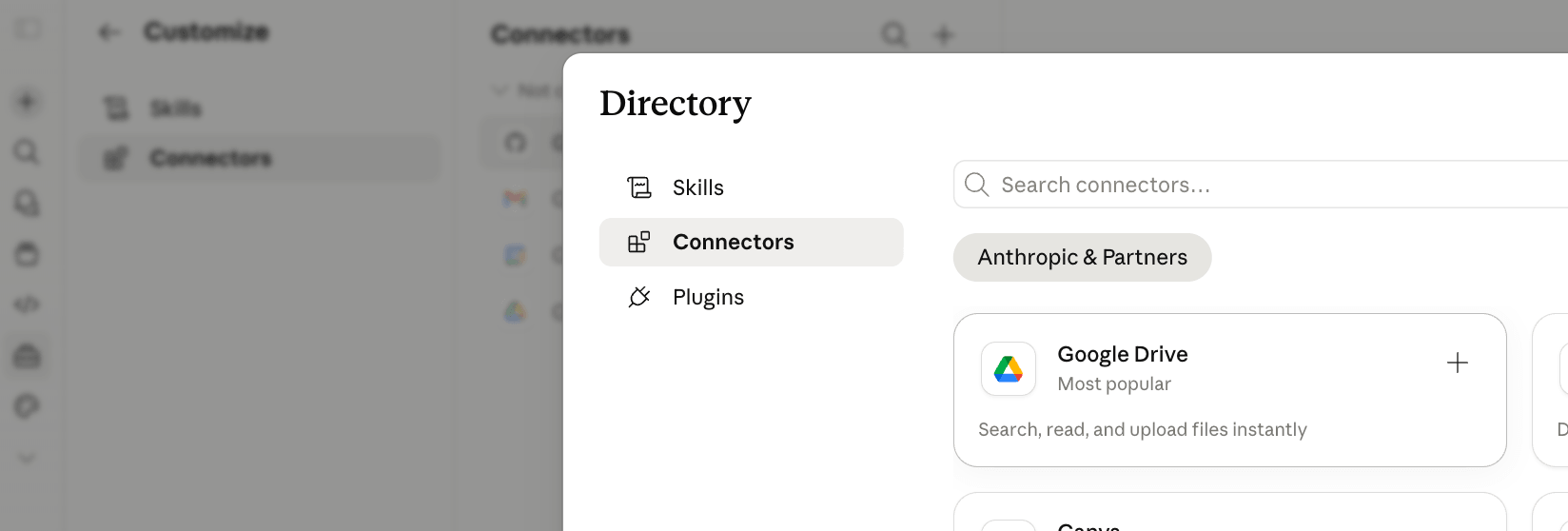
Modern platforms like Claude and ChatGPT are beginning to support the Model Context Protocol (MCP). MCPs function as universal connectors—essentially standardized APIs—that allow your AI to reach out and pull data from external sources. By using MCPs to link your AI models to a central, organized folder structure, you ensure that every model you use has access to the same up-to-date instructions.
The "Curated Context" Strategy
A common mistake is "data dumping"—giving an AI access to your entire document library. This often leads to degraded performance as the model struggles to parse noise. Instead, curate specific context files for specific tasks. By creating targeted, task-specific folders, you keep your AI focused. Crucially, when you update a core document, that change propagates across every AI platform connected to that folder, eliminating the need to manually update instructions across multiple tools.
The Mechanics of Portability: Developing "Skills"
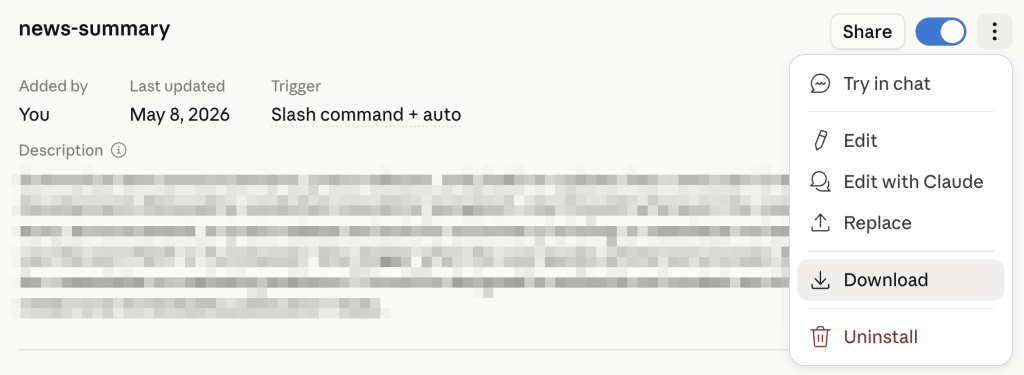
Perhaps the most powerful innovation in portable AI is the concept of the .SKILL file. Think of a skill as a "downloadable expert." It is a .zip file containing a Markdown document that serves as a set of executable instructions for an AI.
How to Create a Portable Skill
To create a skill, you utilize the "Skill Creator" features available in leading platforms. You provide the creator with your existing workflow, prompt structures, and desired outputs. The tool then formats this into a standard SKILL.md file.

This file functions like a set of instructions for an apprentice. Once you have this file, it is completely portable. You can import it into Claude, ChatGPT, or other compatible environments. Once uploaded, the AI "instantly knows" how to perform the specific task, whether it is advanced copywriting, data analysis, or brand-voice alignment.
The Security Warning
While the portability of skills is a massive advantage, it introduces a critical security risk: code injection. Because a skill file can contain scripts and automated instructions, users should be extremely cautious about downloading skills from untrusted third-party repositories. Always verify that your skills originate from reputable sources, such as official developer hubs or trusted internal team members, to prevent malicious actors from gaining access to your CRM or internal databases.
Case Study: The Portable Excel Agent
The ultimate test of portability is the creation of an "AI-augmented" Excel workbook that remains functional regardless of the AI plugin currently in use.
Phase 1: Planning Outside the Tool
Nicole Leffer emphasizes that the best work happens before the application is opened. By using an AI to plan your workbook structure—identifying tabs, formulas, and logic—you create a blueprint. This blueprint is then converted into a "briefing file" in Markdown.

Phase 2: Building the "Self-Briefing" Workbook
By embedding your instructions, prompts, and a history log directly into the Excel workbook tabs, you turn the file into a self-contained ecosystem.
- The Instructions Tab: Contains the logic for how the AI should behave within this specific file.
- The History Log: Records every change, enabling the AI to maintain continuity across sessions.
- The Execution: When you open the workbook in either Claude, ChatGPT, or Copilot, the first instruction is to "read the Instructions and History tabs."
This allows you to switch between AI providers seamlessly. If you start a task in Claude and it reaches a limit, you can switch to Copilot; because the history and instructions are embedded in the spreadsheet, the new agent picks up exactly where the last one left off.
Implications for Future Operations
The move toward portable workflows signals a fundamental shift in the AI industry. We are moving away from an era of "Platform Loyalty" and toward an era of "Workflow Ownership."
Standardizing Internal Processes
For organizations, this methodology allows for the standardization of best practices. Once a high-performing skill is developed, it can be distributed to an entire team, ensuring that every employee is operating at the level of the company’s best prompt engineer.
Reducing "Tool Fatigue"
The mental load of managing different platforms is significant. By standardizing the way your AI interacts with your data, you reduce the time spent "fighting" the tool and increase the time spent on high-value creative and analytical work.
Future-Proofing Your Business
The pace of AI development ensures that the tools we use today will be replaced by more powerful versions tomorrow. By adopting a portable strategy, you decouple your business value from the ephemeral interfaces of today’s tech giants. You are building a library of expertise—a digital brain that you own and control—regardless of which corporate provider hosts the processing power.
Conclusion: The Path Forward
Building portable AI workflows is not a luxury; it is a prerequisite for long-term survival in the age of AI. By externalizing your context, mastering the use of portable skills, and embedding instructions within your project files, you insulate your operations from the volatility of the AI market.
Start small. Begin by moving your most critical, recurring prompts into a central folder. From there, experiment with creating your first skill. As you refine these processes, you will find that the "platform" matters less, and your ability to orchestrate complex, reliable, and portable AI workflows matters more. In this new frontier, the competitive advantage belongs to those who own their processes, not just those who subscribe to the latest model.