The Democratization of Automation: A Comprehensive Guide to Mastering Claude Code
The barrier between human intent and technical execution is dissolving. For decades, the ability to automate complex digital tasks was reserved for those who could speak the language of machines—Python, JavaScript, or C++. However, with the release of Anthropic’s Claude Code, a seismic shift is occurring in the productivity landscape. No longer restricted to software engineers, agentic AI tools are now enabling marketers, entrepreneurs, and non-technical creators to build custom applications and automations using nothing but natural language.
In a recent deep dive featuring AI educator Tyler Reed and Michael Stelzner, the mechanics of Claude Code were laid bare, revealing a tool that does more than just suggest code—it executes it. This article explores the rise of Claude Code, the step-by-step methodology for its implementation, and the broader implications of an "agentic" future where the terminal is the new canvas for every professional.
Main Facts: What is Claude Code?
Claude Code is Anthropic’s entry into the "agentic AI" space. Unlike a standard chatbot that provides text-based answers, an agentic tool can perform actions: it can research the web, create and edit files on your local machine, and interface with external APIs to connect different software ecosystems.
The Death of the "Coding Prerequisite"
The most significant revelation regarding Claude Code is that a background in computer science is no longer a requirement for high-level automation. As Tyler Reed notes, some of the most prolific automation creators currently operating on platforms like YouTube have never written a single line of traditional code. Claude Code acts as a translator, taking a user’s plain-English description of a problem and converting it into a technical solution.
The CLI Interface
Unlike the standard Claude.ai web interface, Claude Code operates via a Command Line Interface (CLI). While the "black screen" of a terminal can be intimidating to the uninitiated, it serves a functional purpose: it allows the AI to have direct access to the computer’s file system and execution environment, enabling it to build tools locally rather than just chatting about them in a browser.
Subscription Requirements
To leverage Claude Code effectively, users must have a paid Claude subscription. For those just starting, the $20 per month "Pro" tier provides the necessary access to the high-performance models (Sonnet and Opus) required to drive the agentic workflows.
Chronology: From Installation to Execution
Setting up a sophisticated AI agent requires a structured approach. The process can be broken down into three distinct phases: preparation, installation, and authentication.
Phase 1: Accessing the Terminal
The first step is locating the gateway to the computer’s operating system.
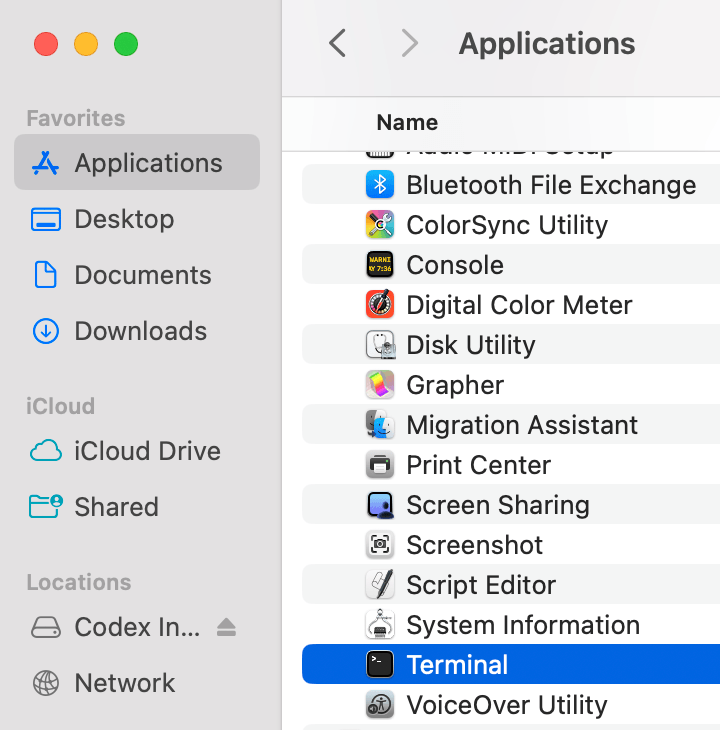
- On Mac: Users open the "Terminal" app found in the Applications/Utilities folder.
- On Windows: The equivalent is the Command Prompt or PowerShell.
- On Linux: The standard terminal emulator is used.
Phase 2: The Installation Command
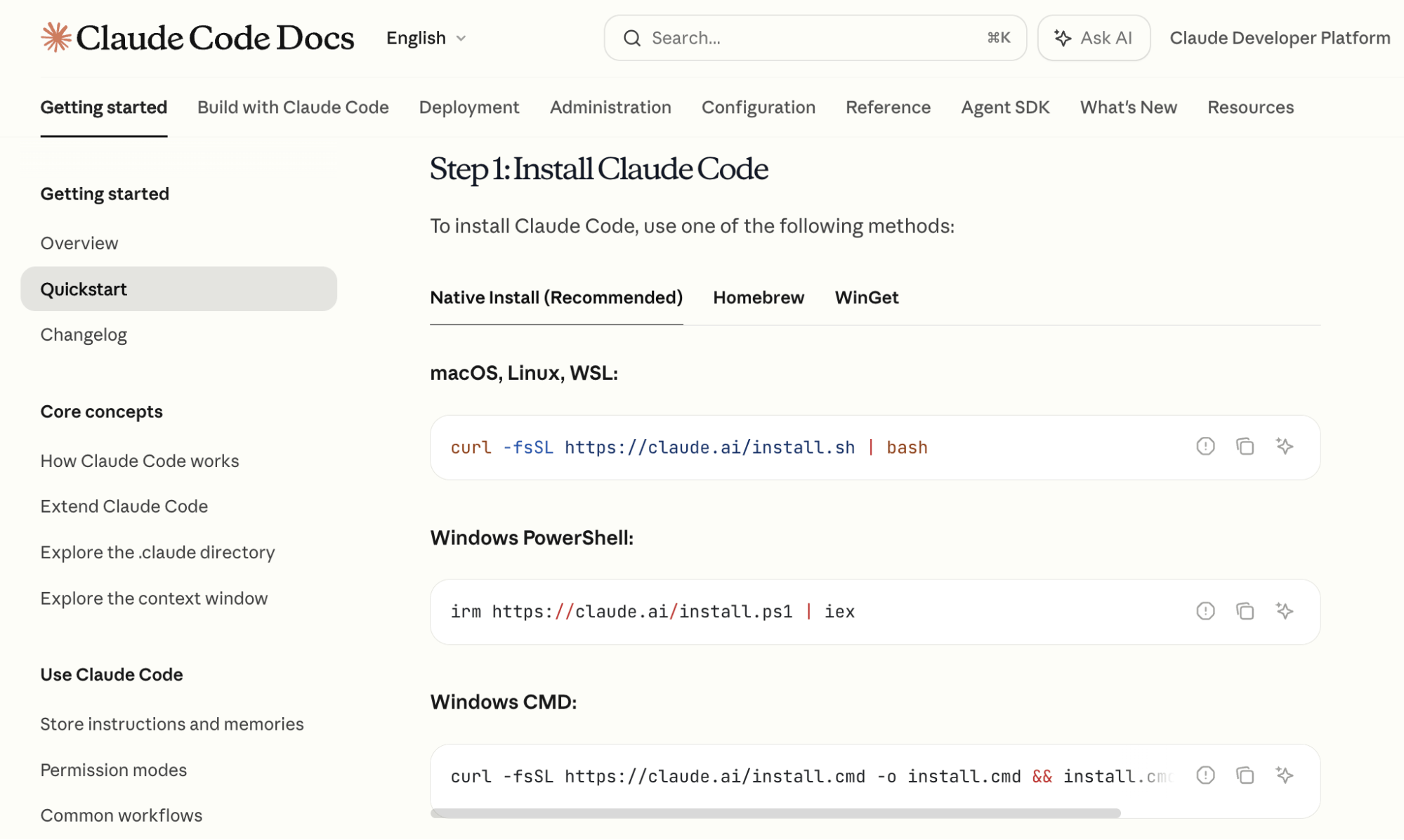
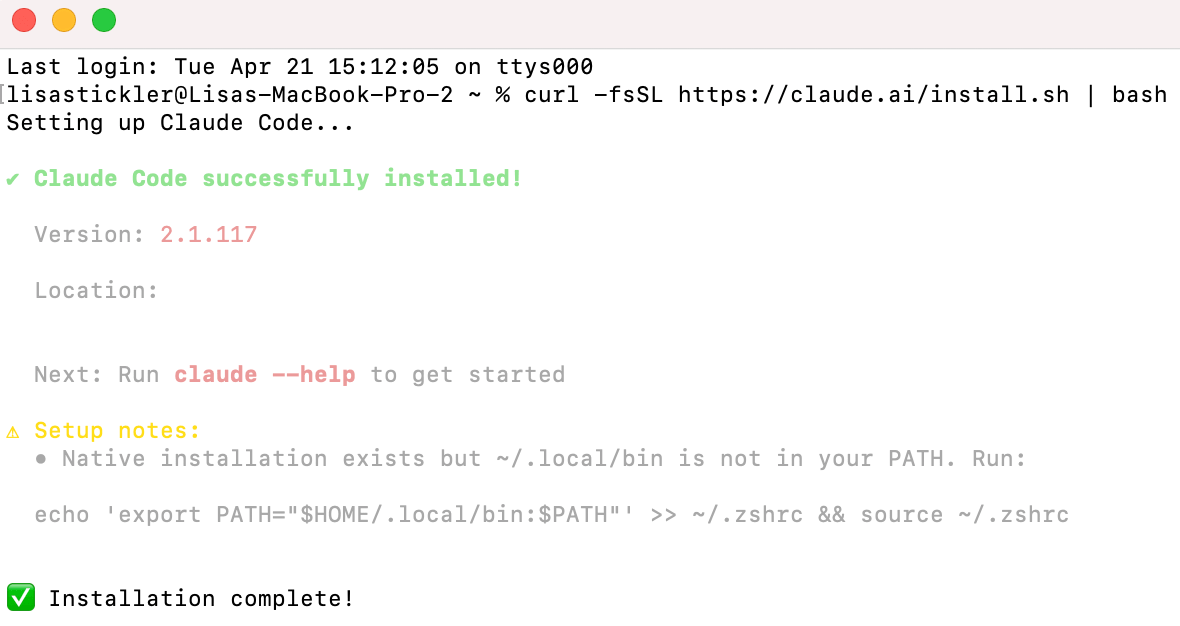
Anthropic provides specific, one-line installation commands via their official documentation. By copying and pasting these commands into the terminal, the system automatically downloads the necessary packages. This step bypasses the traditional "manual install" headaches of the past. Once the terminal displays a confirmation message, the user simply types claude to initiate the software.
Phase 3: Authentication and Model Selection
Upon first launch, Claude Code prompts the user to log in. This opens a browser window where the user authenticates via their Anthropic account. Once logged in, the user must select their preferred model.
Reed recommends a strategic "two-step" selection process:
- Claude 3 Opus: Used during the Planning Phase. Because Opus has superior reasoning and a massive context window, it is best for outlining complex project structures.
- Claude 3.5 Sonnet: Used during the Implementation Phase. Sonnet offers the best balance of speed and coding accuracy, making it the workhorse for actually writing and executing the script.
Supporting Data: Advanced Features and Context Management
To use Claude Code effectively, one must understand how to manage the AI’s "memory" and how to teach it new, repeatable skills.

Context Window Management: The /compact Command
Every AI has a limit on how much information it can "remember" in a single conversation—this is known as the context window. In the bottom-right corner of the Claude Code terminal, a percentage indicator tracks this usage. When the window nears 100%, the AI may become forgetful or error-prone.
By using the /compact command, Claude Code creates a high-level summary of everything discussed so far, clears the "clutter," and allows the session to continue without losing the project’s core objectives.
Custom Skills: Building a Personal Library
One of the most powerful features of Claude Code is the ability to create "Custom Skills." A skill is essentially a saved macro of complex instructions.
- Example: Reed developed a skill for YouTube research. By typing a single command, the agent goes to YouTube, identifies top-performing videos from specific competitors, extracts descriptions, and downloads audio files for transcription.
- Creation: To create a skill, a user simply tells Claude, "Create a skill from this task," and describes the workflow. Claude then saves this as a markdown file that can be invoked at any time in the future.
Persistent Memory: The /init Command
Normally, an AI session is ephemeral; once you close the window, the AI "forgets" the specifics of the project. To solve this, Claude Code uses the /init command to create a CLAUDE.md file in the project folder. This file acts as a persistent project log, documenting what has been built, what is pending, and the overall logic of the application. Every time a user re-opens that folder, Claude reads the markdown file to get back up to speed instantly.
Official Responses and Expert Insights
The consensus among AI experts like Tyler Reed is that the "technical gap" is closing, but the "logic gap" remains.
"The reality is that today’s models have become so capable that a coding background is no longer a prerequisite," Reed explains. However, he emphasizes that the user must still be a good "architect." This means being able to describe a process logically. If a user cannot explain a task to a human, they will struggle to explain it to Claude Code.
The "Explain Like I’m Five" (ELI5) Strategy
One of the most practical pieces of advice for non-technical users is to lean on the AI’s own ability to simplify. When faced with a technical hurdle—such as obtaining API keys from the Google Developer Console—Reed suggests adding "Explain like I’m five" to the prompt. This forces Claude Code to break down complex administrative tasks into simple, jargon-free steps.
Safety and Permission
Anthropic has built-in safeguards. By default, Claude Code is not a "rogue" agent. It asks for explicit permission before it:
- Browses the web.
- Creates or deletes a file.
- Edits a document.
- Executes a script.
This human-in-the-loop requirement ensures that the user maintains control over their local environment.
Practical Application: The Google Calendar/Telegram Case Study
To illustrate the power of the tool, Reed outlines a project that connects Google Calendar to Telegram. This automation provides a daily briefing of the next day’s schedule delivered directly to a mobile device.
- The Connection: The user asks Claude to access their Google Calendar. Claude provides the OAuth sign-in steps and writes the connection script.
- The Interface: The user creates a Telegram bot (via Telegram’s "BotFather") and provides the API token to Claude.
- The Automation: The user prompts: "Read my Google Calendar and send me a Telegram message every morning with a summary."
- The Result: A custom-coded, private assistant that lives on the user’s computer and communicates with their phone.
The only caveat to this setup is that the Claude Code session must remain open on the computer to act as the "server" for the automation.
Implications: The Shift from "How" to "What"
The emergence of Claude Code signals a fundamental shift in the workforce. In the previous era of computing, the primary question was "How?" (How do I write this code? How do I connect these APIs?). In the agentic era, the primary question becomes "What?" (What do I want to achieve? What data do I need to synthesize?).
Impact on Marketing and Small Business
For marketers, this means the ability to build bespoke tools—like custom sentiment analysis engines or automated lead-scraping bots—without hiring expensive developers or relying on rigid SaaS platforms. It allows for "micro-automations" that were previously too expensive or time-consuming to justify.
The Future of the Command Line
We are witnessing a "Terminal Renaissance." For years, the command line was seen as a relic of the past, replaced by "no-code" visual builders. However, Claude Code proves that the text-based interface is actually the most efficient way to interact with an AI agent because it removes the limitations of a GUI (Graphic User Interface).

Conclusion
Claude Code represents the next evolution of the AI revolution. By turning the terminal into a conversational partner, Anthropic has empowered a new generation of "builders" who are limited only by their imagination and their ability to articulate a workflow. As these tools continue to evolve, the distinction between a "developer" and a "user" will continue to blur, eventually disappearing altogether in favor of a new the AI Orchestrator.