Mastering Agentic Workflows: A Deep Dive into LangGraph for Python Developers
In the rapidly evolving landscape of artificial intelligence, the transition from simple chatbots to robust, autonomous agents represents the next frontier of software development. While many developers are comfortable with single-turn interactions—where an AI model receives a prompt and delivers a response—the real-world utility of AI lies in its ability to handle complex, multi-step tasks. These tasks require persistent memory, the ability to use external tools, and a clear, inspectable execution flow.
Enter LangGraph, a powerful library built upon the foundation of LangChain, designed specifically to bridge the gap between static LLM calls and dynamic, agentic workflows. By modeling agent behavior as a graph, LangGraph offers a structured, predictable way to manage the state and logic required for sophisticated AI applications.
The Architectural Shift: Moving Beyond Single-Turn AI
Most initial implementations of AI agents rely on simple request-response loops. However, as requirements scale, these implementations often collapse under the weight of custom "plumbing." Consider a scenario where an agent must query a SQL database, cross-reference user preferences, maintain a conversation history, and provide an audit trail of its reasoning. Doing this manually is error-prone and difficult to maintain.
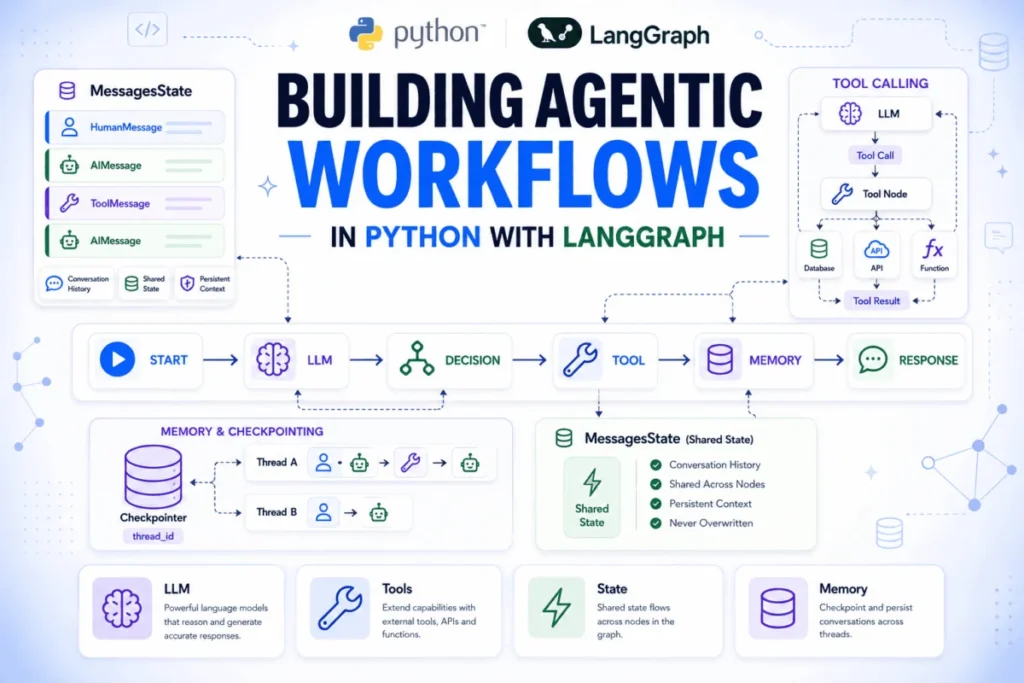
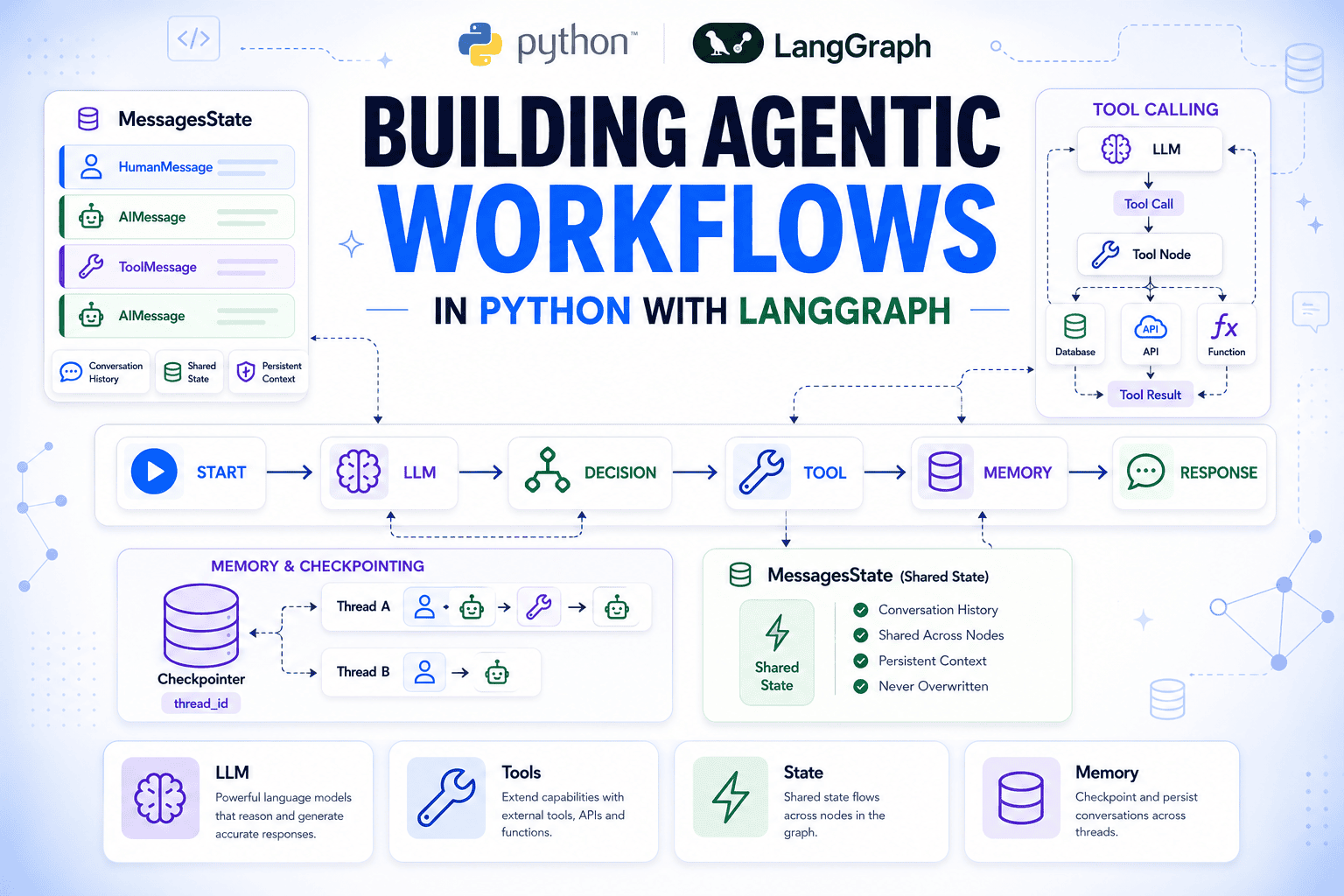
LangGraph resolves these challenges by representing an agent as a directed graph. In this paradigm:
- Nodes act as units of work, such as calling a language model or executing a function.
- Edges define the flow of execution, determining the path the agent takes based on the current state.
- State serves as a shared memory object, ensuring that every step has access to the necessary context.
This modularity is the secret to building resilient agents. Because the model runs within a specific node, every reasoning step and tool call becomes part of the graph’s state. This makes the entire execution flow fully inspectable and, crucially, persistent.
Establishing the Foundation: Setting Up the Environment
Before diving into complex logic, developers must establish a robust development environment. LangGraph relies on standard Python practices, leveraging pip for dependency management.
To get started, developers should install the necessary packages:
pip install langgraph langchain-openai python-dotenvFollowing the installation, security is paramount. Sensitive credentials, such as your OpenAI API key, should never be hardcoded. By utilizing a .env file and the python-dotenv library, developers ensure that configuration remains externalized and secure. Simply create a .env file in your root directory:
OPENAI_API_KEY="your_actual_api_key_here"And initialize it in your script before importing any LangGraph components:
from dotenv import load_dotenv
load_dotenv()
The Primitives of LangGraph: State, Nodes, and Edges
Understanding the core primitives of LangGraph is essential for scaling applications.
State: The Shared Memory
The "State" is a TypedDict that acts as the single source of truth for the entire graph. Every node in the graph interacts with this state, reading input and writing updates. Importantly, only the fields returned by a node are modified, keeping the rest of the state immutable and predictable.
Nodes: The Logic Units
Nodes are standard Python functions. By registering these functions with add_node, you integrate them into the graph’s workflow. This simplicity allows developers to focus on the business logic of their application rather than the underlying framework overhead.
Edges: Defining the Path
Edges manage the control flow. While add_edge(A, B) creates a linear transition, add_conditional_edges provides the branching logic necessary for real-world scenarios. By using a routing function, developers can dictate whether an agent should proceed to another tool, ask the user for clarification, or conclude the task.
Automating Memory with MessagesState
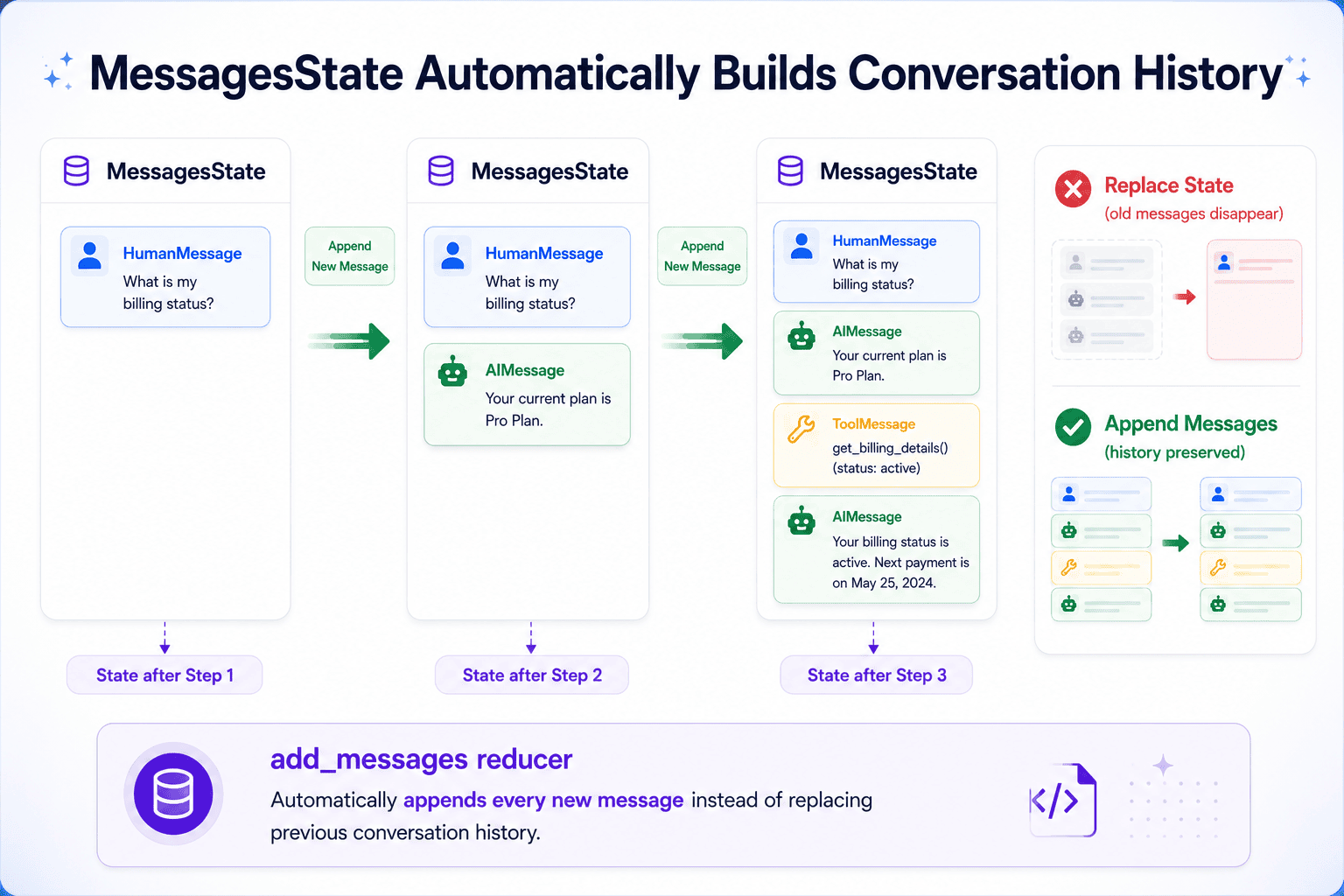
For conversational agents, managing history is a significant hurdle. Manually appending strings to a list is inefficient and prone to formatting errors. LangGraph simplifies this with MessagesState, a pre-built state structure that utilizes the add_messages reducer.
When a node returns new messages, MessagesState automatically appends them to the existing history. This ensures that the model always has access to the full conversation context without the developer needing to manually stitch it together. By extending MessagesState with custom fields, such as customer_id or session_metadata, developers can create highly tailored state objects that meet specific business requirements.
Implementing Tool-Use for Real-World Utility
An agent is only as powerful as its tools. By using the @tool decorator, developers can define custom functions that the language model can invoke. The model uses the function’s docstring as a semantic guide to decide when and how to call the tool.
@tool
def get_customer_tier(customer_id: str) -> str:
    """Look up the subscription tier for a customer by their ID."""
    # Logic to fetch data from a database
    ...
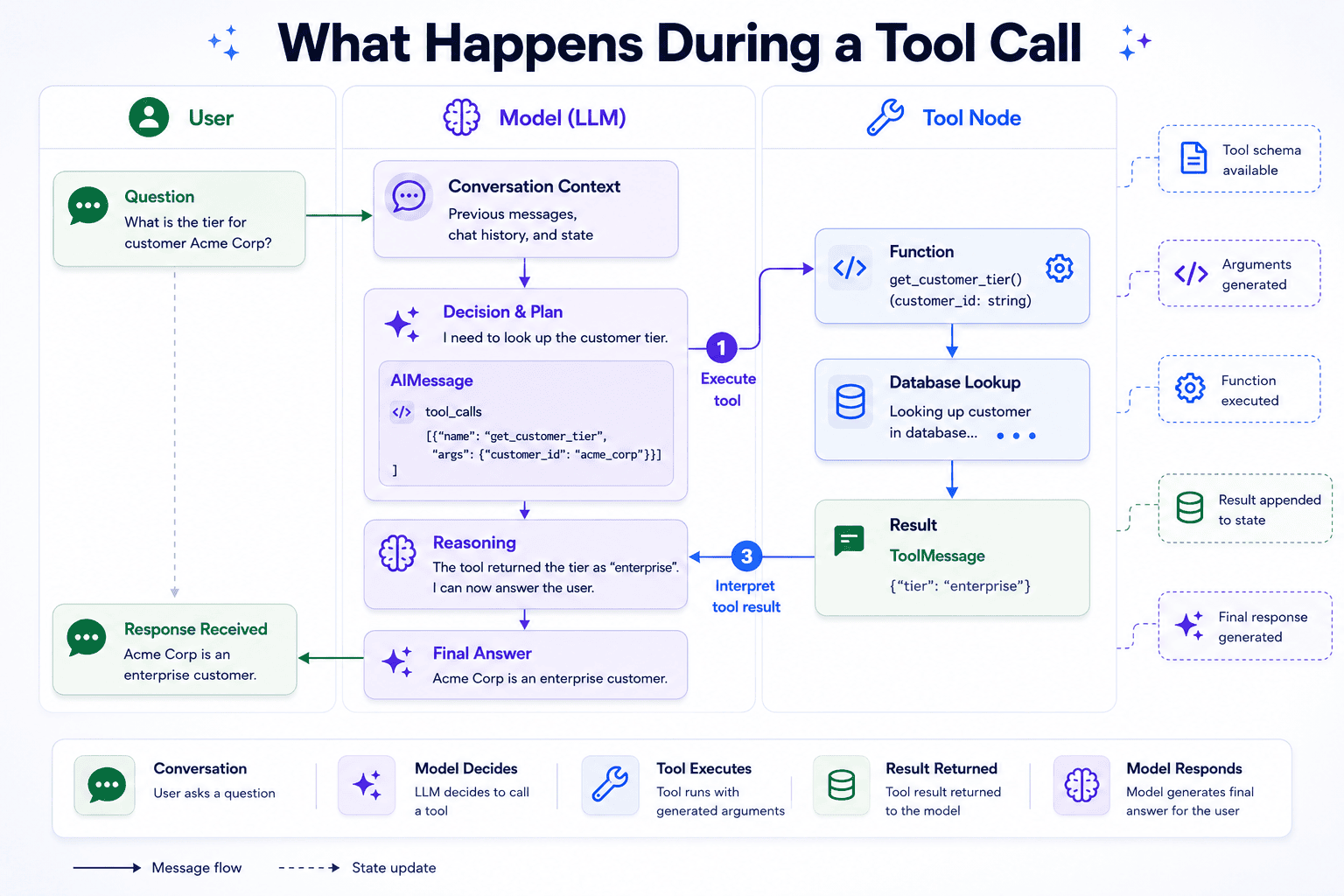
Once the tool is bound to the LLM using bind_tools, the agent becomes capable of proactive decision-making. When the model decides to call a tool, it returns an AIMessage with a tool_calls field. The ToolNode component then executes the function, and the result is appended back to the MessagesState as a ToolMessage. This loop—the ReAct (Reasoning and Acting) pattern—allows the agent to iteratively refine its responses based on real-time data.
Persistent Conversations: The Role of Checkpointers
One of the most critical requirements for production-grade AI is the ability to maintain state across multiple sessions. Without persistence, every interaction starts from a blank slate.
LangGraph solves this through the use of checkpointers. By attaching an InMemorySaver (or a persistent database-backed saver) to the compiled graph, every state transition is recorded. By passing a thread_id to the graph’s invocation, the system retrieves the previous state of that specific conversation, allowing the agent to remember context from days or even weeks prior.
Implications and Future Outlook
The adoption of agentic workflows signifies a shift in how we build AI applications. Rather than building monolithic, rigid structures, developers are now building ecosystems of specialized nodes.
Implications for Development
- Observability: Because every state change is recorded, debugging becomes significantly easier. Developers can inspect the graph at any point in the process.
- Scalability: Multi-agent systems can be constructed by chaining multiple graphs, where each graph specializes in a different domain.
- Reliability: The use of conditional edges and defined state transitions makes the behavior of agents more deterministic and safer for enterprise environments.
The Path Forward
As we look toward the future, the integration of durable "Stores"—which persist information independently of conversation threads—will allow agents to evolve from reactive assistants to proactive partners. By combining the conversational memory of checkpointers with the persistent data of external stores, developers can create AI that understands not just the immediate prompt, but the entire history of the user’s relationship with the platform.
LangGraph provides the architectural rigor that the AI industry has been missing. By focusing on graph-based state management, it empowers developers to build agents that are not just "smart," but truly functional, reliable, and capable of handling the complexities of real-world business logic. Whether you are building a customer support bot or a complex data-analysis agent, the primitives covered here provide the roadmap for success in the agentic era.