WordPress 7.1 Beta 3 Arrives: A Comprehensive Deep Dive into New Styling Controls, Media Fixes, and the Road to August 19
SAN FRANCISCO — The WordPress open-source project has officially announced the availability of WordPress 7.1 Beta 3 for public testing and development. Marking another critical milestone in the development cycle leading up to the final stable release scheduled for August 19, 2026, this latest beta build delivers targeted user-interface refinements, crucial media handling fixes, and structural updates designed to enhance both site builder workflows and developer capabilities.
As with any major pre-release software, project maintainers have issued strict warnings: WordPress 7.1 Beta 3 is intended exclusively for testing, staging, and development environments. Administrators, developers, and agency owners have been strongly cautioned against deploying this version on production networks or mission-critical websites.
Despite these deployment limitations, the release provides a clear window into the upcoming capabilities of WordPress 7.1, reflecting ongoing community feedback, rigorous bug-triage sessions, and the steady maturation of the platform’s block-based editing paradigm.
Main Facts: What’s New in WordPress 7.1 Beta 3?
WordPress 7.1 Beta 3 arrives on the heels of continuous iteration following the initial feature freeze and the rollout of Beta 1 and Beta 2. While major architectural shifts were established earlier in the cycle, Beta 3 addresses more than 71 distinct issues, pull requests, and ticket resolutions since the first beta phase.
The core highlights of the Beta 3 release include:
- Granular Global Styling Controls: Moving away from the previous "all-or-nothing" approach, the block inspector’s "Apply globally" feature now introduces an interactive review step. Users can selectively choose which modified local styles should be propagated globally while retaining others as localized overrides.
- Media and Upload Enhancements: Long-standing pain points regarding media ingestion have been heavily targeted. Beta 3 resolves issues where large, animated GIFs would hang during the upload process. Furthermore, image rotation derived from EXIF metadata is now processed accurately, and an annoying bug where uploading a single HEIC image via Safari resulted in duplicate entries has been neutralized.
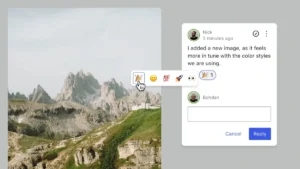
- Editor and Developer Refinements: Improvements have been woven into block Notes, responsive styling tools, and custom CSS management. For the developer community, the underlying WordPress Coding Standards have been officially updated to version 3.4.0.
- Scope Adjustment for Unicode Support: Notably, the much-anticipated integration of Unicode email address, username, and slug support has been pulled from the core release schedule. Development for this feature will instead continue via a dedicated community plugin to allow for rigorous compatibility, security, and data-handling audits.
Chronology: The Road to WordPress 7.1
Understanding the context of Beta 3 requires examining the precise timeline established by the WordPress Release Squad for the 7.1 development cycle. Pre-release testing phases are meticulously choreographed to ensure maximum platform stability.
The Development Timeline:
- July 3, 2026: The official WordPress 7.1 release party schedule is published, setting the stage for late summer development.
- Early July 2026: WordPress 7.1 Beta 1 is released, unlocking initial features and inviting community-wide testing.
- July 17, 2026: WordPress 7.1 Beta 2 is deployed concurrently with the WordPress 7.0.2 maintenance and security release, integrating critical security patches into the pre-release codebase.
- Late July 2026: WordPress 7.1 Beta 3 is made available for public testing, addressing dozens of bugs reported by the community and introducing targeted editor enhancements.
- August 19, 2026: The scheduled date for the final, stable public release of WordPress 7.1.
This accelerated yet methodical schedule underscores the collaborative nature of the WordPress project, balancing rapid feature iteration with thorough quality assurance.
Supporting Data: How to Test WordPress 7.1 Beta 3
The success of any WordPress major release relies heavily on community testing across diverse server configurations, hosting environments, and browser setups. The WordPress project has provided four distinct pathways for users to safely test Beta 3 without risking live assets:
- The WordPress Beta Tester Plugin: For users running dedicated test sites, installing and activating the official WordPress Beta Tester plugin provides a seamless path. By selecting the “Bleeding edge” channel and the “Beta/RC Only” stream, sites automatically pull the latest pre-release updates.
- Direct ZIP Download: Developers can manually download the
wordpress-7.1-beta3.ziparchive directly from the official WordPress repository and configure it on a local development server or isolated staging environment. - Command Line via WP-CLI: Command-line power users can update an existing local test installation instantly using the standard WP-CLI command:
wp core update --version=7.1-beta3 - WordPress Playground (Zero Setup): For instant, zero-friction exploration, users can launch a pre-configured 7.1 Beta 3 instance directly inside their web browser via the WordPress Playground. Operating entirely client-side, this requires no local installation or database configuration.
How to Report Bugs and Contribute
For those actively participating in the testing initiative, structured reporting is vital. Discovered anomalies and bugs can be submitted through two primary channels:
- The Alpha/Beta Support Forums: Ideal for general discussions, user-interface oddities, and community troubleshooting.
- WordPress Trac: Recommended for technical, reproducible bug reports. Contributors are encouraged to cross-reference their findings against the official list of major known bugs before opening new tickets.
- Communication Channels: Real-time coordination among testers takes place within the
#core-testchannel on Making WordPress Slack, aligned with ongoing testing initiatives managed by the Make Core team.
Official Responses and Expert Insights
The introduction of the granular "Apply globally" styling review step has drawn immediate praise from theme developers and site builders alike. In previous iterations, pushing a local modification to a global theme setting often overwrote unintended custom properties, forcing developers to manually reconstruct block styles page by page or block by block.
Core contributors working on the Gutenberg project noted that this user-experience bottleneck was among the most heavily requested adjustments in recent months. By decoupling local overrides from global style propagation through a simple review modal, WordPress aims to bridge the gap between flexible, page-level design freedom and cohesive, global design consistency.
Conversely, the decision to remove native Unicode support for emails, usernames, and slugs from the core codebase sparked measured discussion within developer circles. While the feature holds immense promise for internationalization and non-Latin character sets, core maintainers prioritized long-term security and backward compatibility. Transitioning the feature into a dedicated community plugin allows developers to stress-test data sanitization protocols, database indexing implications, and mail-server interactions in a controlled environment before proposing it for a future core merge.
Anne McCarthy, a prominent voice within the WordPress documentation and testing teams, along with fellow contributors @krupajnanda, @wildworks, and @amykamala, emphasized that the collective effort poured into Beta 3 directly reflects the health of the open-source contributor network.
To capture the spirit of the rigorous debugging phase, the release notes even featured a lighthearted community haiku:
Fresh bugs surface now,
click by click, we chase them down—
codebase grows steady.
Implications for Agencies, Developers, and Site Owners
As the August 19 release date for WordPress 7.1 approaches, digital agencies, freelance developers, and enterprise site owners must begin strategic preparations.
1. Preparing for Styling Updates
Agencies utilizing custom block themes and global styles should allocate time to test their existing client builds against Beta 3. The new review step for global style application changes how layout adjustments propagate. Ensuring that existing custom block patterns and theme.json configurations behave as expected under the updated block inspector will prevent layout regressions upon the official public launch.
2. Media Pipeline Verification
Media-heavy websites—such as photography portfolios, publishing platforms, and e-commerce stores utilizing extensive product galleries—should audit their upload workflows using the beta release. The fixes applied to HEIC handling in Safari, EXIF rotation processing, and animated GIF stability promise a smoother end-user experience, but verifying these improvements against specific server configurations (such as Imagick versus GD library setups) is strongly advised.
3. Developer Standards Alignment
With the update to WordPress Coding Standards 3.4.0, custom plugin and theme developers must review their static analysis pipelines and code-linting configurations. Adhering to the updated standards now will ensure long-term compatibility and reduce technical debt as the platform evolves toward future iterations.
Conclusion
WordPress 7.1 Beta 3 represents a mature, highly collaborative step forward in the 2026 release cycle. By refining everyday workflows—such as style management and media uploads—while maintaining strict stability protocols, the WordPress project continues to balance modern design ambitions with enterprise-grade reliability. As the community continues to test, report, and patch vulnerabilities over the coming weeks, the platform stands well-positioned for its stable debut on August 19.