The Rise of Local Intelligence: Running Large Language Models on Your Own Hardware in 15 Minutes
The landscape of Artificial Intelligence is undergoing a quiet, fundamental shift. For the past two years, the industry has been dominated by the "Cloud-First" paradigm, where massive, opaque, and subscription-based APIs dictated the flow of data. However, a new wave of Small Language Models (SLMs) and streamlined deployment tools is rapidly decentralizing this power.
Today, running a sophisticated, generative AI model no longer requires a server rack or a venture-backed startup’s budget. With the emergence of tools like Ollama, developers and enthusiasts can now harness the power of local inference in under 15 minutes. This transition toward local AI is not merely a technical curiosity; it is a shift toward privacy, sovereignty, and cost-efficiency.
The Paradigm Shift: Why Local AI Matters
In our previous explorations of Small Language Models, we highlighted how a new generation of efficient AI—such as Meta’s Llama 3.2 3B and Google’s Gemma 2 9B—is rendering massive, bloated models unnecessary for many daily tasks. By focusing on parameter efficiency, these models deliver high-quality reasoning and creative capabilities without requiring the massive compute clusters once thought essential.
The "Local Scene" offers three distinct advantages over traditional cloud-based alternatives:
- Data Sovereignty: Your prompts and sensitive data never leave your local machine, effectively eliminating the risk of data leaks or third-party surveillance.
- Zero Latency and Cost: Once the model is downloaded, there are no "per-token" fees, no subscription tiers, and no dependency on internet connectivity.
- Infrastructure Control: You maintain total ownership of the environment, allowing you to enforce strict security policies that are impossible to guarantee when relying on third-party cloud endpoints.
The Technical Evolution: From Dependency Hell to One-Click Deployment
Historically, the barrier to entry for local AI was formidable. Running a large language model (LLM) required navigating complex CUDA driver installations, managing fragmented Python virtual environments, and resolving "dependency hell"—a state where conflicting software versions would crash an entire project.
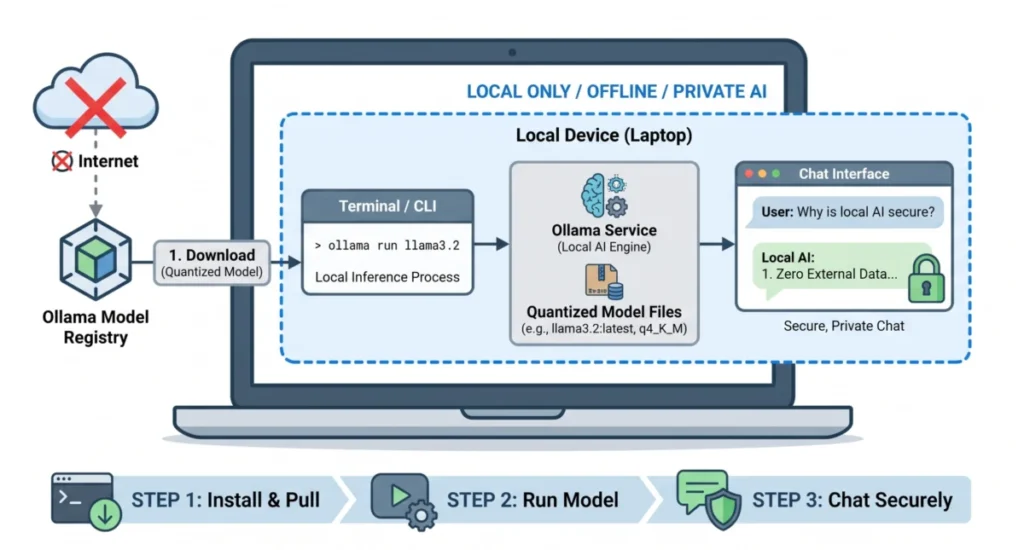
Ollama has emerged as the definitive solution to these bottlenecks. It acts as a lightweight background service that abstracts away the complexity of hardware acceleration, model weight management, and API hosting. Think of Ollama as a Docker-like containerization layer specifically engineered for the LLM ecosystem. It handles the heavy lifting of mapping model layers to your specific GPU or CPU architecture, allowing you to interact with the model via simple command-line interface (CLI) commands.
The 15-Minute Roadmap: A Practical Walkthrough
For those ready to transition from theory to practice, the "Happy Path" to local AI setup is remarkably consistent across macOS, Windows, and Linux. Below is the chronological breakdown of the setup process.
Step 1: Installing the Infrastructure
The first step is to visit the official Ollama website and download the installer tailored to your operating system. The installation process is standard; it provisions the background daemon necessary to host your local models. Once installed, ensure your system is prepared by opening your terminal (or PowerShell on Windows) and executing:
ollama --version
This command verifies that the background service is active and communicating with your shell.
Step 2: Downloading Your First Model
Ollama utilizes a command-line syntax that simplifies the acquisition of models. By running the ollama run command, you initiate a process that pulls the model weights from the Ollama library and prepares them for immediate execution.
ollama run llama3.2
For this example, we select Llama 3.2 3B. This model is currently regarded as the "gold standard" for consumer hardware. It provides an optimal balance between parameter depth and performance, fitting comfortably within the memory constraints of most modern laptops. The download will pull approximately 2.0 GB of data—a task that typically completes in under three minutes on standard broadband.
Step 3: Launching the Interaction Layer
Once the download hits 100%, your terminal transitions into an interactive chat interface. You are now communicating directly with the model, with zero data transmission to external servers. You can verify this by testing a prompt:
“Write a three-bullet point summary explaining why local AI is secure.”
The model will respond instantly. When finished, a simple /bye command gracefully shuts down the session.
Deep Dive: Behind the Scenes of Your Model
While the user experience is designed to be seamless, the underlying mechanics involve significant engineering optimizations. Understanding these helps in troubleshooting and scaling your local setup.
The Role of Quantization
A primary challenge in local AI is the discrepancy between model size and available hardware memory. A 3-billion parameter model, if kept at full 16-bit floating-point (fp16) precision, would require roughly 6 GB of VRAM. However, through a process called Quantization, developers compress these weights into 4-bit integers (q4_K_M). This reduces the memory footprint by over 60% with negligible impact on the model’s accuracy, enabling high-performance inference on devices with limited RAM.
Output Sanity Checks
As you push your hardware, you may encounter performance degradation. If the model begins to print text slowly or exhibits signs of "hallucination," it is often a sign that your system resources are overextended. Monitoring your CPU/GPU utilization during the first few sessions will provide a baseline for your hardware’s capacity.
Troubleshooting: The First-Run Symptom Table
Despite the simplicity of the setup, hardware variability remains a factor. If you encounter issues, consult this guide for immediate resolution:
| Symptom / Error | Root Cause | Immediate Fix |
|---|---|---|
| Sluggish response | Insufficient VRAM/RAM | Close resource-heavy apps like Chrome or IDEs. |
| GPU Driver mismatch | Incompatibility with CUDA/ROCm | Update your GPU drivers to the latest version. |
| "Address already in use" | Background daemon conflict | Do not restart; the background service is already active. |
Implications for the Future of Work
The ability to run sophisticated AI locally has profound implications for industries ranging from software development to data analysis. By utilizing the local API (hosted on localhost:11434), developers can integrate these models into their own applications as a drop-in replacement for OpenAI’s API.
This creates a new ecosystem of private tools. Imagine a local IDE extension that suggests code without sending your codebase to the cloud, or a private document summarizer that handles proprietary legal files without ever risking a data breach.
As we look toward the future, the "Top 7" list of small models will continue to grow, with specialized models for coding, reasoning, and long-context analysis becoming more accessible. By mastering the Ollama workflow, you are not just setting up a chat tool; you are building the foundation for a more secure, efficient, and private technological future. The era of local intelligence has arrived, and it fits comfortably on your laptop.